

Tutorial Introduction to Guile
(with new scm_* interface)Modified by Phuah Yee Keat, the original version is at http://www.gnu.org/software/guile/docs/guile-tut/tutorial.html
This is a tutorial introduction to using Guile, the GNU extension language. I'm aiming at people who want to use Guile, and who don't want to mess around in the guts of Guile itself.
For example, if you've just written a spiffy new word processor/image manipulator/window manager, and you want your users to be able to run cunning scripts, then Guile is the library for you and (hopefully) this is the tutorial for you.
I'm going to assume that you know a little bit about the Scheme programming language, and I'm also going to assume that you have managed to get Guile successfully built and installed on your system. I'm also going to assume that you have Guile version 1.3 or higher.
The Fundamentals
Theory
Guile is an implementation of the Scheme programming language, made available as a library, together with conventions for interfacing to the interpreter from other programming languages.
The point of this is to allow extensibility. You can write a big piece of software in C, and then allow the users of your software to write Scheme scripts which call various C functions in your software. I'll show a simple example of this later on.
That's not all. One of the things that Scheme as a programming language is particularly good at is the emulation of other programming languages. This means that your users don't actually have to write their extension scripts in Scheme; instead, they can write the scripts in Tcl or Python, and just load up the appropriate chunk of Scheme code to emulate that language. (Or at least they will be able to, when the appropriate translators have been written.)
Practice
In concrete terms, you'll have a number of things available once you have Guile correctly installed.
Firstly, you should have guile, which is the Guile
Scheme interpreter as a stand-alone executable. This is useful if you
want to just write Scheme code; it's also useful for testing out bits
of extension Scheme code interactively. This should be very small,
since all it contains is a thin wrapper for the Guile shared library
(on my system, it's less than 4k).
Secondly and most importantly, you should have
libguile.so. This is the Guile shared library, which you
can link to from your C (or C++ or whatever) code.
Thirdly, you'll probably also have some standard Scheme library
functions installed somewhere. These will typically have a
.scm filename extension; on my system
these are installed under /usr/share/guile.
The things I've described so far make up the primary parts of Guile, that is the things you'll need if you want to run a program which uses Guile as its extension language.
Given that we want to write code, we need a few more things (which
are kept in the guile-devel RedHat package). . . .
Fourth is a collection of header files which cover the process of
calling Guile from C and vice-versa. These might get installed into
/usr/include/guile and /usr/include/libguile,
for example.
Fifth is the utility function guile-snarf. This
utility is used to ease the process of getting Guile and C to talk to
one another, provided you stick to some coding conventions.
Sixth and last is the utility guile-config.
This program scans your local configuration and tells you what options
you need to compile and link Guile code into your programs.
The Tortoise
To demonstrate Guile, we are going to write a very simple graphics program. It's written for the X Window system; however, it is so simple it should be easy to convert to other graphics systems.
The program draws graphics by assuming that there is a tortoise sitting in the middle of the screen. This tortoise is quite stupid, and can only understand a small number of instructions.
You can ask the tortoise to turn to the right by a number of degrees (negative numbers will get him to turn to the left). You can ask the tortoise to walk forward a certain number of steps. And you can ask him to hold a pen either in his paws or behind his ear, so that when he moves he will either leave a mark on the ground or not (respectively).
Finally, in case the tortoise gets utterly confused, you can ask the tortoise to return to the middle of the screen and turn to face the top of the screen again
The Core Program
To program this up, I'm going to write a C program where each of the tortoise instructions corresponds to a function call.
First, lets take care of the bookkeeping. The main()
function will deal with the mechanics of getting some graphics -
getting a window and a GC, in X terms.
Display *theDisplay;
Window theWindow;
Screen *theScreen;
GC theGC;
int main(int argc, char *argv[])
{
    theDisplay = XOpenDisplay(NULL);
    XSynchronize(theDisplay, True);
    theScreen = DefaultScreenOfDisplay(theDisplay);
    theWindow = XCreateSimpleWindow(theDisplay, RootWindowOfScreen(theScreen),
                                    0, 0,
                                    WINDOW_SIZE, WINDOW_SIZE, 0,
                                    BlackPixelOfScreen(theScreen),
                                    WhitePixelOfScreen(theScreen));
    theGC = XCreateGC(theDisplay, theWindow, 0L, NULL);
    XSetForeground(theDisplay, theGC, BlackPixelOfScreen(theScreen));
    XMapWindow(theDisplay,theWindow);
    /* more stuff to come here . . */
    return 0;
}
Next, we have some variables which hold the current state of the tortoise:
double currentX;
double currentY;
double currentDirection;
int penDown;
We need to initialize this data, so we add the following function
invocation to main():
tortoise_reset();
The function being invoked here implements one of the things that the tortoise can do. There are similar functions which implement all of the other things that the tortoise can do:
void tortoise_reset()
{
    currentX = currentY = WINDOW_SIZE/2;
    currentDirection = 0.0;
    penDown = 1;
}
void tortoise_pendown()
{
    penDown = 1;
}
void tortoise_penup()
{
    penDown = 0;
}
void tortoise_turn(int degrees)
{
    currentDirection += (double)degrees;
}
void tortoise_move(int steps)
{
    double newX, newY;
    /* first work out the new endpoint */
    newX = currentX + sin(currentDirection*DEGREES_TO_RADIANS)*(double)steps;
    newY = currentY - cos(currentDirection*DEGREES_TO_RADIANS)*(double)steps;
    /* if the pen is down, draw a line */
    if (penDown) XDrawLine(theDisplay, theWindow, theGC,
                           (int)currentX, (int)currentY, (int)newX, (int)newY);
    /* in either case, move the tortoise */
    currentX = newX;
    currentY = newY;
}
Testing it Out
We can test that we have written our primitives correctly by
temporarily including some test code at the end of main():
    {
        int ii;
        tortoise_pendown();
        for (ii=0; ii<4; ii++) {
            tortoise_move(100);
            tortoise_turn(90.0);
        }
        /* sleep for a bit so the window stays visible */
        sleep(10);
    }
As expected, this draws a square in the window. (Compilation instructions here)

That's it. We have all the code we need. Except, of course, that we have no way to get our tortoise to do anything. Now we want to let the user instruct the tortoise directly.
Becoming BeGuiled
Talking to the Tortoise
This is where Guile comes into play. Without Guile, we would have to write code to read input from the user, interpret it, and call the appropriate tortoise primitive.
Even if we did write this code, the user would only be able to instruct the tortoise directly. There would be no way for the user to perform loops or iterations; they would just have to do a lot of typing.
In fact, in order to get more programmable function out of the tortoise we would need to write an interpreter for a tortoise programming language.
This would be wasted effort; Guile already provides a perfectly good way of making our tortoise programmable. The next section talks about how to do this.
Making Guile available from the program
The first step is to get access to the Guile library from within the program. To do this, we first need to include the master header file:
You may need to add an extra include directory to your path to get
at this header file; the command guile-config compile
should tell you where to find it.
Next, we need to kick off the Guile interpreter. This is done in
two steps; firstly, for arcane reasons we need to call
scm_boot_guile at the end of main().
    scm_boot_guile(argc, argv, inner_main, 0);
    return(0); /* never reached */
Secondly, scm_boot_guile will call back into the
inner_main function passed to it, and it is this
inner_main function which actually calls
scm_shell to start the Scheme interpreter
void inner_main(void *closure, int argc, char **argv)
{
    register_procs();
    scm_shell(argc, argv);
}
This code refers to the function register_procs. We'll
come to this below
Finally, we need to link with the libguile.so library.
On my system, this simply involved adding -lguile to the
link line. Running guile-config link is a good way of
finding out what you might need to do on your system.
Making the Primitives available from Guile
At this point, we now have our tortoise program invoking the Guile interpreter, but the user has no way of accessing all of our tortoise functionality. When the program starts, the user can interactively write programs in Scheme, but can't get the tortoise to wake up and do anything.
What we need to do is to make all of our tortoise primitives available from the Scheme interpreter.
To recap, these were:
tortoise_reset()to return the tortoise to the starting positiontortoise_pendown()to lower the pentortoise_penup()to raise the pentortoise_turn(int degrees)to turndegreesclockwisetortoise_move(int steps)to movestepssteps.
We make Scheme accessible versions of all of these.
SCM tortoise_reset()
{
    currentX = currentY = WINDOW_SIZE/2;
    currentDirection = 0;
    penDown = 1;
    return SCM_EOL;
}
SCM tortoise_pendown()
{
    penDown = 1;
    return SCM_EOL;
}
SCM tortoise_penup()
{
    penDown = 0;
    return SCM_EOL;
}
SCM tortoise_turn(SCM s_degrees)
{
    int degrees = SCM_INUM(s_degrees);
    currentDirection += (double)degrees;
    return SCM_EOL;
}
SCM tortoise_move(SCM s_steps)
{
    double newX, newY;
    int steps = SCM_INUM(s_steps);
    /* first work out the new endpoint */
    newX = currentX + sin(currentDirection*DEGREES_TO_RADIANS)*(double)steps;
    newY = currentY - cos(currentDirection*DEGREES_TO_RADIANS)*(double)steps;
    /* if the pen is down, draw a line */
    if (penDown) XDrawLine(theDisplay, theWindow, theGC,
                           (int)currentX, (int)currentY, (int)newX, (int)newY);
    /* in either case, move the tortoise */
    currentX = newX;
    currentY = newY;
    return SCM_EOL;
}
In this code, there are a few key points
- Each of the new versions of these functions returns something of
type
SCM, which is the universal type for representing Scheme values inside C code. For now, in all of these functions we return the specific valueSCM_EOL, which is the way to say the Scheme value()in C. - The first three functions all take no arguments; however, the
last two functions each require a single argument. The value of
this argument is going to be provided by the Scheme interpreter, and
so it appears as an
SCMtype once more - The macro
SCM_INUMconverts a Scheme object into a regular C integer, on the assumption that the object is actually an integer. (If it isn't, what happens is undefined)
Having set up all of these C functions in a way which is accessible
from Guile, we now need to tell Guile that they are there. To do
this, we define the function register_procs which was
mentioned in the previous section.
void register_procs(void)
{
    scm_c_define_gsubr("tortoise-reset",   0, 0, 0, tortoise_reset);
    scm_c_define_gsubr("tortoise-pendown", 0, 0, 0, tortoise_pendown);
    scm_c_define_gsubr("tortoise-penup",   0, 0, 0, tortoise_penup);
    scm_c_define_gsubr("tortoise-turn",    1, 0, 0, tortoise_turn);
    scm_c_define_gsubr("tortoise-move",    1, 0, 0, tortoise_move);
}
The registration of the new Guile-accessible primitives is done by
the calls to scm_c_define_gsubr. This function takes the
following parameters
- A string giving the name of the function when seen from Guile.
- The number of required arguments to the function (0 or 1 in all our examples).
- The number of optional arguments to the function (0 in all our examples).
- A boolean expression indicating whether the function takes a 'rest' list (false in all our examples)
- The C function providing the primitive
Running It
Amazingly, that's it - we have the entire program. If we now compile and run the program, we get a Guile interpreter prompt:
guile>
We can now try a few commands:
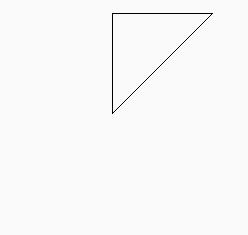
guile> (tortoise-move 100)
()
guile> (tortoise-turn 90)
()
guile> (tortoise-move 100)
()
At this point, a couple of lines should have appeared in the program's window.

Given that this is Scheme, we can define a new top-level procedure.
guile> (define (move-n-turn angle)
...            (tortoise-move 100) (tortoise-turn angle))
guile> (for-each move-n-turn '(80 80 80 80 80 80 80 80 80))

Next Steps
More Communication Between Scheme and C
All of the primitives so far have returned the empty list, because this was easy to do. However, we'd now like to pass some information back from C to Scheme - in particular:
tortoise-turnshould return the angle that the tortoise was at before this turn took effecttortoise-penupandtortoise-pendownshould both return the whether the pen was down before the calltortoise-moveshould return the previous position of the turtle as a Scheme list, for example(200 200)
Also, we've noticed that tortoise-move and
tortoise-turn only allow an integer argument. It's time
to change this so that we can specify floating point values for these
arguments.
SCM tortoise_reset()
{
    currentX = currentY = WINDOW_SIZE/2;
    currentDirection = 0;
    penDown = 1;
    return SCM_UNSPECIFIED;
}
SCM tortoise_pendown()
{
    int prevValue = penDown;
    penDown = 1;
    return (prevValue ? SCM_BOOL_T: SCM_BOOL_F);
}
SCM tortoise_penup()
{
    int prevValue = penDown;
    penDown = 0;
    return (prevValue ? SCM_BOOL_T: SCM_BOOL_F);
}
SCM tortoise_turn(SCM s_degrees)
{
    int prevValue = (int)currentDirection;
    double degrees;
    degrees = scm_num2dbl(s_degrees, "tortoise-turn");
    currentDirection += degrees;
    return SCM_MAKINUM(prevValue);
}
SCM tortoise_move(SCM s_steps)
{
    double oldX = currentX;
    double oldY = currentY;
    double newX, newY;
    double steps;
    steps = scm_num2dbl(s_steps, "tortoise-move");
    /* first work out the new endpoint */
    newX = currentX + sin(currentDirection*DEGREES_TO_RADIANS)*steps;
    newY = currentY - cos(currentDirection*DEGREES_TO_RADIANS)*steps;
    /* if the pen is down, draw a line */
    if (penDown) XDrawLine(theDisplay, theWindow, theGC,
                           (int)currentX, (int)currentY, (int)newX, (int)newY);
    /* in either case, move the tortoise */
    currentX = newX;
    currentY = newY;
    return scm_cons(scm_make_real(oldX) , scm_cons(scm_make_real(oldY), SCM_EOL));
}
So what's different about this version of the code? Well, firstly
the pen up/down functions use SCM_BOOL_F and
SCM_BOOL_T to return the Scheme values #f
and #t, as appropriate. Secondly,
tortoise_turn uses SCM_MAKINUM to build a
Scheme integer from a C integer.
Thirdly, the function tortoise-move builds a list
containing the previous coordinates using
scm_make_real, which converts a Cdoubleto the equivalent Scheme value, andscm_cons, which conses two C representations (SCMs) of Scheme values together.
Fourthly, tortoise_move and tortoise_turn
use scm_num2dbl instead
of SCM_INUM to get a floating point value from their single
arguments.
Finally, I mentioned before that the results of SCM_INUM are
undefined if the Scheme value passed in is not an integer. However, in this version of the
code I protect against this possibility
The way to ensure that an argument passed from Scheme to C is of a
particular type is to use scm_num2dbl.
The arguments to scm_num2dbl
are:
- The scheme variable containing the value
- The name of the function (as seen from Scheme) which raised the error.
We can take advantage of these changes (this version of the complete program):
guile> (tortoise-move 100)
(250.0 250.0)
guile> (tortoise-turn 90)
0
guile> (tortoise-move 100)
(250.0 150.0)
guile> (tortoise-turn (+ 90 45))
90
guile> (tortoise-move (sqrt (* 2 (* 100 100))))
(350.0 150.0)
guile> (tortoise-penup)
guile> (tortoise-move "abc")
ERROR: In procedure tortoise-move in expression (tortoise-move "abc"):
ERROR: Wrong type argument in position 1: "abc"
ABORT: (wrong-type-arg)
Scripting
In the examples so far, the program has kicked off the Guile Scheme interpreter, allowing the user to interact with the program dynamically. For many of the potential uses of Guile, this is not what is needed; the program will only need to read in a configuration script at start-of-day, and then proceed with its normal processing
So we're now going to change the program so that it reads in and
runs a .tortoise file at start-of-day. To do this, we
still need to use scm_boot_guile to get to our
inner_main function. However, when we get there, we
don't want to hand over control of the program to Guile with
scm_shell.
Instead, we want to open the .tortoise file and
explicitly pass the lines from it to the Scheme interpreter, one by
one. When we're done with the file, we're done with the interpreter
and we can get on with the main business of the program.
void read_config_file(void)
{
    FILE *file;
    char inputLine[1024];  /* hack: assume each line less than 1024 chars */
    char *p;
    file = fopen(CONFIGFILENAME, "r");
    if (file == NULL) return;
    /* spin through the file */
    while (1) {
        p = fgets(inputLine, sizeof(inputLine), file);
        if (p == NULL) return;
        scm_eval_string(p);
    }
    fclose(file);
}
void inner_main(void *closure, int argc, char **argv)
{
    register_procs();
    read_config_file();
    /* now get on with the main business of the program . . . */
    sleep(20);
}
Here, the key function is scm_eval_string, which gets the
Scheme interpreter to evaluate one particular string and then
return. (The complete program is here)
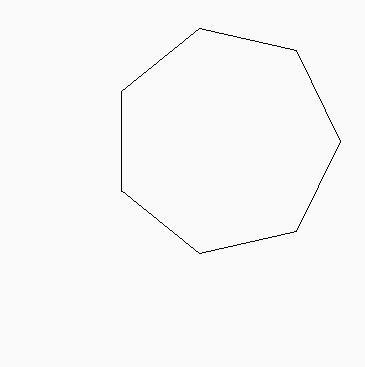
We can test this out with a sample .tortoise file,
which defines a Scheme procedure for drawing a polygon with a given
number of sides:
(define (move-n-turn angle) (tortoise-move 100) (tortoise-turn angle))
(define (polygon n) (do ((i n (- i 1))) ((zero? i)) (move-n-turn (/ 360 n))))
(polygon 7)
Unfortunately, there is a downside to this approach. Each line of
our .tortoise file has to be a complete Scheme expression.
It's very easy to fix this - we just let Guile do more of the work
for us. There is a function scm_c_primitive_load which will load
an entire file and evaluate it:
void read_config_file(void)
{
    scm_c_primitive_load(CONFIGFILENAME);
}
void inner_main(void *closure, int argc, char **argv)
{
    register_procs();
    read_config_file();
    /* now get on with the main business of the program . . . */
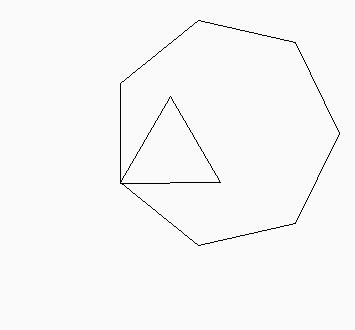
    scm_eval_string("(tortoise-turn 30)"); /* example: call C-defined procedure */
    scm_eval_string("(polygon 3)");   /* example: call Scheme-defined procedure */
    sleep(20);
}
With this version of the code, we can re-write our
.tortoise file in a more easily readable version:
(define (move-n-turn angle)
  (tortoise-move 100)
  (tortoise-turn angle))
(define (polygon n)
  (do ((i n (- i 1)))
      ((zero? i))
    (move-n-turn (/ 360 n))))
(polygon 7)
The Story So Far
Let's recap on what we've seen so far. We can now:
- Load up Guile from a C program, and get it to interpret user input from a file or interactively
- Make C functions available from Scheme with
scm_c_define_gsubr- Pass simple Scheme values to these C functions, extracting the
values with
SCM_INUMandscm_num2dbl - Return simple and slightly more complicated Scheme values from these C
functions using:
SCM_EOLSCM_UNSPECIFIEDSCM_BOOL_FandSCM_BOOL_TSCM_MAKINUMscm_cons
- Pass simple Scheme values to these C functions, extracting the
values with
- Make Scheme functions available from C, invoking them by
evaluating a Scheme expression:
scm_eval_string("(procname args)")
Further Reading
At this point, you probably need to find some more detailed
information on Guile. Bizarrely, the official Guile documentation is
not currently available on the Guile homepage, so you'll either have
to scan the internet for guile-doc, or you'll have to get the
current guile-doc images via anonymous CVS (I couldn't do
this because my internet proxy won't allow it).
The Guile documentation includes a tutorial
(guile-tut.info), a reference manual
(guile-ref.info*) and a copy of the Revised^4 Report on
the Algorithmic Language Scheme (r4rs.info*).
Some things you might need to find out next:
- How to get the value of a Scheme variable from C (hint: use
gh_lookup) - How to prevent an incorrect
.tortoisefile from terminating your program (hint: usegh_catch) - How to make Guile emulate other languages
Have fun . .
Colophon
I wrote this page because I really needed something like it when I started playing with Guile - I actually wrote the page as I figured out how to do things.
Hopefully, this page will be useful to other people who are in the same position that I was. If you're one of those people, please let me know if it has been useful, and if not, how it could be improved so that it is. (Thanks to Neil Jerram and others who have already provided some useful feedback).
If you want to know the answers to deep tricky Guile questions, I'm probably not the best person to ask. Try joining one of the Guile mailing lists (see info here).
Copyright (c) 2000 David Drysdale
Permission is granted to copy, distribute and/or modify this document under the terms of the GNU Free Documentation License, Version 1.1 or any later version published by the Free Software Foundation; with no Invariant Sections, with no Front-Cover Texts, and with no Back-Cover Texts. A copy of the license is available here.