Into The Void

Before Playing - Items - Tweaking
Tips and Cheats - Single Player

Updating Game Files

There's a few patches that must be applied before you can get some multiplayer going. Many of the games glitches are addressed in these patches so even if single-player is your game... update! Apply the 1.1 patch

International versions need to apply the patch appropriate to their version. Links to all the patches can be found here.

Installing New Maps

A few players have had some success experimenting with the deEdit tools. The resulting maps are available for download, and here's instructions for installing them.

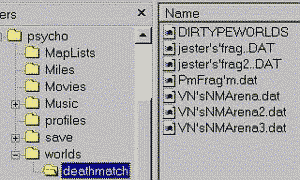
- In the c:\psycho (or c:\games\psycho?) folder, create a subdirectory called "worlds"
- Open the new "worlds" directory and create a subdirectory called "deathmatch"
- Unzip downloaded DAT files to this "deathmatch" folder

Installing New Textures

Some of the mappers have created additional textures for their maps. These are installed much the same way the maps are, but instead of a "worlds" folder create a "textures" folder in your psycho directory (c:\psycho\textures). Unzip the DTX files into this folder.
 

Installing New Skins

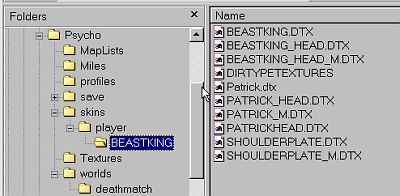
The folders for skins can are created much the same as for maps and textures, but you'll be creating deeper directories eventually... folders within folders within folders!

The zip files for this custom (Eric Carr... The Fox) contain the directory structure. Use the "extract to..." option in Winzip, browse to your psycho directory, and extract. All the folder-creation work is done for you and your skin should show up next time you play.

If it's not working, check for the proper directory structure in your psycho folder.

As new skins are added new folders will get created. For instance, a Vinnie skin to replace the Ace would go into the psycho\skins\player\CELESTIAL folder.

Update Your System

This is a matter of making sure you've got the latest drivers for your video hardware. I've provided a list of some of the more popular ones. Consult your hardware manual for info if you need...

nVidia
 

Also make sure your DirectX is current. There were reported problems with DX8 but I think the 1.13 patch took care of that.


Hosted by www.Geocities.ws

1