
| Main PS2 Help Page | | | ipconfig | | | tracert | | | DNAS Error List | | | Speed Test | | | Line Quality | | | Board |
|---|
|
If you found this page while looking for information on the use of the ipconfig command, or are just curious, look at this page from Microsoft. This pictoral guide will show you how to find the numbers you need to create a manual configuration setup for your PS2. This is useful when you need to designate a DMZ host. Macintosh Users See Below For general information on the ipconfig command, click here. |
| Windows Users Start Here | |||
|---|---|---|---|
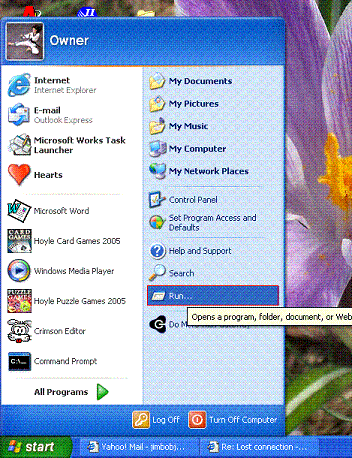 |
Do a START > RUN Here is a little bit more information on IP adress assignment. DHCP, which stands for Dynamic Host Configuration Protocol, automatically assigns an IP address to the computer (or PlayStation�2 system) that logs onto the network as opposed to Static IP, which assigns an IP address that does not change. Setting a manual IP is useful when you want to desiganate your PS2 as a DMZ Host or forward ports. Designating your PS2 as a DMZ host forwards all of the ports to your PS2, effectively puting your PS2 outside the Router's firewall. |
||
| Windows 95 / 98 / ME | Windows NT / 2K / XP | ||
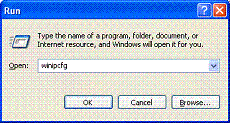 |
Type "winipcfg" without the quotes. | 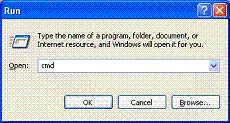 |
Type "cmd" without the quotes. |
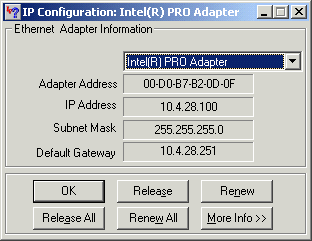 |
Click "More Info >>" | 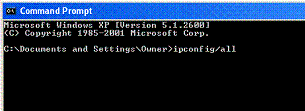 |
Type "ipconfig/all" without the quotes. |
MACINTOSH USERS
Mac OS X Users
Thanks to Joe Hitch
Legal Stuff: To the best of my knowledge, all of the information on this page is correct, and it is provided in hope that it will be useful. However, I assume no liability for any damages, direct or otherwise, resulting from the use of this information, and no warranty is made regarding its accuracy or completeness. Use this information at your own risk.
