Java MicroTuning Organ, version 1.02
© 2007, Jeroen Donkers, www.jedosoft.info, [email protected]
This easy-to-use program provides musicians the experience of playing keyboard instruments in historical temperaments and at historical pitches.
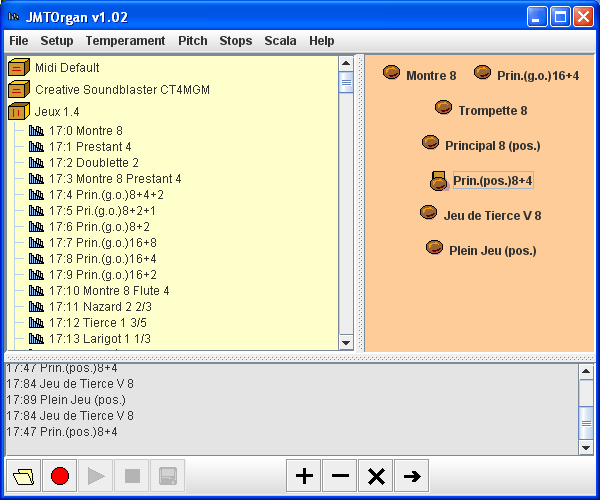 Screenshots from JMTOrgan showing the presets of the Jeux 1.4 Soundfont and seven stops on the stop board. One stop is currently selected. |
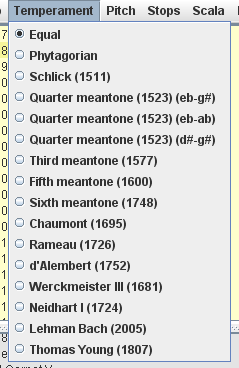 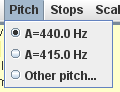 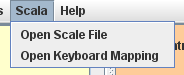 |
Online guides:
Examples:
- Listen to some examples created with JMTOrgan (Bach's WTC1, prelude in B-flat minor n harpsichord and William Byrd's Salvator Mundi on Organ).
This program is "donationware". You can freely use and spread the program as long as you do not change the contents of the package. You can register the program by donating a small amount (20 Euro) via PayPal. You will receive a version of the program that does not mention "UNREGISTERED" and you will be informed of future developments.
| Donate here: |
Features of version 1.02
- JMTOrgan relays input from your MIDI keyboard (or a MIDI file) to your soundcard, meanwhile applying a (historical) temperament and retuning to a (historical) pitch - even beyond the pitch-bend limit of a semitone (e.g. to A=309 Hz).
- JMTOrgan supports/imports Scala scale and keyboard mapping files.
- JMTOrgan allows easy preset selection of soundfonts that are loaded on your soundcard.
- JMTOrgan reads Soundfont 2.0 files and displays the names of the defined presets. It also reads the bank and patch number of each preset.
- JMTOrgan provides a stop board to which you can drag presets.
- JMTOrgan allows cycling through the stops on the stop board by using the spacebar - which is very convenient during rehearsal or performance.
- JMTOrgan can record what you play. You can playback it immediately or save to a midi file. Using a soft-synthesizer such as Synthfont these midi-files can be transformed into mp3 or wav format and put on a standard audio-cd.
- JMTOrgan can open MIDI files and can play them using any preset, pitch and temperament. Preset, pitch and temperament can be switched during playback!
- JMTOrgan is configurable: you can add your own Soundfont files, scales, and pitches.
- JMTOrgan provides four different look-and-feels.
Requirements
- JMTOrgan is a Java application; it runs on any platform that supports Java.
- JMTOrgan needs Java runtime JRE 1.5 or higher to be installed.
- If you want to use a Midi keyboard, you need a MIDI connection from your keyboard to your computer, for instance, a MIDI-to-USB connector.
- If you want to use soundfonts, you need a soundcard that can deal with Soundfonts, for instance, the Creative Sound Blaster Audigy.
- You need to download the Soundfonts, upload them to your soundcard, and add them to the configuration of JMTOrgan.
Download
- Windows setup: JMTOrganv102Setup.zip.
- Zip file for manual installation: jmtOrganv102.zip
- Runnable Jar JMTOrgan.jar (use rightclick to download).
- Default config.xml: config.xml (use rightclick to download).
- Documentation (pdf) JMTOrgan.pdf (use rightclick to download).
Installation
Installation is available in two modes.Windows 2000/ME/XP:
A setup program is available for Windows:- download JMTOrganv102Setup.zip, unpack it and run JMTOrganv102Setup.exe.
Manual installation (all platforms):
- Download JMTOrganv102.zip.
- Create a folder in which you want to install JMTOrgan.
- Unpack the contents of the zip-file to that directory.
- To run JMTOrgan: doubleclick on JMTOrgan.jar or type "java -jar JMTOrgan".
Some technical details
JMTOrgan applies microtuning by sending MIDI pitch-bend commands to the MIDI output device. To enable microtuning for several tones at the same time, the incoming MIDI commands are split into twelve channels, one for each pitch (we use channel 1 to 13, except channel 10). Each channel receives only one pitch-bend command when a temperament or pitch change is selected. Incoming pitch-bend commands are not sent to the output.
Microtuning is achieved in three steps. First, the global pitch-change is added to the temperament changes. Then the amount of whole semitones (i.e., 100 cents) is subtracted from the amount to change. This number of semi-tones is translated into a change in MIDI pitch number. The remainder is translated into a MIDI pitch-bend command.
Program changes and bank selection are sent to all twelve channels simultaneously. (Also sustain on and off commands are treated in this way.)
Midi files saved by JMTOrgan use twelve channels in a single track. It uses the PPQ format with 5000 time points per second.
Midi devices are detected automatically at startup of the program. So, devices have to be present at the time the program starts.
Links
Some links to programs and websites mentioned in the documentation:
Many free soundfonts can be downloaded at, for instance, at HammerSound and at SF2Midi.
The Jeux 1.4 organ soundfont is available at: Realmac. A harpsichord font is also available.
You find SynthFont at Synthfont.com.
Scala is available at the Huygens Foundation
.Send comments and questions to: [email protected].