JAL Computing




|
|
|
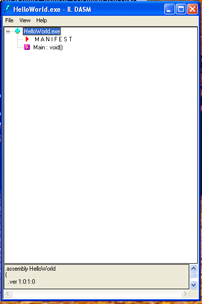
Getting StartedHere is a quick start in IL .NET. Using the ToolsIf you have Visual Studio .NET 2003, the CIL assembler (ilasm.exe) is available at C:/WINDOWS/Microsoft.NET/Framework/v1.1.4322 The CIL dis-assembler (ildasm.exe) is available at You can launch these tools from the command line by adding these two paths to your system path. Under Windows XP go to Start--> Settings --> Control Panel --> System --> Advanced -> Environmental Variables --> System Variables --> Path and click on Edit. Once you have the Path variable set appropriately you can launch the GUI dis-assembler from the command line as: >ildasm <NameOfManagedCodeBinaryApplication>.exe You can also compile IL assembler code into virtual machine binary code from the command line by navigating to the folder containing the source code and entering: >ilasm <NameOfILAssemblerFile>.il ildasmHere is the GUI view of a Hello World program opened in the dis-assembler.
The dis-assembler converts the virtual machine binary code into low level human readable IL assembler code. Here is the Manifest IL for the Hello World application. .assembly extern mscorlib
{
.ver 0:0:0:0
}
.assembly HelloWorld
{
.ver 1:0:1:0
}
.module HelloWorld.exe
// MVID: {4D86A6B8-B03E-4FE4-AF79-93F4330CED98}
.imagebase 0x00400000
.subsystem 0x00000003
.file alignment 512
.corflags 0x00000001
// Image base: 0x06c00000
Here is the IL for Main: .method privatescope static void Main$PST06000001() cil managed
{
.entrypoint
// Code size 21 (0x15)
.maxstack 2
IL_0000: ldstr "Hello World!"
IL_0005: ldstr "JAL 11.24.04"
IL_000a: call void [mscorlib]System.Console::WriteLine(string)
IL_000f: call void [mscorlib]System.Console::WriteLine(string)
IL_0014: ret
} // end of method 'Global Functions'::Main
The program sets the stack size to two. It then pushes two strings onto the stack and outputs them to the console using System.Console.WriteLine. Each call to WriteLine pops a string off the stack leaving an empty stack (void) on return. Here is the program output: Hello World! ilasmYou can write managed code in low level IL assembler rather than using a high level language such as C#. You can use Notebook as your editor and rename the saved file using the .il extension. Here is the IL assembler source code for our Hello World application. // HelloWorld.il // Test IL Assembler // 11.24.04 Jeff Louie .assembly extern mscorlib {}
.assembly HelloWorld {.ver 1:0:1:0}
.module HelloWorld.exe
.method static void Main() cil managed
{
.maxstack 2
.entrypointldstr "Hello World!" ldstr "JAL 11.24.04" call void [mscorlib]System.Console::WriteLine(string) call void [mscorlib]System.Console::WriteLine(string) ret } Learn MoreIf you want to learn more about the CIL check out these links.
There is also extensive documentation in the SDK at C: --> Program Files --> Microsoft Visual Studio .NET 2003 --> SDK --> v1.1 --> Tool Developers Guide --> Docs --> Partition III CIL. Have fun,
|
Send mail to [email protected]
with questions or comments about this web site. Copyright © 2001, 2002, 2003,
2004, 2005, 2006, 2007, 2008, 2009 ©
|