
| HOME | NEWS | PHOTO GALLERY | COMPUTER PLUS | COOKING PLUS | ABOUT THE SITE | CONTACT |
| |||||||||||||
|
| |||||||||||||
Compressed Music
Recently I overheard one friend say to the other “My CD Player can play 12 and a half hours of music from a single CD.” “Well you must be joking” said the other, and continued saying “That's impossible as a CD can hold 74 minutes of music only”. Their conversation went on, each trying to disprove the other. Unfortunately I didn't manage to hear the end of it.
Well Folks, what I want to say is that you can compress 12 and a half hours of music or even more depending on the quality you need , as compared to a measly 74 minutes of audio in a normal audio CD. You can also compress music without any loss in quality and in a manner that it can be completely reversed, however the file sizes will be a little large as compared to the other formats.
We will take a look at the popular formats used for compressing music, how to compress music ourselves and how to play the compressed music. The information given in this article is for the information of the readers. According to the current line of thought it is legal to make any compressed music only from CD's that you legally own and that you cannot sell or give away the resulting files. The reader must note that He/She has to observe relevant copyright and other laws. Although all efforts have been made to provide accurate and relevant information, any user of the information contained herein must note that they are making use of the information contained here at their own risk.
The music formats that I will discuss here are MP3, WMA, Ogg Vorbis, Monkey's Audio.
MP3
This format is a proprietory format owned by Fraunhofer IIS and Thomson Multimedia. It dates back to 1992 when the Fraunhofer institute in Germany invented a format called as Moving Pictures Expert Group Layer 3 Shortened to MPEG-1 Layer 3 and finally as it gained popularity it got shortened to MP3.This format is the most widely supported format in hardware devices as well as across all Operating Systems.
Ogg Vorbis (www.vorbis.com , www.xiph.org )
Ogg Vorbis is a completely open, patent-free, professional audio encoding and streaming technology with all the benefits of Open Source. The music encoded in this format sounds slightly better than mp3 at the same bit rates. Its Popularity has soared ever since the Fraunhofer institute decided to get tough on the MP3 standards patents and is now charging a fee for use of MP3 technology in decoders also.
Windows Media Audio (www.microsoft.com/windows/windowsmedia/default.asp)
This format is next in popularity to MP3.Windows Media Audio ( WMA) is Microsoft's proprietory standard for Compressed Music. This format is made only for windows users, although recently, a command line media player has been released for linux which supports wma playback.One of the major differences with the other formats is that WMA supports Digital rights Management (DRM) which means that distribution of copyrighted wma's is severely restricted.
Monkey's Audio
Monkeys Audio is a what you would call a loss-less compressor, that is when a monkeys audio file is played the resulting rendition is exactly the same (quality wise) as the original. The process is reversible in the fact that if we reconvert the monkeys audio file to wav the resulting wav file will be exactly the same as the original wav file, unlike Mp3, WMA, Ogg vorbis and other similar compression methods which are lossy compression methods ,( like the .jpg format for digital photos) where sound information is discarded in the name of higher compression rates. The downside to Monkeys approach is that compression ratios will very low as compared to the lossy compression methods.
The table below illustrates the file sizes, compression ratios and compression time for various audio file formats.
| |
||||
| Audio Format | File Extension | Compression Ratio | File size in MB | Encoding Time (minutes: Seconds) |
| MP3 | .mp3 | 11.0 to 1 (9%) | 5.80 | 1:05 |
| Ogg Vorbis | .ogg | 11.5 to 1 (8.7%) | 5.57 | 2:59 |
| Wma | .wma | 0.9 to 1 (9.1%) | 5.85 | 0:36 |
| Monkeys Audio | .ape | 1.7 to 1 (60%) | 38.2 | 2:00 |
NOTE:
(i) The original wav file used for encoding was 63.9 MB having a Playing time of 6:20
(ii) All the compressed files were encoded at a bitrate of 128 Kbps, Except for monkeys audio where normal compression was used.
(iii) During Playback of the ogg file in winamp 2.xx it showed a variation from 116 to 138 kbps. This may sometimes result in a slightly smaller file size than MP3 (As in the present Case)
(iv)The above results will vary with your system configuration, and encoder used. For example the P4 3.06 Ghz is reported to encode a 51 MB Wav file in just 17 seconds.
We will now take a look at the various Encoders which we can use to make compressed music.
Encoding Using CDEX (http://www.cdex.n3.net)
When you put the CD in the drive you will get the list of files displayed. The files have been named by default names such as Track One, Track Two, Etc.
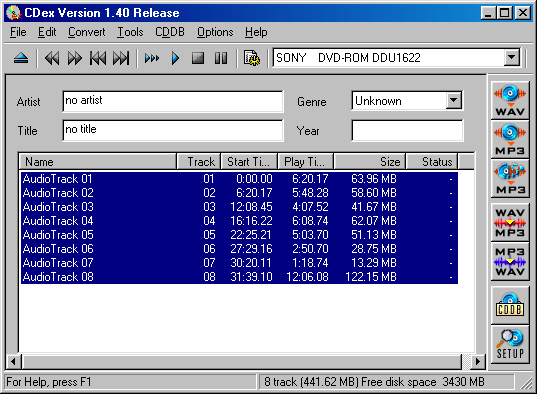 |
If you convert the Songs to MP3 by the using these file names, after you have converted several files you will not know which file corresponds to which song. Hence it is preferable to rename according to the name of the song. Firstly enter the name of the album. Next Enter the type of the song by selecting from the provided list. Then select the track, press F2 and enter the name of the song .Repeat the process for all tracks. The names of the songs can also be entered by opening CD player in Windows 95/98 and entering the names of the tracks , artist name, album name etc. in the playlist. If you want to save the track names entered in CDEX in CD player then select the option save to CD player.ini under the CDDB menu.
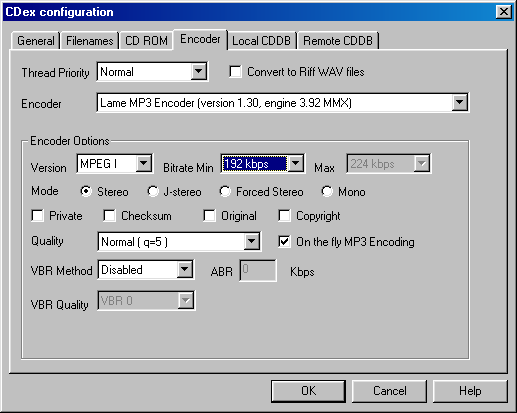
Settings
 |
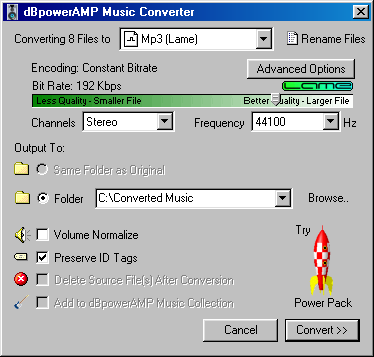
Conversion using dB Power Amp Music Converter (http://www.dbpoweramp.com/dmc)
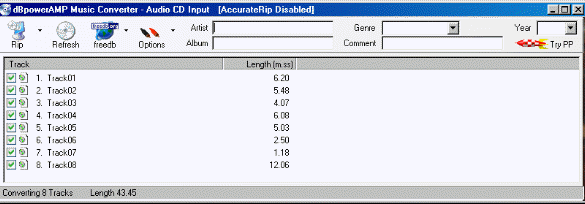
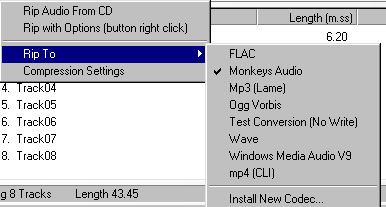
Before I describe now to use the dBPowerAMP Music converter I will tell you the files that are to be downloaded. Firstly you have to download dBPowerAMP which is currently in it's 11th version. It is about 1.5 MB in size.
 |
 |
 |
© ALL RIGHTS RESERVED