Photoshop
Special Effects
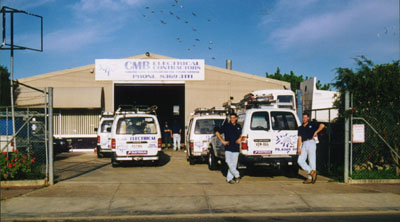
The original photo isn't the best image so I went to the Image>Adjust>levels dialog box and manually brought the triangles in-line with the beginnings of the light and dark tonal ranges on the graph.
The next thing was to try and reduce the glare from the sun that is obscuring the company signage on the shed and vans. Using the burn tool I was somewhat able to make the text appear stronger.
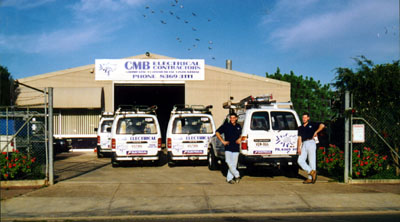
Using the selection tools I outlined a copy of the work van and saved it as a new layer via the layer>new>layer via cut. The same method was used on the 4-wheel drive, giving 2 layers on top of the background and for the instant garden (bottom right of picture).
I deleted the van in front of the 4-wheel drive and moved a copy of the van layer (alt-move) and placed the image so that there is 2 vans side by side. By moving the 4-wheel drive to the topmost layer I was able to achieve the effect of the van being parked in front of the 4-wheel drive.
The areas of the deleted van left dark spaces that I selected (polygonal lasso) and by using the rubber-stamp tool I was able to stamp the texture of the shed into it.
The large truck was removed and the tree at the back of the shed was used as the 'pad' to create the fake tree in its place (small sections selected working from the top of the tree downwards). After connecting the small sections of the tree together I utilised the blur tool to smooth the joins out.