
|
||||
| A quick example |
Lessons 3 |
|||
|
The basic idea behind an Alias is to create your own command. You do
this by assigning one or more previously defined commands to your new
command. (alias) Here is a simple example- (all examples can be entered
(or pasted) directly into Aliases and will work.)
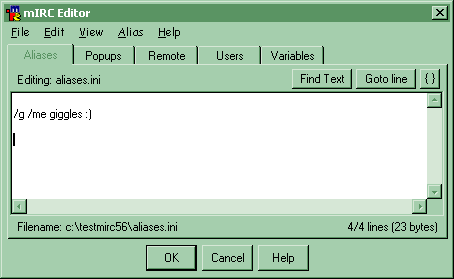
/g /me giggles :) |
||||
|
Remember to enter each alias on it's own line, if you already have some aliases. You must also remember to press 'OK' or select 'Save' from the File menu before any changes to scripts take effect in mIRC. In this example, the new command is named /g. The command that it performs, is /me giggles. Try this out- enter this into the alias editor and press OK. Now you can use /g as an 'abbreviation' for /me giggles. |
|||
|
|
||||
|
||||
|
||||
|
All information shown on this site is regularly maintained and kept as up to date as possible. All other trademarks are property of their respective owners. Copyright © 2001, Infinity.ca.us.webchat.org Webmaster, Inc.Service Hub |
||||
