|
||||
| A longer example Lessons 4 | ||||
|
Obviously, you can assign more than one command to an alias. In mIRC, when you work with a block of multiple commands, you need to surround them in { braces }. Here is a quick example- /go { When you use /go, it will part all channels, then join #infinity. As you can see here, an opening brace { and closing brace } are used to surround the multiple commands, which are placed on separate lines. The commands are then executed in order.
|
||||
|
|
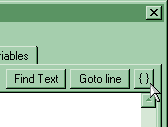
NOTE: The indentation is to help you keep organized, and
is automatically added by the mIRC editor if you close and reopen
it, or press the braces {} button in the upper right corner.
|
|||
|
|
||||
|
|
||||
|
||||
|
All information shown on this site is regularly maintained and kept as up to date as possible. All other trademarks are property of their respective owners. Copyright © 2001, Infinity.ca.us.webchat.org Webmaster, Inc.Service Hub |
||||