| FarmHand - Easy Dairy Installation Instructions
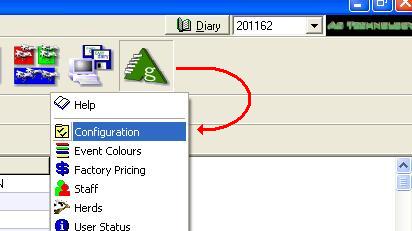
When installing the program from the download page. you will only need the file for your chosen device of course. Initially you would choose the Full installation file and on subsequent visits just the upgrade. For the full option the file you download will be called SETUP.EXE. (Please email us if your browser will not allow you to import .EXE files). Once the file has been downloaded, double-click it to install FarmHand and follow these instructions. To install the upgrade only, if for a Palm device, simply open the Quick Install folder and drag the downloaded file (FARMHAND.PRC) into the top area. Click here if you are unsure. If for a PocketPC, drag the file into folder called Install inside the Farmhand folder on your C: local hard drive and disconnect and reconnect the device to start an Activesync session. Note: You will need to establish Farmhand on your device and run it once before sending data across to it. 1. Configure the EasyDairy system to put the files in the correct place. Run EasyDairy and select the icon shown. |
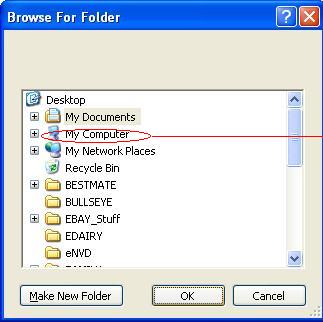
| When this screen appears use the yellow folder icon here... to search for the correct folder. Palm users would select similar to location shown where the folder name after palmone is the name of their device. PocketPC users must use only the folder called Farmhand so the text line would read C:\Farmhand |
 |
 |
 |
 |
 |
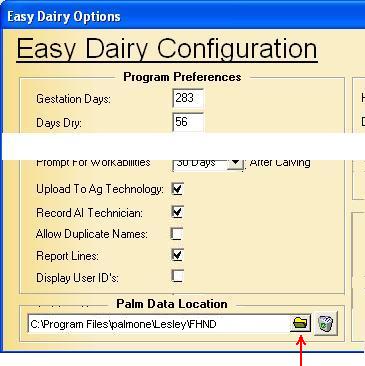 |
| Double-click on My computer and each link in turn until you find the correct folder. If the final link to the FHND folder (Farmhand for Pocket PC users) is not found, it means you have not installed the SETUP program correctly. This has to be done before EasyDairy can do its thing. |
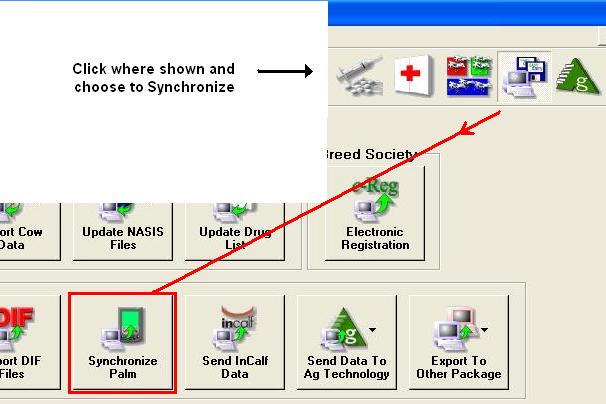
| Once the folder name is established click the SAVE button to confirm it. Then select the main icons in turn as shown. |
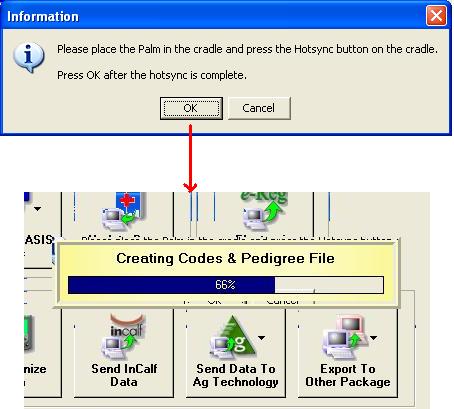
| This should generate a series of files into the folder link you've just established. For the time being, when EasyDairy uses the terms Palm and Hotsync impliesz 'PocketPC' and 'Activesync' as well. |
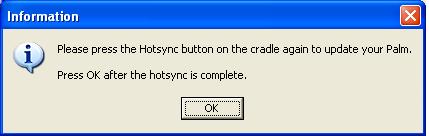
| Pocket PC users can ignore the following message |
| You're nearly through! Pocket PC users click here... Palm Users click here... click the Back button to return |