| TYPES | BUS NETWORK TOPOLOGY | RING NETWORK TOPOLOGY | STAR NETWORK TOPOLOGY |
| EXPLAINATION(PHYSICAL) | A bus network topology consist of a single central cable(backbone/trunk) to which all computers and other devices connect(node) | On a ring network topology a cable form a closed loop(ring) with all computers and devices arranged along the ring | All computers and devices on the network connect to a central device(hub/switch) thus forming a star |
| EXPAINATION(LOGICAL) | Send
data in a series of signal in both direction in which all node will
receive the message but the intended receipient will accept and the
rest will reject | Data,instruction
and information in ring topology travel as a packet in one
direction(clockwise/anticlockwise)to all nodes using token until it
reach to the destination | Data,information and instruction travel in star network topology through hub/switch,if the
network use hub the device will send the message to all receipient but
only the intended receipient will accept,if use switch it only send data to the intended receipient only |
| ADVANTAGES | Bus network topology are inexpensive and easy to install | Cable fault are easily located,making troubleshooting easier | If one device fails,only that device is affected |
| DISADVANTAGES | If the cable breakdown it will effect the entire network | A failure in any cable or devices breaks the loop and can take down the entire network | More expensive because of the cost of the hub/switch |
| DIAGRAM | 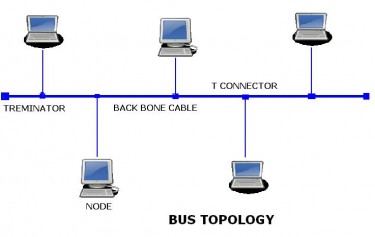 | 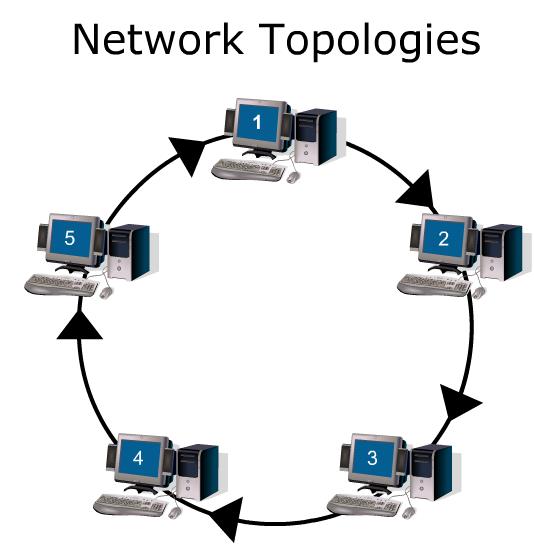 |  |

