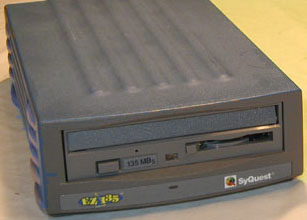
The general test revealed the drive mechanism was ok. With cart inserted the drive spins up OK to green light.
Yet I was getting strange SCSI related errors from SyQuest Utilities 4.01 driver when the drive was reconnected to the computer. Errors like two drives at the same SCSI ID when only one is connected. This was not a termination problem or cable problem since it exists on different computers with different cables. If the drive was placed in the middle of the SCSI chain or at end of chain with terminator the problem still existed.
After exhausting all possible software problems using different mounting utilities, I finally guessed it may be an internal hardware problem with the SCSI cable connectors or a board failure.
Remembering I had another EZ 135 with a broken drive mechanism I proceeded to disassemble both drives and switched the working drive mechanism to the other drive enclosure. Much to my surprise this fixed the problem. No related SCSI errors and all disks mounted as they should.
Just to verify it was the enclosure related, I connected the old enclosure with the bad mechanism to the computer an the same SCSI type errors (double devices and ID's) was again indicated in SyQuest Utilities 4.01.
As someone who has followed the alt.syquest newsgroup and the unofficial SyQuest Support message boards I have never read of this solution before. Most of the time all problems are thought to be damaged mechanisms or a software installation (or conflict) problem.
To Change drive mechanism in a SyQuest EZ 135:
Pry the rubber feet up from the out side of the case. Remove the two screws under the feet. Carefully push all four plastic latches out and remove the drive and board from the case. Remove 4 screws holding the mechanism in place. Carefully unplug the SCSI cable, the power plug and the other connector (4 wires) remember the red wire is closest to the power connector.
Reassemble. remember to reconnect the ground (green) wire. Be sure to slide on the bottom of the enclosure to the mechanism assembly before pushing the entire assembly back into the case to assure alignment of drive mechanism.
Reconnected power supply, turn on, insert cart and pray. If the cart spins up (green light), reconnect to computer an pray again.