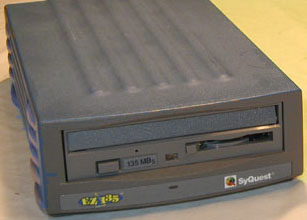
One of the work stations has three external SCSI drives; a ZIP, a SyQuest EZ135 and a SyJet. Since I frequently add or remove the various peripherals on the SCSI chain the computer desk faces away from the wall for easy access to the various cables and cords. This workstation is in very small room crammed with another (larger) workstation, a very large B/W laser printer and a color copier/printer all networked together.
Just before closing on this Friday the color copier suffered a serious jam with a heat transfer melting on the fuser roller. Three people were crammed into this small space, one on the floor trying to fix the copier, one at a the work station and a colleague.
In this Friday frenzy the colleague accidentally backed into the nest of SCSI and other cables and cords connecting the EZ135 to the computer causing the drive to fall off the desk and drop three feet to the floor. It hit directly on it's face with a loud noise.
The impact was severe enough to smash the plastic face and spring loaded cover where the disks are inserted. I tried to insert a old disk into the drive (power off of course) and I could feel resistance from the mangled slot. OK--that's the end for that drive, I thought.
On Sunday when the place was quiet and I decided to realistically assess the damage. I removed the rubber feet from EZ 135 case, unscrewed the cover and discovered the mechanism wasn't bent. I powered it up without the cover and inserted a disk -- to my amazement it worked!!!
I Remembering that I had a dead EZ 135 that someone asked to fix last year. (He ended up giving me the drive when I informed him I could not fix the broken drive mechanism.) Armed with this piece of junk I proceeded to remove the cover, carefully unscrewed the plastic face covering the insertion slot; then carefully peeled back the tape holding the plastic face to the drive mechanism (yes they used cellophane tape to hold the top of plastic face in place and to keep dust out) and replaced the broken parts.
I put everything back together (including the tape) and now that EZ135 works perfectly. It reads it writes --it WORKS as it should!!!
The amazing EZ 135 mechanism is so durable it survived a three foot drop. If only the SparQ's and Syjet's could suffer such abuse. Anyway just thought I share this little repair victory with other EZ 135 users.
And good luck with your SyQuest drives -glen