****** Using New Auto Connectors
Feature in V8 ******
V8 of Wilcom ES has a new features that
allows you to open a stitch file into ES while allowing you to
recognize the connectors between objects.
Previous to V8, opening a stitch file
into ES, even with objects and outlines turned on, resulted in
connectors being recognized as manual jump stitches. Making
changes to these connectors meant you had to manually remove the
jump stitches, which can be time consuming.
Now with V8, you can open the stitch
file, convert to objects and outlines, and convert connectors so
that they are recognized as properties of the object.
Advantages:
* Easier editing of connectors
* Using the connectors tab to quickly
make changes to the connector properties
* Using auto start and end no longer
requires editing the previous auto center jump stitches.
Steps to using Auto Connector
Recognition:
* Open a stitch file by clicking
File-->Open
* Select the stitch file you would like
to open (.dst, .exp, .xxx, etc...)
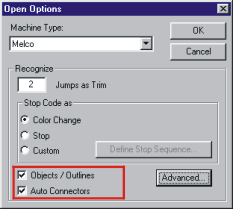
* Click the Options button to access the
open options window.
* Note the bottom of the window that
appears. You will see two checkboxes.
* Check both boxes (Objects/Outlines and
Auto Connectors). See screen shot below as an example.
* Click OK
* Click Open to open the file.
Results:
The design initially will not look
different on the screen. You can open the Color/Object list
to see a visual list of the objects in the design. Note that
there are no manual jump stitches listed as separate objects.
If you had unchecked the Auto Connectors checkbox, you would see the
jumps listed as separate manual objects in the Color/Object list.
To Edit:
If you would like to edit the properties
of the connectors, select one or more objects, then click Properties
and go to the Connectors tab as you would with an original .EMB file digitized
in Wilcom.
Screen shot of window:
(note if you have HTML turned off in
your mail and only accept text messages, you will not see the image,
you can open your software as specified above to see the
checkboxes).
We hope you find this tip helpful as
you work with V8.