
Hotel Management System
HMS 2003


Tax Definition
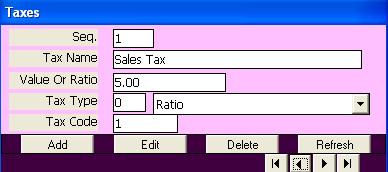
Function:
Enter and update all sorts of taxes which applicable on rooms and outlets.Openning Page:
Open the page by clicking on the button (Tax Definition) on main menu.Data Fields:
Data fields that define a tax include the following fields:
a tax internal sequence number which is assigned by the program for internal use.
Tax name entered and updated by the user. This name is shown on bills.
Tax value or ratio which is a numeric field entered by the user and associated with the tax type field which determine how the tax is computed.
Tax Type field is selected from a list of four types:
Ratio determines that the tax is a percent rate of the bill value like sales tax (5%).
Ratio on residence only which is a percent ratio of the residence cost only, the meals costs are not included.
Fixed Value on bill which is a value added to the bill regardless of its value like stamp.
Value for person night which is a fixed value multiplied by the number of persons times the number of nights.
The last field is assigned by the program for internal use.Functional Buttons:
In addition to the buttons that transfer control to each tax record (First, Last, next, and Previous) there are the following functional buttons:
Add: to add a new tax record.
Edit: to edit (change) the fields of existing tax record.
Delete: to delete an existing tax record. Taxes are not deleted if they are used in processing even one time use.
In editing or adding mode the program shows two functional buttons, the first to accept and save updates and the second to cancel the changes done.Function Keys/Short cuts
Function
Key
Move to next field
tab
Edit
Alt+E
Add
Alt+A
Delete
Alt-D
Update
F2 Or Alt+U
Cancel
Esc Or Alt+C
Exit
Alt-Q
Last Record
End
First Record
Home
Next Record
Down Arrow Or Page Down
Previous Record
Up Arrow Or Page Up