
HMS 2003
Function
Openning Page:
Data Fields:
Function Buttons
Function Keys/Short cuts
Function
Key
Move to next field
tab
Edit
Alt+E
Add
Alt+A
Delete
Alt-D
Update
F2 Or Alt+U
Cancel
Esc Or Alt+C
Exit
Alt-Q
Last Record
End
First Record
Home
Next Record
Down Arrow Or Page Down
Previous Record
Up Arrow Or Page Up


Rooms' Types
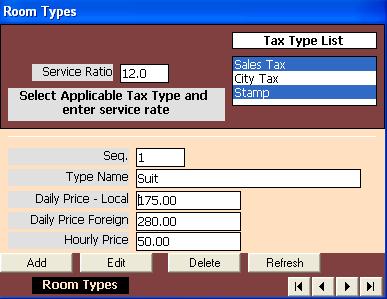
Define rooms' types in hotel and the standard prices for each type. There are three standard prices.
The first is local which is a price by night for the three first guest nationalities in nationality table. The three nationalities are Egyptian, Palestinian, Sudanese.
The second is foreign which is the price per night for other nationalities. The third is hourly rate and used for day use check in. These standard prices can be changed by authorized users at the time of check in.
In addition to defining the prices, the page is used to select the taxes applicable to room type and specify the service rate which is usually 12%.
The page is opened by clicking on the button (Room Type) in the main menu.
At the top of the page there are two fields: a list box containing tax types defined in tax page, and service rate initialied as 12.00.
The applicables taxes are selected from the list by clicking on its name.
Other data fields include:Sequence which is assigned by the program for internal use.,
Type Name which is entered and updated by users, Daily Price - Local
Entered and updated by users and applicable to the first three nationalities in the nationality table.
Daily Price - Foreign Entered and updated by users an applicable for other nationalities.
Hourly Price Applicable on the day use check in.
These standard prices are added automatically by the system for new check in. The autorized users are able to change then after check in.
Function buttons include buttons for transfer control between records (First, Last, Next, and Previous) in addition to buttons for
Add new record, Edit existing record, and Delete existing record. In Add or Edit mode, there are two buttons available, one for
Cancel changes done on the record, and the other for Update accepting and save changes.