|
Function:
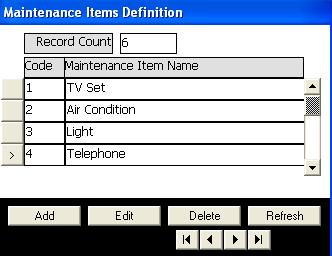
Maintaine Maintenance Items table, Add items, edit item name, and delete existing items. This list of maintenance items is used in room service module to set the maintenance items when a room set into maintenance status.
Opening Page:
Click on Maintenance Items definition button in the main menu of basic data module.
Data Fields:
Data necessary to define Cities are:
Code is a code of maintenance item set by the program for internal use.
City Name is the name of item dispayed in forms and reports.
The page also includes a field showing the total number of maintenance items defined.
Function Buttons:
In addition to the buttons used to transfer control between items defined, there are buttons to perform the following functions:
Add to add new item
Edit to change the fields of existing item.
Delete to delete an existing item. The item in this case must not been used in maintenance carried on a room.
In the edit or add mode two buttons apears: Cencel button to cancel changes done and Update button to accept and save changes done.
Function Keys/Short cuts
|
Function
|
Key
|
|
Move to next field
|
tab
|
|
Edit
|
Alt+E
|
|
Add
|
Alt+A
|
|
Delete
|
Alt-D
|
|
Update
|
F2 Or Alt+U
|
|
Cancel
|
Esc Or Alt+C
|
|
Exit
|
Alt-Q
|
|
Last Record
|
End
|
|
First Record
|
Home
|
|
Next Record
|
Down Arrow Or Page Down
|
|
Previous Record
|
Up Arrow Or Page Up
|
|