 |
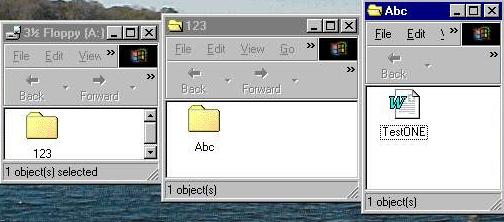 |
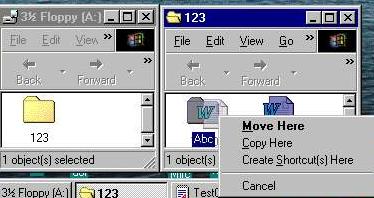
| I have decide to move or copy the file to another location on the A-DRIVE. I can Click on EDIT and use that menu or use the RIGHT mouse button as show in the graphic on the left. Place the mouse pointer on the file hold the RIGHT mouse botton and drag the file to the new location. Then release. Click on what is to be done |
 |
 |
 |
 |
| Below are instructions on RENAMING a FILE or FOLDER |
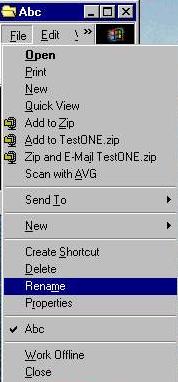
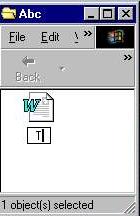
| First you have to click on the FILE or FOLDER you want to RENAME. One Click will highlight it. Now with the file highlighted you CLICK on the word FILE and then on the drop down menu a CLICK on RENAME. This opens the box where the file has it name as show in the middle graphic above. Again the first key that is struck will erase the old name. The new name of the file will be TestTWO. A tap on the ENTER key will register the new name. |
|
| The last set of instructions in this page is how to DELETE a FILE or FOLDER. |
 |
 |
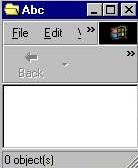 |
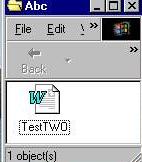
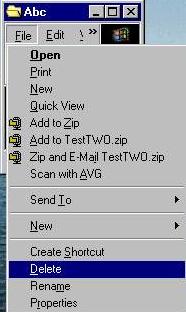
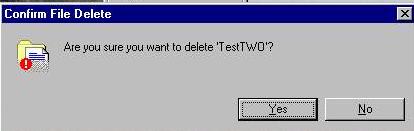
| Again you must highlight the file or folder with a click that you want to DELETE A CLICK on File a click on DELETE in the drop down menu and the CONFIRM FILE DELETE program appears. Click on yes and the file or folder disappears. as shown in the graphic on the right. |
| The END |