How to burn an Akai image with Nero
Written by Splat!
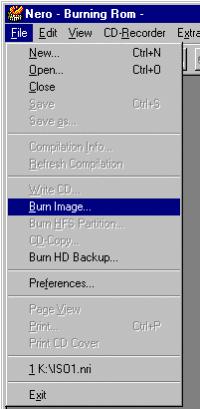
1. Select File -> Burn Image.
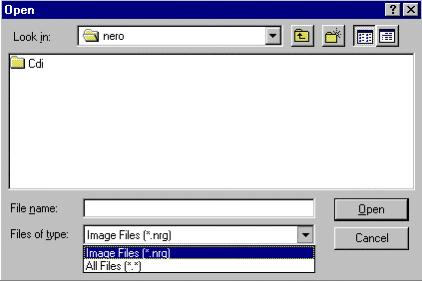
2. Select All Files if it is not an *.NRG image and then select your image file.
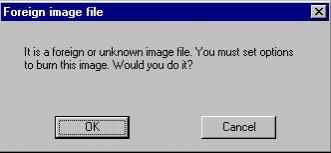
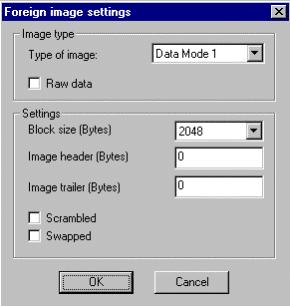
3. If you've selected a non-NRG image (*.BIN, *.ISO) this dialog will pop up, you're in a good mood, so OK why not.
4a. If it's a *.BIN file you check the accompanying *.CUE for the block size.
FILE "Akai.bin" BINARY
TRACK 01 MODE1/2352 <------- Block Size
INDEX 01 00:00:00
You only have to change the setting of the block size, it checks or unchecks the Raw Data checkbox accordingly.
Most likely it's 2352 and so your settings should look like this:
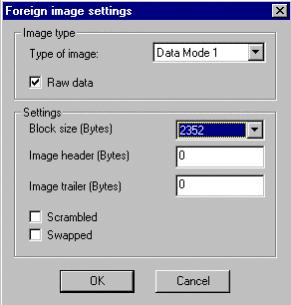
4b. If it's an *.ISO or the CUE gives a block size of 2048 use these settings.
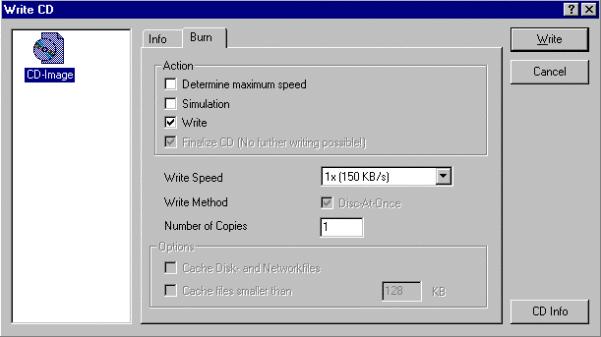
5. Burning an Akai image seems to give best results on 1X speed. Now hit that write button, go, cat, go.
I am in no way, shape or form responsible for you burning a coaster.
If you want to send the bill somewhere send it to God,
he created this chaos we call IT.
Using a rewritable the first time might not be a bad idea.