Created by Krysten Allen, 02/24/2009
I will be teaching you the basics of XHTML and how to make a CSS page. Below I will introduce you to what is XHTML and the very beginning of your website. The link up top will guide you in making your site that unique page you've always wanted. You will learn how to color your page, make links to your favorite site, add images to spark it up, and then we will make all of those tags and make them yours using attributes. After you have finished with the main page, continue to Main Tags Page where you will learn the main objects of a website. From there continue to my Attributes Page to learn how to change the main objects with little details. End this tour with my External CSS Page. Here you will learn how to make a external css page and link it to your website.
HTML is Hypertext Markup Language. It is the language we use to type up websites. Have you ever been curious and decided to right click a website and view it's source? Remember all the crazy writing you thought you would never be able to understand. That is what we are understanding today. The 'X' in XHTML stands for eXtensible. It really means it's picky. HTML is like your elementary teacher. You had to do the problems right, but you made it up as you went. You didn't have strict guidelines, it was how you wanted to do it. With XHTML, you are now is calculus. Rules galore! Now don't be scared. It may seem scary at first, but trust me. This is easier than learning Japanese, and that I know for a fact.
Now, I will show you an example of a template website. The coding is simple, look it over and below I will answer all your questions. Well at least the ones dealing with XHTML.
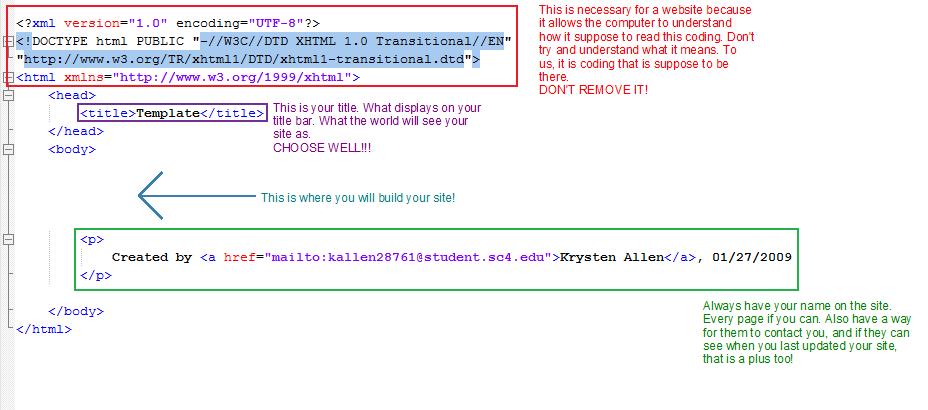
Now you know what your basic site should look like. In the <head> is where all your programs
for your code should go. All the behind the scenes programming, but we won't get that far indepth.
Right now we will just leave it how it is, but in Step 4 -- External Css we will learn how to program
our external css in there. In the <body> is where we shall be typing all of our text. Now I know you
are looking at the template and sighing, saying this isn't for you, but just wait. I shall explain all
to your curious eyes.
Continue to Step 2 -- Main Tags
Created by Krysten Allen, 02/24/2009