Mid Term - Project X
Step 1 -- Home
Step 2 -- Main Tags
Step 3 -- Attributes
Step 4 -- External Css
Introduction
Woah, look at that website you built. Loads of XHTML that you didn't even know you had in you. I told
you this was as easy as pie. Now External Css gets you a little more complicated. Remember how I told
you that we would put a small program into the <head> </head>. Well thats what we are doing
now. This small line of programming will tell your computer that your website's attributes are all written
down on a sepearte piece of paper. First you will want to put this coding into your header:
<link href="Name_here.css" rel="stylesheet" type="text/css" />
Now let us make that Css sheet for you. First open a new page in your notepad. Save it as
'Name_here.css'. Now we shall begin with the body. It should look like the image below. Remember, you
must close your brackets.
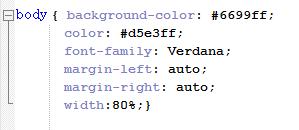
You just do a body with brackets and inside the brackets you add your attributes. Simple as pie, yet
again, and since you know all your attributes, make it as unique as you can. Now in the last step we
talked about class. The same concept is used for classes. Look at the image below.
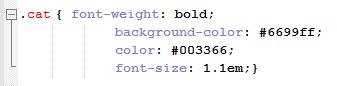
Congradulations you have made a website! Now validate and make sure you have no errors!!
Validate Your Prize!

Created by Krysten Allen, 02/24/2009