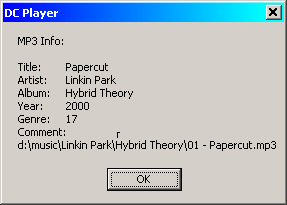
Old Bla info screen nothing special
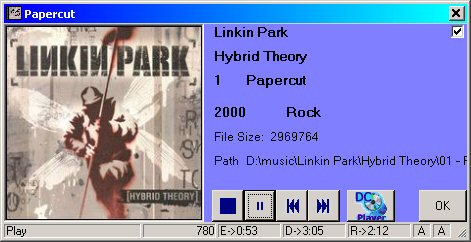
New wicked ultra useful info Screen with album art!
Features of UDC Player X!
Why do you use any paticular piece of software? It's confusing, lacking simple features, but it is pretty? No, you use software that functionality and lets you use your media they way you want to use it. UDC Player X is feature PACKED and the best part is the price. It's free! There is no catch. Use it, like it, keep it. If not remove it and go back to Media player or WinAmp. If you want to give me money, sure I will not stop you.
Standard features for UDC Player X!
1 - Plays many different file types .asf .wav .mid .mp3
.mp2 .mp4 .mpeg .mpg .mpe .avi .mov .mpa
It will play most any type of Audio Video type if the correct filter is installed.
This includes Dvix, AngelPotion, and MS formats.
2 - True Random!
3 - JoyStick Remote! You can now use any joystick to control your DC Player.
4 - Presets! Just like in your car. With four
TEN presets you can quickly access you favorite folders even if it is on a network
computer. No more searching for that Napster folder!
5 - Keep on top! Not the most useful feature, but great for adding songs quickly.
6 - Close on exit! Free up those resoruces! DC Player is a smart program, it will put its self away when its done!
7 - Sizeable! Make it fit where YOU need it to. Also has Mini Mode
8.- Small! After installing DC Player, upgrades (Also FREE (Crazy!)) are only about 300 to 600 Kb
9 - Drag and Drop! Gotta keep ya play list loaded! Quick playlist load with drop and drag, means non-stop tunes!
10 - It just Cool OK! It loads quick, its small, its feature
filled, and its easy to use! (and better than anything else in the world!
Mabe the UNIVERSE HA HA HA HA HA HA HA!!!!)
Features new to UDC Player X compared to Ultra! DC Player
1. New info Screen!
Old Bla info screen nothing special
New wicked ultra useful info Screen with album art!
2. 5 fully functional playlists! Ultra DC Player only had 2! While this was revolutionary, 5 just seems better. No one only listens to only 1 type of music. Make a playlist for every day of the work week!
3. Improved Copy Tab. The abilty ot copy music to a CD or portable device is a must to keep constant tunes all day. The X tab allows you to make a playlist to copy to as many different devices as you want. The old dc player only allowed 1 device to be setup.
4. Automatic playlist generator. UDC Player X! now has a feature to make playlists for you! Tab P (Playlist) can create a playlist entry for avery song you listen to. It also has a drop down where you can select moods. Create a played Rock playlist and select Rock from the drop down. Every song you listen to (without skipping) gets added to the Rock played. Moods can be switched when every you want. In a way this give you an infinint number of playlists. The Played button gives you quick access to your saved Played playlists.
5. Visulations! Any Windows Media player Visulation can be used in UDC Player X!
6. Options, Options, Options! UDC Player X! has more options
than you can shake a stick at! (Not recommended to try. Damage may occure to
your screen.)
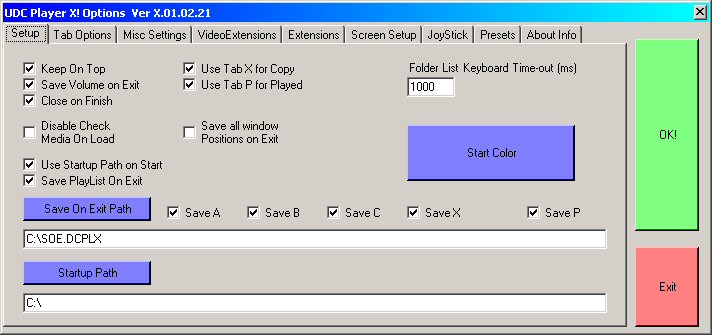
7. Improved joystick operation. Now has 2 joystick support and hat switch support. Analog or digital volume control with joysick. Also curse word mute option for small childeren. Want to listen to your Eminem or WuTang Clan but there are small impressionable childen around? Simple hold the mute button for the duration of the curse word and impressionalbe ears go untainted. Mute can also double as a normal mute button.
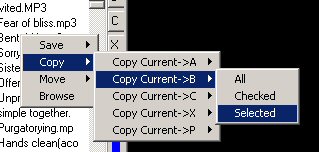
8. Right click playlist manipulation! Copy, Move, Save, and find target option let you quickly manage all 5 playlists.
9. New Playlist format. *.UDCPL This new format allows for saving any combination of the 5 playlists you want. The 5 letter extension is very 2007 if is say so my self! Support for old *.DCPL playlists is also available. Playlists can also be huge! I'm not sure how large they can be, but I have made a few with over 2,000,000 entries in a single playlist! Not like the lame 32,000 the old DC player had!
10. UDC Player was completely re-written in Visual Basic 7.1 (2003), the .NET framework (1.1) and is designed for use with Windows Media player 10 DLL. Ok, yep I said it. It uses Windows Media player's DLL. The DLL is the best part of Windows Media player. The rest, your better off with out. The reason of using Windows Media player DLL is that it can handle many different formats and can download formats if needed. The player part of the DLL is ALL that is used. Every thing else is pure DC code!
There are also a number of other improvements. I have to leave a few supprises.