© Dave Productions 2008
Software
Obviously though first and foremost the Xbox 360 is designed to play its own High Definition games and that is where it excels. According to xbox.com figure the Xbox 360 has over 700 games currently available. The next 3 pages will include the top rated or top selling games of the first 3 years on the market.
Launch games are on page 2,
Games released in 2006 - 2007 on page 3 and
Games from 2008 and Beyond on page 4.
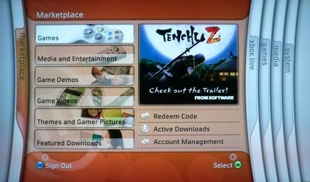
The Xbox 360's GUI (graphical user interface) is the Xbox 360 Dashboard. The Dashboard (right) is very user friendy. It is arranged into 5 tabs, the Marketplace tab, Xbox Live tab, Games tab, Media tab and System tab. The dashboard can be disabled so the system will boot the disc immetiatly, this can be done through the System tab. A simplified version of the dashboard can be displayed at any time during a game by pressing the Xbox guide button on the game pad.
Xbox 360 Dashboard
The 360 can play DVDs, HD-DVDs (with the add-on drive), data discs, USB storage devices and movies downloaded from Xbox Live. The Xbox 360 supports videos in .wmv-format, as well as high-definition .wmv-videos, H.264, MPEG-4, and MPEG-4 ASP. The console can also display pictures and perform slideshows of photo collections with various transition effects, and supports audio playback, with music player controls accessible through the Xbox 360 Guide button. Users may play back their own music while playing games or using the dashboard, and can play music with an interactive visual synthesizer. The 360 can also be linked with a Windows Media Centre PC via cable or wirelessly to stream videos, music and pictures.
Media
Backward compatibility
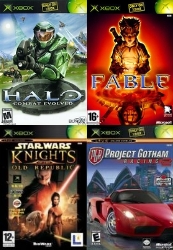
The Xbox 360 is backwards compatible with Xbox 1 games. After the last system update on 27th November 2007 the 360 is now compatible with 476 games, which is approximately 51% of the original Xbox library. Each game requires an emulation profile to run. These profiles can be downloaded from Xbox Live, burned onto a CD/DVD from the website, Official Xbox magazine monthly discs or mail ordered from Microsoft. A hard drive is required to play original Xbox games not only to store the emulation profiles but to store the games save data, store downloaded content and serve as a data cache for titles that require it. Original Xbox games can also be downloaded through Xbox Live and stored on the hard-drive, they cost 1200 microsoft points (£10).
Xbox 360 Games