Pironomy

The following are some of the projects that I have worked on. Please read the descriptions carefully as I detail the goals I had set for each project. All of the OpenGL programs require at least a Voodoo Banshee 3D accelerator.

F-Zero Demo

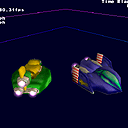
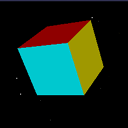
Being a big fan of the original SNES version of the futuristic racing game, I chose the machines from F-Zero as subjects for experimenting with scene-graph-like technology. I wrote this during spring break of 2001 (No Cancun for me). My brother created the models and textures using Milkshape3D, and Photoshop respectively. My goal with this project was to setup a system where I could construct hierarchical objects composed of different classes. In the case of the Wild Goose (green hover craft), I have particle emitters for engine exhaust attached, as children, to the main fuselage, a movable fin is also attached to the main fuselage, and another particle emitter is attached to it. I am still working on perfecting this hierarchy system in terms of OOP design, but I believe this demonstration serves as a pretty good model as to how it can be done.

Download - 207KB

Controls:

  • Blue Falcon:
    • Turn Left: A
    • Thrust: S
    • Turn Right: D
  • Wild Goose:
    • Turn Left: J
    • Thrust: K
    • Turn Right: L
  • Camera Controls:
    • Track Wild Goose: 1
    • Track Blue Falcon: 2
    • Track Between Both Ships: 3
    • Chase Wild Goose: 4
    • Chase Blue Falcon: 5

Keywords: C++, OpenGL, Milkshape 3D

Grabity

Upon reading of a technique astronomers were using to detect planets around neighboring stars by detecting subtle wobbling in their paths though the sky, I decided to take the good old Newtonian gravity equation out for a spin. Although not graphically impressive, this applet offers quite a user the challenge of creating a stable solar system. Using the mouse to sling shot planets into orbit around the sun, try to get more than two planets revolving around the star without them either getting sucked into the star or smashing into each other.

Execute

Keywords: Java, AWT, Physics, Gravity

FirstGL

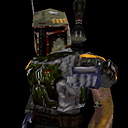
My first OpenGL application was this Quake2 .MD2 model viewer. It runs through all of a model's vector based animations, interpolating smoothly between frames. The model can be rotated and moved about with the Z, X, C, V, B, and N keys. I've included a model of Boba Fett, from the Starwars saga. You can change the model and texture by copying over the tris.md2 and esb_fett.pcx files.

Download - 520KB

Controls:

  • Rotation:
    • Rotate Pitch: C, V
    • Rotate Roll: Z, X
    • Rotate Yaw: B, N
  • Sliding:
    • Up: Up Arrow Key
    • Left: Left Arrow Key
    • Down: Down Arrow Key
    • Right: Right Arrow Key
    • Forward: E
    • Back: R
  • Misc:
    • Turn ON Frame Interpolation: 1
    • Turn OFF Frame Interpolation: 2
    • Turn OFF Texture Filtering: 3
    • Turn ON Texture Filtering: 4
    • Exit: Left Mouse Click

Keywords: C, OpenGL, Quake2 .MD2 format

Game Demo

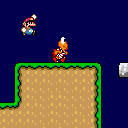
As an ode to Shigero Miyamoto, this is my attempt at replicated the tight controls and action of the Super Mario Brothers series. The graphics were lifted from the Super Mario World ROM via means of various screen captures from an emulator. My brother designed the level using a tile map editor I quickly hacked together as he waited impatiently. My goal here was to recreate the feel of Super Mario World and experiment with some basic collision detection, collision response, and entity behavior.

Download - 87KB

Controls:

  • Mario:
    • Jump: Space Bar
    • Move Left: Left Arrow Key
    • Move Right: Right Arrow Key
    • Duck: Down Arrow Key
  • Misc.:
    • Reset All Entities: R
    • Exit: ESC

Keywords: C, DirectDraw, Physics, AI

N-Tetris

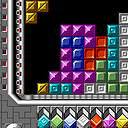
A Tetris clone is perhaps the most popular project for an aspiring game programmer to attempt. I spent several hours studying other Tetris games, going back to the original PC version, to acquire an adequate understanding of the rules, scoring systems, and level ramping systems. My goal was to create a portable module for game logic. I made two versions, a DOS version with very plain vanilla graphics compiled with Watcom C, and a more graphically impressive Win32 version compiled under MSVC. My brother designed the graphics using Deluxe Paint 2e, and I created the sound effects through the using Sound Forge 4.5 to digitally manipulate a variety of drum samples I had lying around.

Download 116KB

Controls:

  • Gameplay:
    • Slide Left: Left Arrow Key
    • Slide Right: Right Arrow Key
    • Slide Down: Down Arrow Key
    • Rotate Piece: Up Arrow Key
  • Misc:
    • Exit: ESC

Keywords: C, DirectDraw, Portable Gameplay

Sim Air

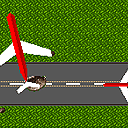
This project is the result of an assignment from my Data Structures class. We were asked to implement a priority queue in order to simulate the workings of an airport with a single runway. Only one airplane was allowed to take off or land on the runway at a time. Priority on the queue was determined by the fuel reserve an airplane had. The less fuel a plane had in reserve, meant higher a priority. Airplanes currently in the air waiting to land would continually burn fuel; upon exhausting the fuel supply an airplane would automatically crash. The final goal of the project was to determine how many airline catastrophes would occur over time due to the lack of runways.

The results of this simulation were to be displayed on the console. I wanted to make the project more interesting for myself, so I decided to present the simulation graphically, and I ended up implementing many interesting solutions in the process. I am using a waypoint system to direct the paths of the aircraft. The airplanes themselves are rendered as 2D polygons transformed via a 2x3 matrix; their motion is determined via forces and torques. A control tower-like object services the priority queue and signals the aircraft in the area to take on a particular flight plan.

Excecute

Keywords: Java, AWT, 2D Polygons, AI

Java Demo

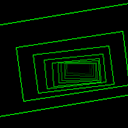
Written in the Fall of 1997, the Java Demo was my first serious Java Applet. As you will gather from the code, I hadn't quite gotten the handle of OOP yet. My Java code looks more like C without pointers. My goal was to implement some of the classic demo-scene effects using the Java AWT, and do so through a smooth progression of transitions that did not involve blacking out the screen and displaying the name of the effect.

Execute

Keywords: Java, AWT, Old-Skool Demo-Scene Effects, Trippin'


Hosted by www.Geocities.ws

1