If you unclick this option, you can choose which type of sail tokens to produce. However, don't forget about it once you've unchecked it!
| Ok to basics. Each battle has a number of timed turns. There are 4 moves per turn. Each move proceeds in the order: | ||
| 1. Ship Movement. | ||
| 2. Winds and whirlpool movement. | ||
| 3. Cannon fire and grappling. | ||
| (1) Note that, a ship may choose not to move or may be unable to move. | ||
| (2) Either one or the other for a ship, not both. Eg, if you get blown into a whirlpool in one move, you won't swing around in the whirlpool until next turn. However, your ship could be blown by winds, while your enemy rotates in the whirlpool in the same turn. | ||
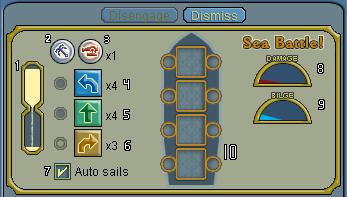
| The navigation panel | ||
| ||
| 1. The timer. Place your 4 moves before the timer runs out. | ||
| 2. The grapple token. Move this to the circles to grapple off one side or the other. You have as many of these as you want. Shows up as a 'x' in the circle. | ||
| 3. The fire token and loaded cannon counter. Move this to the circles to shoot off the corresponding side. Will show up as a red circle. You can fire on both sides during a single turn. On any given move, you may either grapple or shoot, not both. Generated by your gunners, and last until you use them. | ||
| 4. Left turn tokens and counter. Move this to the corresponding square to make a left turn. | ||
| 5. Straight forward tokens and counter. | ||
| 6. Right turn tokens and counter. | ||
| Each of the move tokens (Left, straight, or right) last for 5 rounds. | ||
| 7. Auto sails. Automatically generates sails of the type you have the least of (including the tokens to be used this turn). If there are 2 types which have the same number, tokens are produced in this order: Straight, Left, Right. Exception is the first turn, where a straight token is generated before generating any other token. If you unclick this option, you can choose which type of sail tokens to produce. However, don't forget about it once you've unchecked it! | ||
| 8. Damage indicator. Red is bad. More red, more damaged you are. | ||
| 9. Bilge indicator. Blue is bad. More blue, more full of water you are. | ||
| 10. Move Placement The most important part; this holds the moves for next round. | ||
| To move tokens to the corresponding spots, click and drag the tokens. Or click the circles and squares directly. | ||
| Square Left click: Nothing -> Left Turn -> Straight -> Right Turn -> Nothing... | ||
| Square Right click: the reverse, Nothing -> Right Turn -> Straight Turn -> Left Turn -> Nothing. | ||
| Circle Left click: Nothing -> Fire -> Grapple -> Nothing. | ||
| Careful with this; it's easy to triple-click instead of double click, or double-click instead of single click. Also if you're out of a certain type of token, it'll skip right to the next one. Eg, if you're out of left turns and have a straight token, clicking on a blank square will change it to straight. | ||
| <--Prev Next --> | ||