


MACROS
A
MACRO is a series of pre-recorded keystrokes that is activated by a single
command.
Macros
are used to perform operations quickly and to ease the burden of repetitive
operations.
Uses
for macros are
·
sorting rows or columns
·
format areas
·
moving to and from areas
·
perform operations
·
control user input
PRAC #7
MACRO
Put
the following data into the spreadsheet
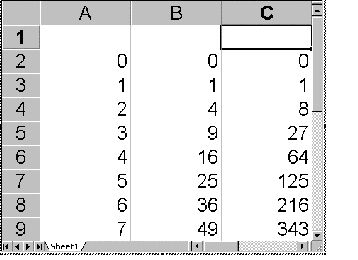
Use
fill down
Max
20 for column A
Cell
B2 =A2*A2
Cell
C2 =A2*A2*A2
To
create a MACRO
Ø
Click on Tools
Ø
Click on record New Macro
Ø Give the Macro a Name eg Column_A_Chart
Ø A little rectangle appears and your keystrokes will
be recorded.
Ø Highlight Column A
Ø Click on Chart wizard then finish
Ø Press stop button
To play your macro
Ø Click on Tools
Ø Click on Macros
Ø Choose your macro and click Run.