

PRAC #6
LOGICAL
FUNCTIONS
These
functions are used in programming and in search engines for encyclopaedia and
the internet.
Use
the IF and AND functions to give grades of PASS and FAIL and check on high
marks.
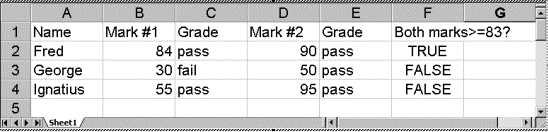
If
you type the headings and names as shown then
In
cell C2 insert the function
=IF(B2>=50,"pass","fail")
then
fill down
In
cell E2 insert the function
=IF(D2>=50,"pass","fail")
then
fill down
In
cell F2 insert the function
=AND(B2>=83,D2>=83)
then
fill down
Add to the spreadsheet extra columns.
Use
the OR function to return TRUE or FALSE if either mark is high.
Use
the NOT function to reverse the outcome of the OR function.
Modify
your marks sheet to include columns which test for any mark which is below 50%
and for consistent high marks.