|
|
|
|
Bulleted lists can be useful in some cases and with FrontPage they are easy to create. Not sure what a bulleted list is? Well, Here's one now
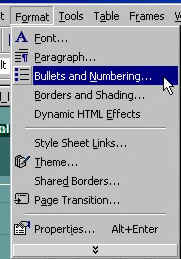
First, type out your list items. Enter the first item and then press enter and do the same with the rest of your list. Then highlight your entire list by putting your mouse cursor behind the first word, the while holding down the left button, drag the cursor across the rest of the text until it is all highlighted. Then choose "Format" and "Bullets and Numbering" from the toolbar.
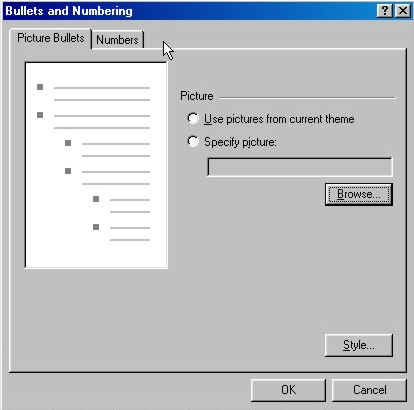
As always, a box will open with many list choices to choose from. You can choose to use bullets (small pictures) from the sites theme by clicking on "Use pictures from current theme," or choose from several numbered lists by clicking on the "Numbers" tab. Pick the one you like and click on OK.
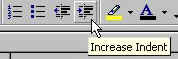
To increase the indent of a line, click on the "Increase Indent" button twice or click on the "Decrease Indent" button twice to decrease the indent. This is how you achieve the many layered lists.
In the picture above, the first box is a quick way to make a numbered list, the second for a bulleted list. As per the first set of instructions, highlight the list and then simply click on one of the two buttons. The third button increases the indent and the fourth decreases it.
|
| ||||||||