





|
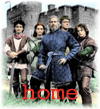
Every Castle has a banner to wave. Lucky us, we have two! |
| Step One Copy the following code: "<*A HREF="index.html"><*IMG SRC="http://www.geocities.com/covingtonfans/INSERT%20IMAGE%20NAME%20HERE"><*/A>" and paste it into the HTML code of your website in the location where you want the link to appear. Be sure to remove the "*" symbol from the beginning of each tag after pasting the code into your webpage. Step Two Select a banner, and copy the filename that appears below the image. |
 Romancebanner.jpg  knigitbanner.jpg |
|
Step Three
Replace the "INSERT IMAGE NAME HERE" line in the above code with the image name of the banner you selected, then save your page according to your web design program or server protocall. Thank you for linking to the Covington Cross Fan Page! |