|
|
|
Understanding digital camera memory will help
you make better choices about what camera to
buy, how much memory you need, and which media is best for you. |
|
CompactFlash
Secure
Digital/MultiMedia Cards
xD
Picture Cards
Memory
Stick
MicroDrive
SmartMedia
Card
Readers
Portable
Digital Storage
Other
Resources | |
|
Digital Camera Media
Digital camera media is an essential and
often overlooked piece of digital photography
equipment. There are many types of memory and
it's a good idea to consider what type of memory
a camera uses before you buy your first digital
camera. It's also important to make sure you
have enough memory before you take pictures of
an important event or leave for vacation.
Although memory cards are reusable, they don't
have a limitless capacity and it's always good
to have more than you actually need.
Most digital cameras come with very low
capacity memory cards. If you're shopping for
your first digital camera make sure to budget
for an additional card. It's a safe bet that the
card that comes with your camera is woefully
inadequate. And as camera megapixel counts grow,
higher capacity memory cards become necessary.
Most camera manufacturers publish tables on
their Web sites to show how many images you can
save on their included memory card. There is no
fixed rule for the number of photos you can put
on one card because different image file types,
different amounts of compression, and image
content all affect the size of each file. But
the manufacturer's site is a good place to start
when you decide how much memory you want. As a
general rule, I'd recommend at least a 256
megabyte or two 128 megabyte cards if you're
buying a 3-5 megapixel compact digital camera.
If you want to shoot lots of high resolution
TIFF or RAW files, then you'll probably want to
look at 512 megabyte and 1 gigabyte cards. It's
also a good idea to not save all of your photos
on one card. There's always the possibility that
cards can get corrupted, lost, or stolen. Using
more than one and switching during a shoot
protects your valuable photographic data.
Now that you know a little more about memory
cards, you can start thinking about what to buy.
The links to the left briefly describe the most
common types of digital camera memory. There are
also a few useful, memory-related accessories
listed.
| |
|
|
|
|
CompactFlash

| |
 |
|
| CompactFlash is one of the most common types
of digital camera memory. Most high-end digital
cameras, and all digital SLRs are CompactFlash
compatible.
There are two physical sizes of CompactFlash -
Type I and Type II. Type II is thicker and some
cameras will only accept Type I CompactFlash. Type
II CompactFlash is usually higher capacity. The
most common Type II CompactFlash cards are
mechanical, MicroDrive,
memory cards.
The main benefit of CompactFlash, besides
availability, is that it has a controller chip in
the card. The controller chip allows higher
transfer rates. Most cameras can't take advantage
of this extra speed, though. Only cameras with
larger internal buffers - mostly digital SLRs -
can take advantage of high-speed CompactFlash.
CompactFlash is inexpensive, easy to find, and
works in a lot of digital cameras. For those
reasons, it's one of the most desirable types of
digital camera memory.
| |
|
| Secure Digital &
MultiMedia Cards |
| | |
|
Secure Digital & MultiMediaCard
Memory

| |
|
|
| The smallest available memory cards, Secure
Digital and MultiMediaCard memory allow for very
small cameras and can also be used in selected
PDAs, organizers, phones, and MP3 players. The
current maximum capacity for Secure Digital and
MultiMediaCard cards is 512 MB.
The only difference between the two memory
types is that Secure Digital cards have a
write-protect switch for added data security.
| |
|
|
|
|
xD Picture Cards

| |
|
|
| Introduced by Olympus and Fuji in 2002, the xD
Picture card is the newest digital camera memory
format. It's tiny size - 0.97" x 0.98" x 0.67" -
means it can be used in very small cameras. The xD
Picture Card can also be used in any CompactFlash
compatible camera with the available CompactFlash
adapter. It's currently available in capacities up
to 512 MB, with larger capacity cards to be
available soon.
Since it was developed and introduced by
Olympus and Fuji, most current compact digital
cameras from those manufacturers use the xD
Picture Card media.
| |
|
|
|
|
Memory Stick

| |
|
|
| Memory Stick was developed by Sony for their
CyberShot digital cameras and other Sony
electronic devices. With the exception of a very
few cameras, Memory Stick is only compatible with
Sony digital cameras. That means if you have
Memory Stick media for a camera and you decide to
buy another brand of camera, the Memory Stick
cards you own are not likely to work with the new
camera. On the other hand, if you own other Sony
devices, there might be benefits to owning Memory
Stick. Sony MP3 players, PDA's and selected Sony
Vaio computers also accept Memory Stick media.
Memory Stick is available in capacities up to
256 MB, and Sony's new Memory Stick Pro is
available in capacities up to one gigabyte.
Memory Stick is also made by SanDisk and Lexar
under license.
| |
|
|
|
|
MicroDrive

| |
|
|
| The MicroDrive card is actually a miniature
hard drive housed in a Type II CompactFlash
chassis. The IBM (now Hitachi) MicroDrive was the first compact
memory card to offer a full 1 Gigabyte storage
capacity. The MicroDrive is
the best buy on a dollar-per-byte basis.
MicroDrives have a reputation for being
delicate and unreliable. They are more prone to
failure since they have moving parts that can
wear, or be damaged. But when handled normally and
not abused, they are very reliable. Because of
their moving parts, MicroDrives use more battery
power than flash memory. And compared to new,
high-speed CompactFlash cards, MicroDrive seek and
write times are fairly slow. But if you need Gigs
of cheap digital camera memory, MicroDrives are
still the most bang-for-the-buck.
| |
|
|
|
|
Card Readers
| |
|
|
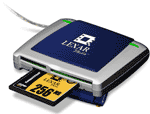
| Card readers are the most efficient way to
download your digital digital memory cards and a
highly recommended digital camera accessory. Card
readers plug into your computer via USB or
FireWire port and allow you to transfer your files
without using your camera's batteries or dealing
with cables. You install the card reader as you
would any other USB or FireWire device and plug
the card into the reader when you want to transfer
your images. The memory card will show up on your
computer as a separate, removable drive when it's
plugged into the reader.
Card readers are available in internal and
external models with USB, USB 2.0, and FireWire
connections. USB 2.0 and FireWire readers have
considerably faster transfer rates than most
cameras - another good reason to use a card reader
instead of using your camera's supplied USB
connection.
| |
|
|
|
|
Portable Digital
Storage

| |
|
|
| Sometimes you either can't afford to buy or
carry enough memory. Professional event
photographers with digital SLRs can shoot many
gigs of photos in one day. And what about
traveling? Should you have to carry a laptop
computer just to store your photos?
Portable digital storage devices are standalone
hard drives that allow digital photographers to
download and reuse their memory cards in the
field. Capacities generally begin at 20 gigabytes
and most are powered by rechargeable batteries.
Many have LCDs for still image viewing and video
playback. Images are transferred to your computer
via USB or FireWire connection. If you travel a
lot or find yourself running out of memory
regularly, you may want to consider adding a
portable storage device to your camera bag.
| |
|
|
| |