
Differences between HTML/CSS
HTML--- codeing it's self, works to create pages and such, however if you put an image on the page the image will scroll down with everything. For example
HERE. As you can see the pictures scroll up as you scroll down the page.
CSS--- is really just the same as HTML it just allows for more effects like, text over pictures and fixed images. For example HERE If you waited for the picture to load and scrolled down, you could see that the picture was 'fixed', or the picture stayed where it was, while text was the only thing that moved.
Differences between a .htm/.html or a .com .org .gov or .edu
a .htm or .html is a page hosted by an acutal website. For example the page your looking at right now. The url for this page is... "www.geocities.com/chickadee40040/CSSHTMLhelp.htm". The .htm is a name that I have given. Really this isn't a website, but a series of pages linked together hosted by geocities.com. The same works for Myspace. NO ONE on myspace has an actual website. They DO have their own page, it is not a website.
A .com .org etc... is a website it's self. www.myspace.com is a website because of the .com. Myspace has pages such as www.myspace.com/lenagirly. The lenagirly is page off of the website. The website is something that someone as created to hold a certain amount of pages within. If you would want an actual website with a .com in it. You would have to pay a certain amount every month.
Now we will begin to actually start learning the HTML/CSS codes.
Images
First of all you must have a server or website that allows to have pages like This. You put your text in the box, using HTML/CSS. you can do this on Geocities.com or Freewebs.com or Myspace or Neopets.com. All these websites have areas where you can edit your own page. You would need to put this HTML in those areas:
If your wondering what a URL is, take a look here's a picture of one. The URL is where the red circle is:

Background Colors
To make a page a background color you must use this code:
Color
There are two different ways to use color in your websites/pages.
Text Colors:
You can also make your text/font/writing different colors as well. The default color for text is black, so this code is necessary but it's nearly mandatory for a conceptual and able website. Here is the code for coloring your text:
Text Size
Text size important for the viewers of any website/page. They have to be able to read it. If the text is too small than people won't want to read it, too large than it just seems tacky. For regular text sizing there are 7 levels. 1 being the smallest and 7 being the highest. Here is the code for text size:
Text Style
Text style is just as cruical to good webpage or site as font size is. Some fonts are able to be used in you webpages like on Geocities or Freewebs or Myspace because they do not recognize the font style because there are spaces. However if you have a program like "Front Page" or "Dreamweaver", it is recognizeable. Here is the code for regular fonts used:
Just a tip, if you don't know any font style names off the top of your head, then go to word and then right click on some text and click "Font" and then you'll see some font styles like "Times New Roman" and such.
Marquee
Marquee is text that moves up or down like this:
Marquee can be quite annoying and confuseing if you use it too much. Marquee is good for as you can see "Guild till" or website rateings or how many hits a website has had. Here is the code for Marquee:
All you have to do is change the text where it says:"Guild Till: 200,00mp Average Guild Rateing: 7/10" and put whatever you want.
Divs
A text box or floating box sometimes called a div, is where there is text that you want to be on a page at a specific point, instead of the text scroll with the page, the text is fixed. Now the only problem with textareas is that you have to position it exactly where you want it, however since people have different screen resolutions that you it might be off to them, when for you they look perfect. HERE is an example of a page with several text boxes. The pictures are NOT the text box, just the scroll bar with the text NOT the picture. HERE is an example of why text boxes are useful. And yes I did make the layout... it's for a guild on Neopets.com. Here is the code to make a text box:
To use this code correcty you need to change the position of the pixels (px) to where you want it to be. This might take a little toying around with untill you get it just right. The lower the pixel is the closer it is to that edge. So for the "top : 45px;" if you made it 0px than it would be to the very top. If you put it at around 850 px it would be all the way at the bottom.
Tables
Tables are VERY useful. Below is an example of a table:
| BOX ONE | BOX TWO | BOX THREE | BOX FOUR |
| BOX FIVE | BOX SIX | BOX SEVEN | BOX EIGHT |
You can also have the boxes have no borders (which is good if you want to hide that you have one) which can be seen on my blinkies page. You may not know it but there is a table there. Below is the HTML for a table:
Links
I expect that nearly everyone looking at this page right now, realizes what a link is. It's what you have been clicking on to get here to this page or to the examples on this page. Everwhere on the interenet is links, without links on the internet you would have to guess the URL to every webpage. How lame would that be? So here is an example of a link:
Google.com
And below is the code for a link:
If you didn't already figure out you can change the color of the link to red or blue if you want like this:
In order for a link to work properly you MUST have a "http://www." in the URL. The second part is a phrase for URL. Like "google.com" or "HERE".
Textareas
Sometimes you may need to put HTML/CSS in an area on a webpage like I have been doing this whole time (where the codes are). You may also use these textarea's as text boxs I suppose, you just can't have any HTML/CSS inside the box because it's just plain text. Here is the code below for a Textarea:
After your text/writing in the textarea you MUST also put a < / textarea > this ends the command. Of course you take out the spaces though.
REMINDER
For every command that you give in HTML/CSS you MUST close it with
.
You can notice this in ALL examples that I have given you.
CSS
I will now be giving you example of CSS/HTML...
Scrollbars
Most everyone knows what a scrollbar is. If not here's an image of a scrollbar:

Codes for scrollbars are very useful to add coordination to your website and color. You may notice that this image also shows the names of the certain parts of a scrollbar. You can find these names and change their colors in the code below:
You can see what that scroll bar looks like HERE just look at all the scrollbars....
Fixed Images
We have already covered a few things about fixed images. So here is the code for fixed images:
Yes I realize that this has some other codes besides just the background, however I think it helps... Just use the code like before, by changing the URL of the picture.
Other
Now I will be showing you some other stuff that's just either spiffy or useful.
IFRAMES
An IFRAM is when you have a website (or series of webpages) and you have different frames that stay put while you have links that are directed to a main page.
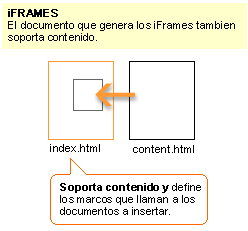
That was an example of what an IFRAM does (yes I know it's in spanish... I couldn't find one that was in english). You can think of it like for example 3 picture frames. One that's horizontal at the top, one that's vertical on the right hand side and one that's squared off in the center. The top frame has a picture that never changes, and the right frame has a picture that never changes, however it also has links in the right frame. When you click on the right frame links the picture will change in the middle not the right. This is very helpful for when you have a website like the one your on now, where you don't want to have to keep on copying and pasting code from page to page, and having to load all the pixels again, using up time. And example of IFRAMES is on the website your on now and also HERE.
For an IFRAME to work you must have an index that has all frames URL's on, and the percentages of how large the frames are. You will then have pages with the same URL's that you have on your index page. I will give you examples. This first example of code is the index code:
As you can see you have the three frames. Now if you tried to access this site (whatever it's called) you would find nothing, because you haven't made your three frames yet (or three pages). You would then create a page titled,"Links.htm" "Main.htm" and "News.htm". The links page is on the left, while the main page is in the middle and the news page is on the right. The only real page that you need to work on after the index (of any real importance at least) is the links page, to make sure that the links all go back to your middle page or the main page. Example is below:
You then would put all your links underneath.
Here is another way to make sure all links go to your main page.
As you can see the target="main.htm" is put after the URL and before the name, this directs the link. Another useful linkage is to put it in a new page (as you can see in this website), an example of this is below:
The target has been changed from "main.htm" to "new_page" . This will open up a new window.
Drop Down Menues
A drop down menue that words can be seen HERE just look for the small box at the top of the left hand side of the page.
As you can see the links are all in an organized bos, instead of a page layout. I got a code from this from a website (forgot the name), however here's the code: