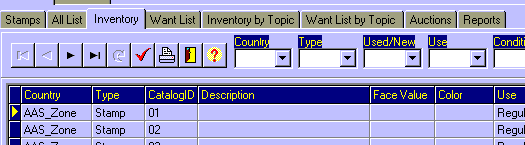
There are 4 different screens & reports for Inventories and WantLists:
1. Inventory (by Country)
2. Want List (by Country)
3. Inventory by Topic
4. Want List by Topic
Viewing them has the same procediments:
When you click on the correspondent tab, you�ll get an unselected data
presentation. Then, selecting the correspondent selection fields data, and clicking on
the Selected Presentation Button, you�ll have presented the data from the
selection you�ve done.
If you then click on the Print Report Button, you�ll get a Report with exactly
the same selection you�ve done.
Consulting Inventories and WantLists