Skin Map & Understanding File Naming
Here you can view pictures of the skins layout and learn about the the skinning file names.Understanding File Names
For Skinning
Skin Maps
B stands for Body. A body file begins with B
F stands for female
M stands for male
C or Chd stands for child
lgt stands for light skin
med stands for medium or light brown skin
drk stands for dark skin
fit stands for looking fit
fat stands for looking fat
skn stands for skinny looking
C stands for child or cranium (head). It's a head file if it begins with C
UC stands for universal child
001 stands for shorts and short sleeved t-shirt, shorts and tank top, short skirt and short sleeved t-shirt (males adult and child, female adult and child, fit, fat)
002 stands for short sleeved t-shirt and pants (males adult and child, and female adult, skinny, fat, fit)
003 stands for long sleeved shirts and pants (male adult, fit)
004 stands for pants and long sleeved jackets (male adult, fat)
005 stands for long sleeved shirts with vests and pants (male adult, fit)
006 stands for mid sleeved shirts and mid calved pants (female adult, fat)
007 stands for knee high dresses (female adult, fit)
008 stands for knee high dresses with long sleeves and jacket (female adult, fit)
009 stands for knee high skirts with long sleeved blouses (female adult and child, skinny)*There's no 010*
011 stands for shorts with short sleeved t-shirts, shorts with leggings and short sleeved t-shirts (female adult and child, skinny)
012 stands for long pants with leather coverings with short sleeved t-shirt (female adult, fat)
013 stands for pants with long sleeved shirt and sweater covering (male adult, skinny)
014 stands for pants with long sleeved jacket (adult male, skinny)
Ok, those are the bitmaps (.bmp, image file type) that come with the game. I don't have the "House Party" extension so I don't know if there are more skins/clothes then what I've put here. Usually when you read a skinning file the image file, which is always it bitmap (.bmp) format, it looks like this: "B009FASknmed_Gma1" This means it is a Body file (B), the number (009) identifying it as a knee high skirt with a long sleeved blouse, a female adult (F and A), that is a skinny mesh type (Skn), with medium or light brown skin coloring (med).
An example of a head file is: "C003FAdrk_fatale". This means that it's a head or cranium file (C), it contains the number 003 to indicate it goes with the 003 head mesh file. If you use another number besides the 003 head mesh number then the head looks weird. Check it out in "Sim Show". Anyway this also says that it's an adult female (F and A), and she has a dark skin tone (drk). The part after the underscore (_) is where if you wanted you could type in any name that you desire when you make new skins/clothes.
But try to keep it short, equal to or less then 6 letters, because the following could happen. Say you have a file that is named "Deidre1" after the underscore (_) and that you also have another image file that is named "Deidre2", but both of these image files are using different meshes. Say that "Deidre1" is using the fit mesh and "Deidre2" is using the fat mesh, well since both are beginning with Deidre and only 6 letters are allowed then it would mean the game would recognize only the name "Deidre" and not the numbers, so one Deidre file will be used by the game and if by some chance it did use the other Deidre file too, then it would be using the wrong mesh and would end up looking weird in your game. I hope I explained that ok.
Anyway, when you're making your own skins then you can keep the numbers the same, just change the ending on the file name, the area after the underscore (_). If you're going to be using a custom mesh that you've designed then you're going to have to change the 3 digit number with one of your choice. Or if you're going to be using a custom mesh that someone else designed then you might need to make a cmx file that specifies that the bitmap image you've made will be going with the custom mesh number whatever, remember it's the 3 digit number. If you want to know more about custom meshes and cmx writing then go to Crash's Website. It's really good on exlaining this stuff, but if you have any questions then go ahead and tell me either by email or the suggestion box and I'll try to help if I can.
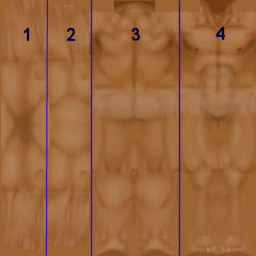
This is what a nude skin looks like for the males, but it's the same as females basically. The sectioned areas, seperated by dark blue lines for the male and the yellow lines for the female, are the main sections of the skin. You must always remember that the skin is flattend and stretched out so try to visualize how it will look on the meshes using "Sim Show" to preview it. Also if you put any logos or wording on some part of the skin or clothes then it should be put backwards because the skin is like a mirror, so remember that too. I've put the descriptions first then the image is after the descriptions.
In this first picture #1 is the underside of the arms, #2 is the top of the arms, #3 is the back of the body, #4 is the front of the body. The skins are almost like a real body so use the shadows and creases as your guides when your skinning. It really helps a lot.
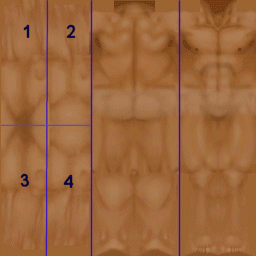
The next picture is about the arms area. #1 is the underside of the left arm, #2 is the top of the left arm, #3 is the underside of the right arm, #4 is the top of the right arm. Notice that the underside and topside of the right and left arms seem to be split or seperated a little, that's the sides of the arms.
The numbers on this final picture are referring to the lines below them. I've included a male and female of this one. #1 is the neckline. Notice the collar bones above the line. On the female you'll be able to see the collar bones better. #2 and #3 are the waists for the front and back. The lines are not exactly in line with eachother because the Sims tend to lean forward at the waist making the back waist area higher while the front waist area is lower. Notice it next time you're previewing a skin in "Sim Show". #4 and #5 are the knee areas for the front and back. Like I explained above the Sims tend to lean forward so that's why the back knee area has to be longer while the front knee area has to be shorter. But that's what "Sim Show" is for, to double check and make sure it's right. #6 and #7 are the top of the feet begin on the front and the ankles begin on the back. Remember to notice the shadows, you'll be able to use that as a guide for areas like this. #8 and #9 are the bottom of the feet for the Sim, this is good to know when you're doing the shoes.
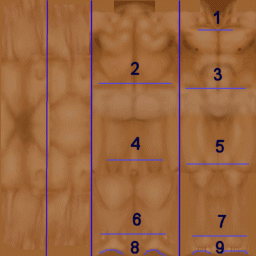
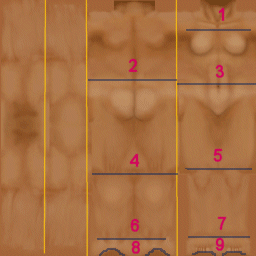
On all of these images also notice that it shows good detail towards the middles of the different areas, but toward the edges it's not too detailed, that's because it's the sides of the Sim on whatever area it is, so remember that when shading. For example, the middle area of the legs are detailed, but not the side. Each skin will be different because it has to fit with a certain mesh, so the fat or skinny skins will be slightly different from this skin image that I've used, which is the fit skin, and of course the female skin is slighly different too. It's always good to follow the highlights and dark spots of the skins and to use them as guides.
I hope it's helped a little with understanding the skin. Also remember the lines I've made on the skin are not perfect and may be a little off target but it gives you a general idea of where to start :)
As always questions, comments, suggestions are welcome. Just go to my suggestion box :)
Last updated on July 14, 2001