தேசிய சேமிப்புச் சான்றிதழ்/NATIONAL SAVINGS CERTIFICATE.
வல்லரசு பங்களிப்பு:
உங்கள் நாட்டின் தபால் நிலையத்தில் மறைமுக வைப்புத்தொகையைப் பயன்படுத்தினால், உங்கள் வருமானத்தையும் உங்கள் நாட்டின் வருமானத்தையும் அதிகரிக்கலாம்.
இது உங்கள் நாட்டின் வல்லரசின் பங்களிப்பிற்கு உங்கள் மறைமுக உதவியை வழங்கப் பயன்படுகிறது.
You can increase your income and your country's income by using indirect deposit at your country's post office.
This is used to provide your indirect assistance to the contribution of your country's superpower.
HOW TO DEPOSIT 50.00 INR TO YOUR PPF ACCOUNT FROM YOUR BANK USING ONLINE?
IF YOU ARE INTERESTED TO DONATE ME DUE TO MY FINANCE HELP COMMENTS TO YOU/YOUR RELATIVES/FRIENDS/SUPERVISORS/AWARDS/REWARDS:
YOU CAN DONATE ME USING YOUR MOBILE PAYMENT TO: +919008893233
Before transferring 50.00 or any INR from your bank to PPF at post office,
note down your current year total deposit amount at your PPF using:
a) Initially login at IPPB
b) Drill down untile My Services
Click Post Office Services
c) Click Public Provident Fund
d) Select the displayed PPF Account number
e) Note down the current year deposit
After transferring any(positive) amount from your bank to your PPF using NEFT without using IMPS, try to view your total PPF current year deposit amount using your IPPB or post office internet banking after 02:00 hours of your transaction time.
Assume that you have opened PPF EARLIER
Here goes the steps to deposit PPF amount using IPPB mobile application.
01) Login at IPPB => My Services
02) Post Office Services
03) Public Provident Fund
04) a) Select PPF Account Number displayed at bottom:
      b) OR IF NOT AVAILABLE:
                ENTER FOLLOWING DETAILS:
                        Z) PPF Accont Number => xxxxxxxxxxxx
                        Y) DOP Customer ID => yyyyyyyyyyyy
05) Confirm your amount and proceed using related OTP for your payment.
Assume that you have opened one MIS on 01-Jan-2024
Example MIS AMOUNT: 117000.00
RELATED MIS INTEREST 722.00 DURING FIRST/THIRD/FIFTH/... MONTHS:
RELATED MIS INTEREST 721.00 DURING SECOND/FOURTH/SIXTH/... MONTHS:
You can get MIS interest at 1st of each month.
YOU DEPOSIT 500.00 INR TO PPF USING POST OFFICE INTERNET BANKING OR POST OFFICE IPPB MOBILE APPLICATION
DEPOSITING THIS 500.00 INR EACH MONTH FOR 15 YEARS.
ADVANTAGE:
TOTAL AMOUNT DEPOSITED: 90000.00 INR
TOTAL AMOUNT TO RECEIVE AFTER 15 YEARS: GREATER THAN 90000.00 INR
S.No Steps to open PPF(public provident fund) at INTERNET BANKING of INDIAN POST OFFICE using a browser.
a) Initially open

b) Provide your user name
c) Provide the Verification code shown at browser.
d) Click Log In button
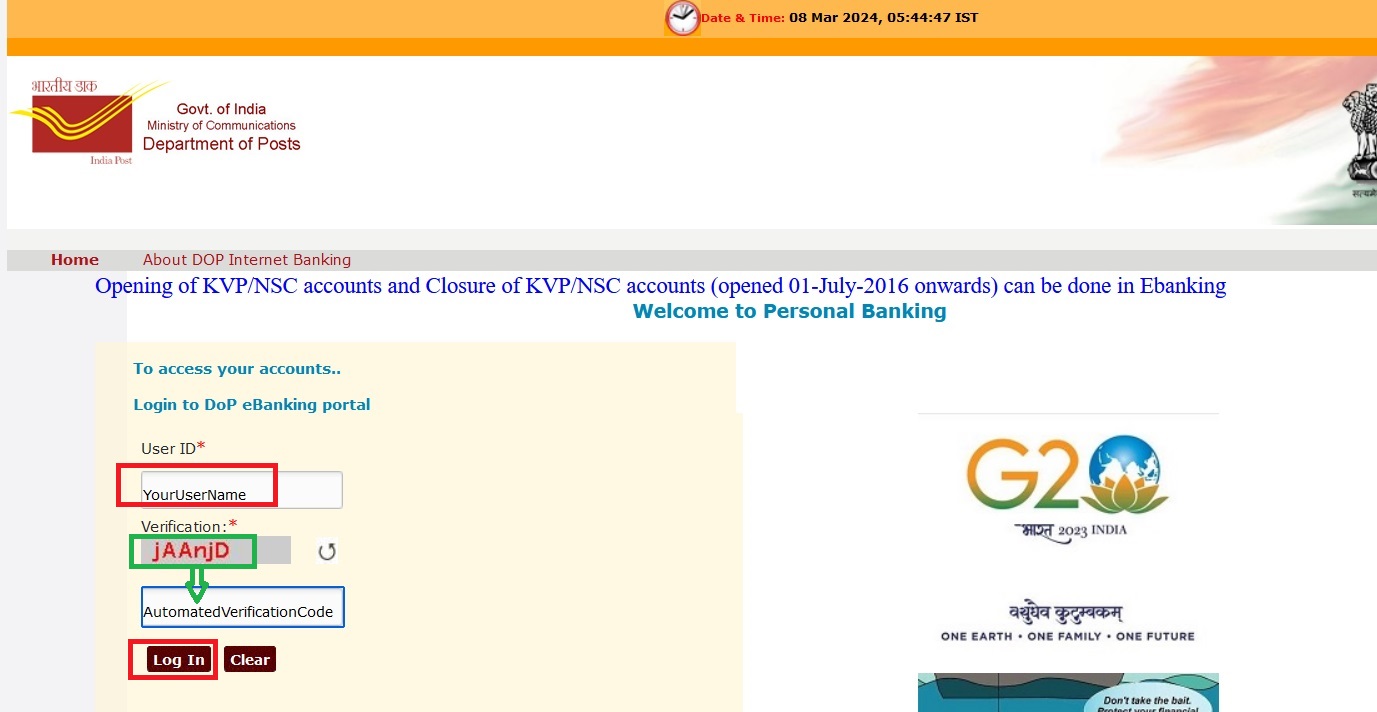
Provide your password Click Log In
Enter your OTP received at your registerd mobile.
If we receive following error after providing OTP, during login:
You cannot logon at this time. Please contact the bank for further information. Do not login at ebanking for 05 hours.
Try login after five hours.
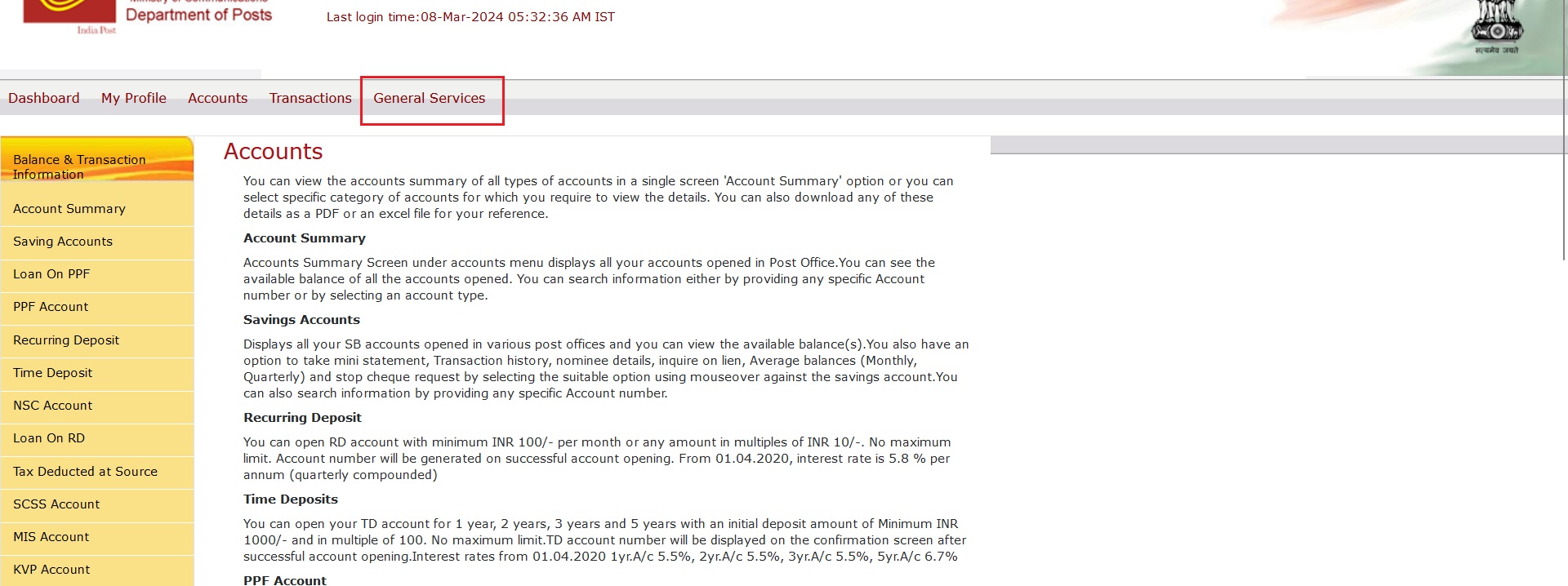
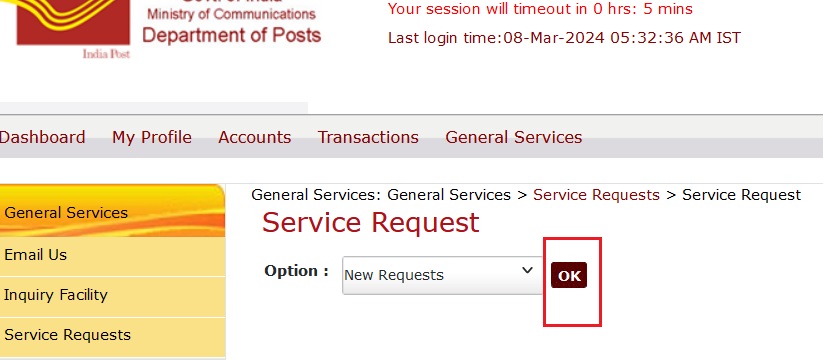
Click General Services
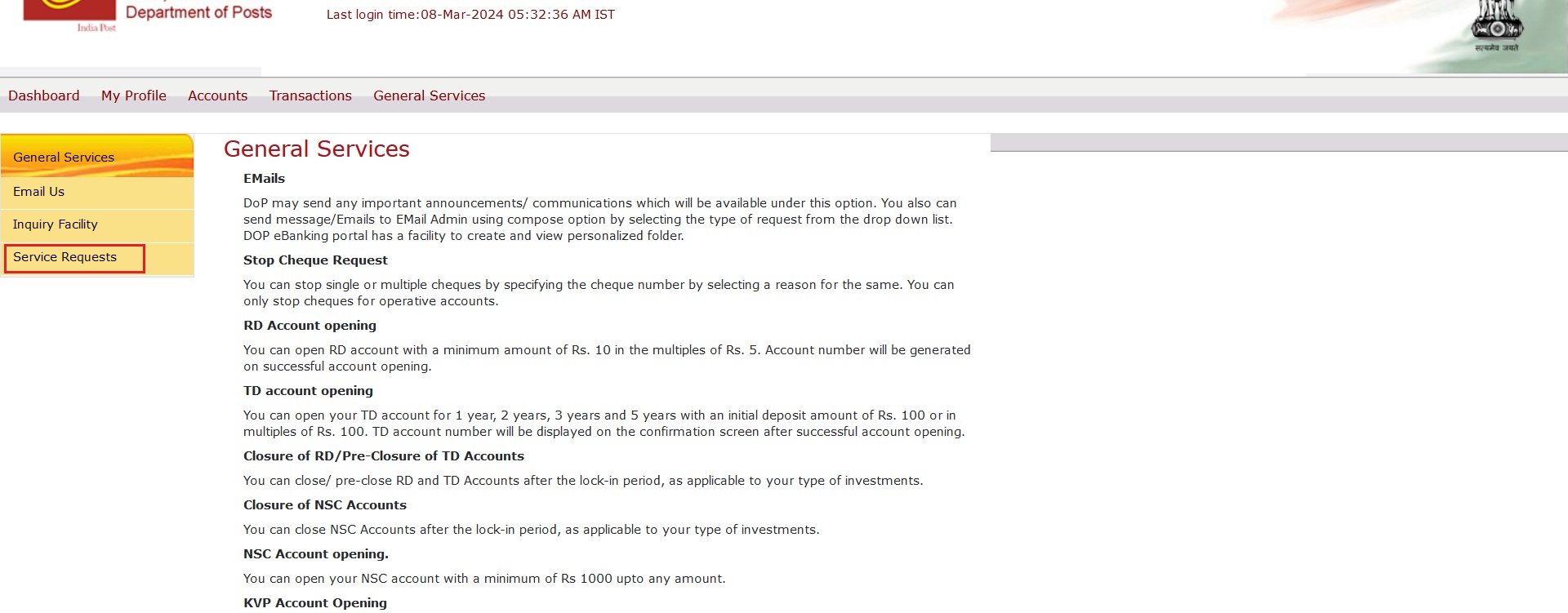
Click Service Requests
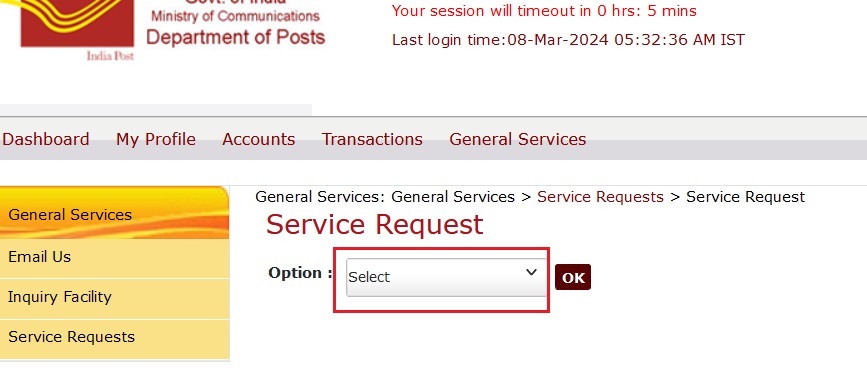
Drill down select option
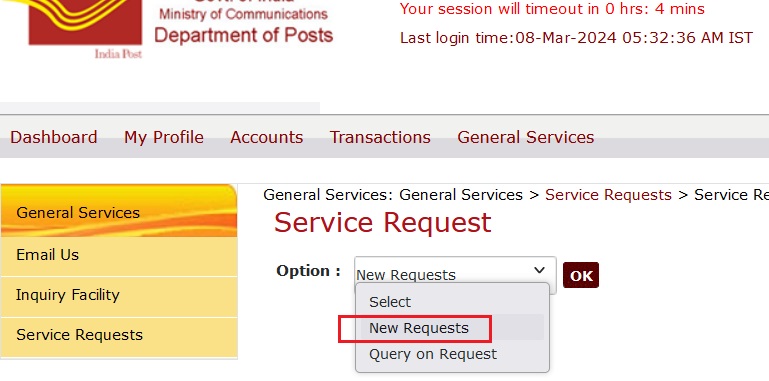
Select New Requests
Press the button displaying Ok
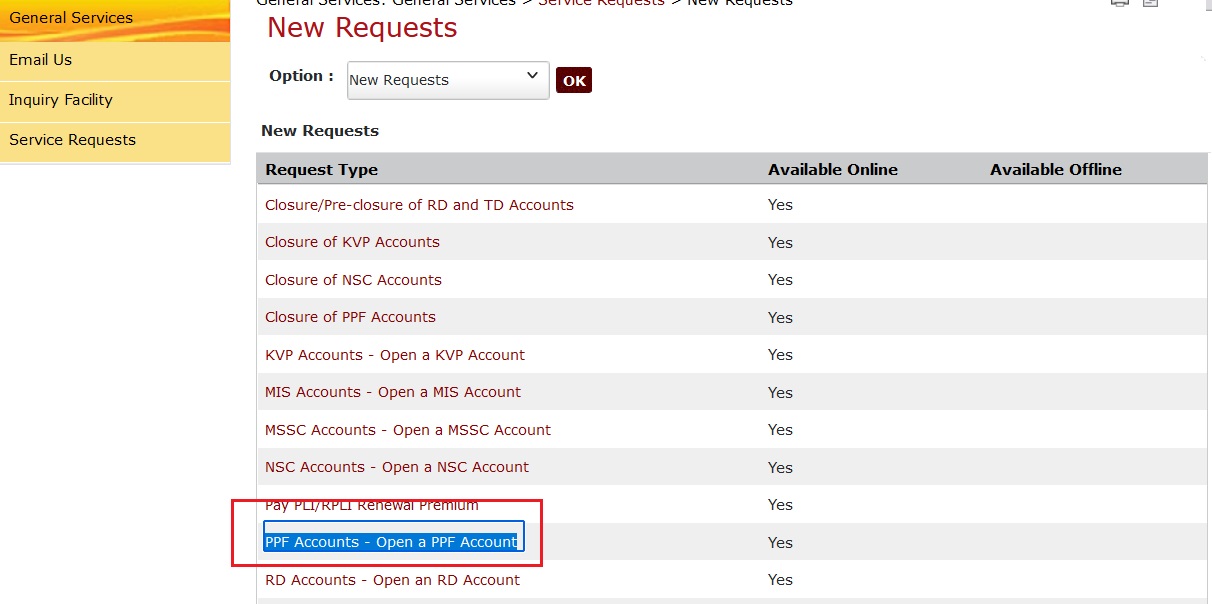
Click:
PPF Accounts - Open a PPF Account
a) Provide the amount.
Examples: 500.00 OR 600.00 OR ANY AMOUNT YOU PREFER
THIS AMOUNT NEEDS TO BE AVAILABLE AT YOUR POST OFFICE ACCOUNT.
b) Select your Debit account of your post office account
c) Provide comment as PPF
d)Click Submit Online
09. a) Type the same comment as PPF
b) Provide your transaction password
c) Click Submit
10. After submission,
a) note down your PPF Account Number.
b) Press OK button shown near PDF file.
This file used to be stored at following location(by default) at Wnidows:
%USERPROFILE%\Downloads
Your post office balance automatically reduced by this PPF amount(500.00 as per the example show in this page)
After that click logout from from browser.
Here after we can deposit money from IPPB account to PPF account.
Before depositing at PPF, transfer money from post office or bank to your IPPB account.
After transferring that money to IPPB account either from post office or bank,
01) Login/re-login using IPPB at mobile using your MPIN.
02) Under My Services => Click Post Office Services.
03) Click Public Provident Fund.
04) Enter PPF account number which is available at downloaded pdf file
Enter DOP of your post office customer id.
Current year deposit used to display your PPF balance.
After providing deposit amount(multiples of 50.00) click Pay
Click confirm.
Enter the OTP received at your post office mobile.
STEPS TO FIND THE TOTAL INTEREST AFTER OPENING PPF USING EXCEL.EXE AT WINDOWS.
Open excel.exe
Following line being first row:
YEAR Count R% Investment during each year Investment up to the year Interest during the year Interest up to the year Closing Balance Return on investment % Permissable loan Permissable withdrawal
Second row => Assume that you are investing 500.00 each month at PPF since you are obtaining 722.00/721.00 INR from MIS interest each month.
1 7.1 =500*12 =C2 =D2*B2/100 =E2 =D2+E2 =100*G2/D2-100 Not Available Not Available
Following line referring formula at third row
=A2+1 =B2 =C2 =D2+C3 =ROUND
((D3+E2)*B3/
100,0)
=E3+E2 =D3+E3+E2 =100*G3/D3-100 Not Available Not Available
Following line referring formula at fourth row
=A3+1 =B3 =C3 =D3+C4 =ROUND
((D4+E3+E2)*B4/
100,0)
=E4+E3+E2 =D4+E4+E3+E2 =100*G4/D4-100
Following line referring formula at fifth row
=A4+1 =B4 =C4 =D4+C5 =ROUND
((D5+E4+E3+E2)*B5/
100,0)
=E5+E4+E3+E2 =D5+E5+
E4+E3+E2
=100*G5/D5-100
Following line referring formula at 6th row
=A5+1 =B5 =C5 =D5+C6 =ROUND
((D6+E5+E4+E3+E2)*B6/
100,0)
=E6+E5+
E4+E3+
E2
=D6+E6+E5+
E4+E3+E2
=100*G6/D6-100
Following line referring formula at 7th row
=A6+1 =B6 =C6 =D6+C7 =ROUND
((D7+E6+E5+E4+E3+E2)*B7/
100,0)
=E7+E6+E5+
E4+E3+E2
=D7+E7+E6+
E5+E4+E3+E2
=100*G7/D7-100
Following line referring formula at 8th row
=A7+1 =B7 =C7 =D7+C8 =ROUND
((D8+E7+E6+
E5+E4+E3+
E2)*B8/
100,0)
=E8+E7+E6+
E5+E4+E3+
E2
=D8+E8+E7+
E6+E5+E4+
E3+E2
=100*G8/D8-100 Not Available
Following line referring formula at 9th row
=A8+1 =B8 =C8 =D8+C9 =ROUND
((D9+E8+E7+
E6+E5+E4+
E3+E2)*B9/
100,0)
=E9+E8+E7+
E6+E5+E4+
E3+E2
=D9+E9+E8+
E7+E6+E5+
E4+E3+E2
=100*G9/D9-100 Not Available
Following line referring formula at 10th row
=A9+1 =B9 =C9 =D9+C10 =ROUND
((D10+E9+E8+
E7+E6+E5+
E4+E3+E2)*B10/
100,0)
=E10+E9+E8+
E7+E6+E5+
E4+E3+E2
=D10+E10+E9+
E8+E7+E6+
E5+E4+E3+
E2
=100*G10/D10-100 Not Available
Following line referring formula at 11th row
=A10+1 =B10 =C10 =D10+C11 =ROUND
((D11+E10+E9+
E8+E7+E6+
E5+E4+E3+
E2)*B11/
100,0)
=E11+E10+E9+
E8+E7+E6+
E5+E4+E3+
E2
=D11+E11+E10+
E9+E8+E7+
E6+E5+E4+
E3+E2
=100*G11/D11-100 Not Available
Following line referring formula at 12th row
=A11+1 =B11 =C11 =D11+C12 =ROUND
((D12+E11+E10+
E9+E8+E7+
E6+E5+E4+
E3+E2)*B12/
100,0)
=E12+E11+E10+
E9+E8+E7+
E6+E5+E4+
E3+E2
=D12+E12+E11+
E10+E9+E8+
E7+E6+E5+
E4+E3+E2
=100*G12/D12-100 Not Available
Following line referring formula at 13th row
=A12+1 =B12 =C12 =D12+C13 =ROUND
((D13+E12+E11+
E10+E9+E8+
E7+E6+E5+
E4+E3+E2)*B13/
100,0)
=E13+E12+E11+
E10+E9+E8+
E7+E6+E5+
E4+E3+E2
=D13+E13+E12+
E11+E10+E9+
E8+E7+E6+
E5+E4+E3+
E2
=100*G13/D13-100 Not Available
Following line referring formula at 14th row
=A13+1 =B13 =C13 =D13+C14 =ROUND
((D14+E13+E12+
E11+E10+E9+
E8+E7+E6+
E5+E4+E3+
E2)*B14/
100,0)
=E14+E13+E12+
E11+E10+E9+
E8+E7+E6+
E5+E4+E3+
E2
=D14+E14+E13+
E12+E11+E10+
E9+E8+E7+
E6+E5+E4+
E3+E2
=100*G14/D14-100 Not Available
Following line referring formula at 15th row
=A14+1 =B14 =C14 =D14+C15 =ROUND
((D15+E14+E13+
E12+E11+E10+
E9+E8+E7+
E6+E5+E4+
E3+E2)*B15/
100,0)
=E15+E14+E13+
E12+E11+E10+
E9+E8+E7+
E6+E5+E4+
E3+E2
=D15+E15+E14+
E13+E12+E11+
E10+E9+E8+
E7+E6+E5+
E4+E3+E2
=100*G15/D15-100 Not Available
Following line referring formula at 16th row
=A15+1 =B15 =C15 =D15+C16 =ROUND
((D16+E15+E14+
E13+E12+E11+
E10+E9+E8+
E7+E6+E5+
E4+E3+E2)*B16/
100,0)
=E16+E15+E14+
E13+E12+E11+
E10+E9+E8+
E7+E6+E5+
E4+E3+E2
=D16+E16+E15+
E14+E13+E12+
E11+E10+E9+
E8+E7+E6+
E5+E4+E3+
E2
=100*G16/D16-100 Not Available
TOP
PPF PAYMENT USING INTERNET BANKING AT POST OFFICE.
00) AFTER OPENING PPF I PREFER NOT TO RE-PAY USING IPPB TO REFUND PPF.
01) Logon to Post office Internet banking
02) At menu pane Click Accounts
03) At Left pane click PPF Contribution/Loan Repayment
04) At Initiate PPF Funding select your SB account and pay your required PPF amount.
The column F16 inside EXCEL.EXE used to provide the total PPF interest received after depositing your PPF for 15 years.
YEAR Count Investment during each year Investment up to the year Interest during the year Interest up to the year Closing Balance Return on investment % Permissable loan Permissable withdrawal
Site developed and maintained by Murugesan Technical Enterprise knowledge transfer solutions © 1985 to 900000000/0(infinite). All rights reserved. PrivacyPolicy