At start-up, SoundSync looks in several places for recognizers. If your recognizer objects (such as volume.so) are not in the standard location, you can set the environment variable ALIAS_PLUGIN_PATH to the directory that contains your recognizer objects and restart SoundSync.
| Setting ALIAS_PLUGIN_PATH to a non-standard location can affect other Alias programs that use plug-ins, such as MotionSampler2. |
My track file (or keyset file) contains configuration information for the recognizers but they don't appear in the menu.
If your recognizer shared objects are not being found at runtime, see the previous problem to set environment variables so that SoundSync can locate your plug-ins.
I don't hear any sound when I use playback or when I scratch across the soundtrack.
The problem may be that the volume is turned down on your machine.
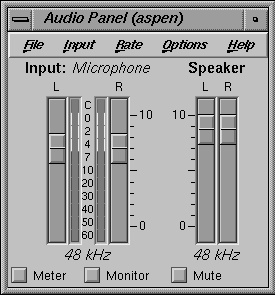
Select Desktop  Audio Control from the desktop Toolchest.
When you select Audio Control, the following control panel opens:
Click and drag the Speaker sliders toward 10. Also, make sure that the Mute button is not pressed.
There does not appear to be any animation in the wire files I applied animation to.
There are several things that could prevent the animation from being applied correctly to your wire file.
Because SoundSync uses dag node names and not the hierarchy to match animation to nodes, the names in the initial file, from which the keysets and keyshapes are derived, must match the final file, onto which the animation is applied. This does not mean that the hierarchy must be the same or that all of the dag nodes must match in each file. Typically, the final file is more complex and contains more data than the initial file, but if you placed animation on the dag node cheek#5 in the initial file, SoundSync looks beneath the dag node you specify in the Apply dialog for a dag node cheek, ignoring the # and numbers. Since Alias renumbers dag nodes to maintain name uniqueness, this is a common problem.
Parts of my geometry appear to be missing in the geometry window.
SoundSync cannot tessellate or display blend surfaces. Therefore, these surfaces do not appear in the display.
The SoundSync window is incorrectly configured and there are a number of X complaints when the program is started.
This means that SoundSync can't locate its resource file. The environment variable XMAPPUSERFILES determines a search path for the resource files.
The Play button is missing its triangle shape.
All of the playback buttons are missing their images.
The playback button images are bitmaps and must be in a known location for SoundSync to load them properly.