The main purpose of any module is to do something important and unique when MotionSampler samples and records motion data. So far you have only learned the passive aspects of modules such as how they are loaded and installed in a pipeline. Over the next few sections you will learn what modules do when a pipeline is actively sampling and how the module sources, filters, and sinks differ in their roles.
Before preceding to the specific methods used by source, filter, and sink modules, it is important to understand in a general sense what happens when MotionSampler samples motion data. This section describes the sequence of events that take place when MotionSampler performs certain activities.
MotionSampler begins actively sampling the current module pipeline whenever you click the Sample button to the right of the shuttle as follows:
Once sampling is started, different variations of sampling can be turned on using the Record, Auto Rec, and Snapshot buttons. Sampling also occurs in a slightly different fashion, when you select one of the menu commands Capture  Calculate IN/OUT or Capture Calculate from File....
Transition from Off to Sampling
When sampling is OFF and you click the Sample button, you are telling the program to begin capturing motion data and to display the live results.
When Sample is selected, MotionSampler opens all the pipeline modules. Opening a module means that the module must go through any preparation required to begin sampling. If any module fails to open successfully, the sampling stops and MotionSampler returns to the OFF state.
Once all modules are open, they are informed that live sampling is about to begin. This phase is slightly different from the opening phase and will become more clear when you see how it occurs in other transitions.
At this point MotionSampler's flow of control splits into two logical threads: the refresh loop and the sampling loop.
In the refresh loop, MotionSampler continually updates its scene display as quickly as possible. However, just before drawing the scene each time, MotionSampler tells all of the active sink modules to perform a live evaluation.
When a sink module performs a live evaluation, it asks for up-to-date values from its parameter inlets, operates on them, and then uses the resulting values to update anything affecting live display. As each sink is evaluated, other evaluation requests ripple upstream in the pipeline until each source module provides its recent sample data. The frequency of refresh achieved depends on the amount of time it takes to evaluate all of the sinks, the time it takes to draw the current scene contents, as well as how much time is used up whenever the second thread of control interrupts the refresh thread.
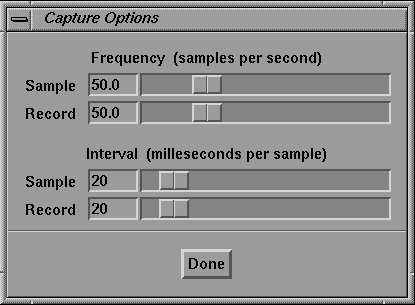
The sampling loop repeatedly interrupts the refresh loop to tell all of the source modules to take a new data sample. The frequency of interruption is controlled by the sampling rate set in the Capture Options window:
By default, the sampling loop interrupts the refresh loop fifty times each second.
When told to take a sample, a source module generates or measures a new value and adds it to a short list of values. Once in a while, modules downstream from the source ask for recent sample values which the source provides. These requests come from the refresh thread.
While sampling, the two threads continue to operate. The sample loop continues to grab samples and the refresh loop continues to update the display.
Transition from Sampling to Recording
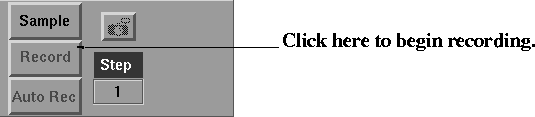
The transition from sampling to recording occurs when MotionSampler is already sampling the pipeline and you click the Record button as follows:
When you click the Record button, the sampling thread is temporarily prevented from interrupting and modules are informed that live sampling has stopped. MotionSampler resets some pipeline dependencies and prepares all the source modules to save their samples in dynamic arrays. All the modules are once again informed that live sampling is about to begin and the sampling thread begins to interrupt.
All of the modules remain open during this transition. The main thing that happens while sampling is briefly turned OFF is the source modules are configured to start accumulating samples in memory. When MotionSampler is just sampling rather than recording, only a small buffer of samples are saved. During recording however, each source is required to save each sample in a dynamically growing array.
While recording, the two threads continue to operate as they did during sampling; the sample loop continues to grab samples and the refresh loop continues to update the display. However, each source saves all of its samples.
Transition from Recording to Sampling or Off
This is one of the most important transitions in MotionSampler. It occurs when MotionSampler has been recording and you select the Sample button or the Record button. Clicking Sample turns OFF all sampling. Clicking Record finishes recording and returns to plain sampling. Clicking ESC while recording aborts the recording session and discards all samples.
When you click either Sample or Record, the sampling thread stops interrupting and the refresh loop stops updating the display. At this point, all of the samples taken over the recording time period are stored in the sources.
In the next step, each sample slice moves from the sources to the sinks for evaluation, and is then exported from the pipeline.
After the pipeline has been evaluated for every sample, the memory used by the sources to store samples is cleared and the sampling either remains OFF or returns to plain sampling. If sampling is being turned OFF, all of the modules close.
Taking a Snapshot During Sampling
Snapshots are a special case of recording. A motion snapshot is taken when plain sampling is on and you click the Snapshot button:
Clicking the Snapshot button is the same as recording one sample and then turning recording off.
Clicking the Auto Rec button is exactly like recording except that the final evaluation of samples is restricted to the In and Out times in the MotionSampler shuttle.
If you select either Capture Calculate IN/OUT or Capture Calculate from File..., MotionSampler samples the pipeline in a way that differs from the other sampling modes. The sampling does not occur in real-time and the two-threaded flow of control is unnecessary. Instead, the sampling engine just walks through a predetermined range of times. For each time, every source takes a sample and every sink evaluates. This happens as fast as the modules can perform their calculations. The calculating modes are useful for sampling pipelines that get prerecorded sample data from files or determine samples procedurally from mathematical equations.