Plugins , modules , and classes often used interchangeably, but there are subtle differences.Plugin refers to a single DSO file which MotionSampler can load. Plugins give MotionSampler the ability to create and use one or more modules. A plugin is an object that is bounded by the way it is compiled and stored on disk. Each plugin follows some important conventions so that MotionSampler can get inside and access the code which implements one or more modules. A single plugin may act as a package of several related modules, but once loaded, this relationship between modules is not obvious.
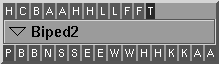
A module is an abstract tool, a single entity of a specific type which MotionSampler uses to construct sampling pipelines. Modules can be grouped together to form a plugin. A module appears in the Pipeline editor as follows:
A class is a C++ object which may or may not be a module class. A module is often thought of as a class due to the specific design strategy of PDL module development. Each module in a plugin is implemented as a C++ subclass of one of three base classes understood by the MotionSampler application. These base classes are PDLSource, PDLFilter, and PDLSink. Through the C++ mechanism of virtual methods, each module redefines specific areas of module functionality.
When MotionSampler is started, it looks in at least one directory for compatible DSOs. The directories searched are specified by the environment variable ALIAS_PLUGIN_PATH which is usually $ALIAS_LOCATION/plugins. In the default installations of Alias software, MotionSampler plugins are located in the directory, /usr/alias/plugins.
The value of ALIAS_PLUGIN_PATH must be a list of directories separated by colons. If the value of ALIAS_PLUGIN_PATH is /usr/local/plugins:/usr/alias/plugins, plugins in the directory /usr/local/plugins will override plugins of the same type in /usr/alias/plugins.
When you are developing and testing plugins, you will probably want to redefine ALIAS_PLUGIN_PATH to something similar to .:/usr/alias/plugins. The period given as the first directory in the list tells MotionSampler to look in the current directory for plugins. By doing this, you can compile a new plugin and then run MotionSampler from the same directory to test it. Otherwise, you would install your plugin in the general area and risk causing problems for other people using MotionSampler.
MotionSampler uses three tests to determine if it should load a DSO object that it finds in one of the plugin directories in its search path.