Models are created in Alias according to the following guidelines, and are then loaded into MotionSampler to have captured motion applied to them. An example of a biped is provided below because it is representative of most models created for use with MotionSampler. Remember, instead of a human, the model can be any creature you can imagine.
MotionSampler operates on a hierarchy of dag nodes rather than a single node. Filters are usually attached to a base node and affect certain dag nodes below. These nodes are identified by name rather than position in the hierarchy, so that additional nodes can be added as needed for control and adjustment.
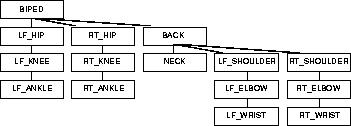
The basic biped dag hierarchy is as follows:
Motion capture data is applied to the named dag nodes. Only the top node, Biped, receives positional information-all other motion capture data is in the form of rotations, relative to each limb's parent node.
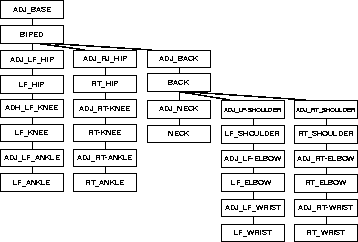
Often, for maximum flexibility and adjustment after motion capture, the biped hierarchy is constructed with adjust nodes that mirror the basic joint nodes as follows:
After motion capture, these adjust nodes are used to alter the animation without affecting the live quality of the motion capture. You can also use Alias inverse kinematics on the adjust nodes to hold end effectors, such as hands or feet, or to use constraints without affecting the motion capture data on the biped nodes.