


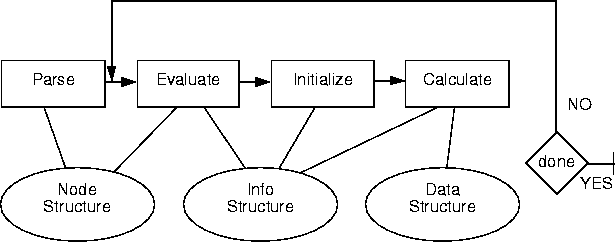
Program flow and data structure usage
RR_ExpNode, that can represent any type of data, including expressions, animation statements, literals, variables, scalars, triples, and textures. All of the NODE structures are kept together in an internal representation of the SDL file, which can then be evaluated.SDL NODE data structure
shader shiny ( typedef struct NODE_TYPE {
model = my_ocr_shader, PARSE .
pattern = texture(...), ----> RR_ExpNode *pattern
. .
. .
. .
); } NODE_TYPE;
light bright (
model = my_ocr_light_model,
intensity = (4.0*5.5)/3.2,
.
.
.
}
RR_ExpNode and evaluates the intensity of the light to be 6.875. The following diagram shows the relationship between the NODE and INFO data structures.Created at Parse Time: Created at Evaluation Time:
typedef struct AR_LightNode { typedef struct AR_LightInfo {
. .
. EVALUATION .
RR_ExpNode *color; ---------> AR_TextureType color;
. .
. .
} AR_LightNode; } AR_LightInfo;
Relationship between NODE and INFO data structures
The content of the
RR_ExpNode structure is unimportant-ALIAS OpenRender provides you with a function to perform the evaluation for any type of RR_ExpNode, and if the ALIAS OpenRender Template File is used in the ALIAS OpenRender C code module, this evaluation is done automatically. In general, there should be one field in the NODE structure for each field in the INFO structure, and the two fields should have the same or similar names for the sake of clarity.
transformed_color, which is the combination of the light's intensity and the light's color for the current frame.
pInfo->transformed_color.r = pInfo->color.out.r * pInfo->intensity;
pInfo->transformed_color.g = pInfo->color.out.g * pInfo->intensity;
pInfo->transformed_color.b = pInfo->color.out.b * pInfo->intensity;
#define NODE_TYPE myShaderNode #define INFO_TYPE myShaderInfo
typedef struct NODE_TYPE { typedef struct INFO_TYPE {
RR_ExpNode *pattern; AR_TextureType pattern;
.
.
.
.
} NODE_TYPE; } INFO_TYPE;
then your initialization routine should look like:
AR_Boolean INIT( INFO_TYPE *pInfo )
{
OCR_initialize_texture( pInfo->pattern.map );
.
.
.
return ( TRUE );
}
shine_along and up fields), then your INIT routine must do some extra work to bind some variables together. This is to allow the positional variables to be defined at any point in the SDL file. To get around the problem of a possible forward reference, here is what Alias does with spot lights. (Alias calls the variable
shine_along even though it really is a shine AT point. The direction of the spot light is calculated by subtracting the shine_along point from the position of the light.) The first thing to do is place a
forward() statement around your possibly forward-referenced field in the SDL file as shown below (to see exactly what the SDL looks like, generate a small SDL file with a spot light in it and look at the layout-then try grouping the spotview with another object, move and rotate that object and see what the SDL looks like):
light spotlight#1 ( model = spot,
.
.
.
shine_along = forward( spotview#1 ),
.
.
.
);
.
.
.
MODEL
.
.
.
{
translate( 4.5, 9.8, 2.3 );
rotate( yaxis, 34.0 );
spotview#1 = current_position( 0.0, 0.0, 0.0 );
}
.
.
.
forward() statement is added automatically when you write out an SDL file from the Alias interactive package. If you have a positional field in your ALIAS OpenRender C code module, you must add the forward() statement yourself by editing the SDL file.Then, in the COPY routine, you must bind some variables together. Do this using the
OCR_bind_forward_reference() function so that the forward reference gets carried over to all copies and instances of this light:
static long
OCR_Shallow_Copy(
INFO_TYPE *pTo,
INFO_TYPE *pFrom
){
pTo->field1 = pFrom->field1;
pTo->field2 = pFrom->field2;
pTo->field3 = pFrom->field3;
.
.
.
pTo->shineAlong.x = pFrom->shineAlong.x;
pTo->shineAlong.y = pFrom->shineAlong.y;
pTo->shineAlong.z = pFrom->shineAlong.z;
OCR_bind_forward_reference ( (AR_Triple*)(&(pTo->shineAlong)),
(AR_Triple*)(&(pFrom->shineAlong)) );
.
.
.
return (TRUE);
}
AR_Boolean
Ar_init_spot_light (
AR_SpotLightInfo *pInfo
)
{
.
.
.
OCR_transform_point( &(pInfo->shineAlong),
&(pInfo->transformed_shineAlong) );
.
.
.
return( TRUE );
}
shineAlong into a different field in the INFO structure, called transformed_shineAlong. It is important that the shineAlong field is transformed into a different field so that multiple copies of the light are possible. Results are unpredictable if shineAlong is OCR_transform_point()'ed into shineAlong.Be very careful. All forward reference fields must be triple variables. A triple literal (that is, a line like
shine_along = (0.0, 1.0, 3.0) in the spotlight definition) does not work, even with a forward() statement around it.
OCR_Shallow_Copy() (you will find this routine in the ALIAS OpenRender template) in your ALIAS OpenRender C code module so that it does not copy the fields you want to keep from frame to frame. (Lights are passed a new INFO structure each frame-do not count on being able to store information in your light INFO structure for multiple frames. For this reason, sub allocations for lights are not recommended.)For example on the first frame of an animation, you want to allocate an array of values to be used and updated each frame. You only want to allocate the array once on the first frame. You have defined a field in the INFO structure called
particle_array to store the array. Your INIT routine might do something like the following:
AR_Boolean INIT( INFO_TYPE *pInfo )
{
if (pInfo->particle_array == NULL) {
/* Allocate an array of 50 floats. */
pInfo->particle_array = OCR_allocate( sizeof(float) * 50 );
/* initialize particle_array here, somehow */
}
/* update particle_array here, somehow */
return(TRUE);
}
If the above ALIAS OpenRender module is used as a variable anywhere in an SDL file, the field
particle_array will be NULL each time the INIT routine is called. This is because when a variable is assigned to a field of another object, a copy of the variable is made. In this case, a copy of the INFO structure is placed in the field assigned, and the copy is passed to your INIT routine. The same process is repeated on all subsequent frames. You will be modifying the copy each time, but the original INFO structure never gets updated, and the original structure is copied over top of the copy each frame, and your sub allocated memory is lost. This is because the ALIAS OpenRender template uses a shallow copy routine (a copy routine that has no knowledge of the underlying data structure).If you want to keep the
particle_array information in the INFO structure, change the OCR_Shallow_Copy() routine so that the particle_array field is not copied:
static long
OCR_Shallow_Copy(
INFO_TYPE *pTo,
INFO_TYPE *pFrom
){
pTo->field1 = pFrom->field1;
pTo->field2 = pFrom->field2;
pTo->field3 = pFrom->field3;
/*  pTo->particle_array = pFrom->particle_array; /* NO, we don't copy
this. */
return (TRUE);
}
AR_Boolean FREE( INFO_TYPE *pInfo )
{
if (pInfo->depth_map != NULL)
{
OCR_free( pInfo->depth_map );
pInfo->depth_map = NULL;
}
return( TRUE );
}