|
|
Match perspective

|
Matching Perspective Cameras to Image Planes
|
|
|
|
|
Purpose
Matches a perspective camera to an image plane. Doing this makes your scene proportional to and share perspective with the intended surrounding.
This tool is useful when creating renderings where the objects you create are merged perfectly into a scanned image.
How to Use
-
1
-
Select Match perspective
from the Cameras menu, or click its icon.
|
|
|
-
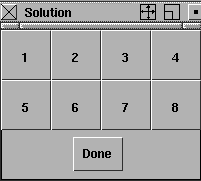
In the Perspective window, three X, Y, and Z locators are
displayed as well as a small window containing 8 buttons.
-
The system prompts:
-
Click and drag a point to align the axes in
the image.
-
2
-
Click and drag the ends of the locators so they align with the objects in the scene. Then, click the desired solution button and Done button. The perspective view is changed accordingly. The prompt line also displays numerical data identifying the swing, tilt, and pan positions of the perspective camera.
-
3
-
For a given arrangement of the axis locators, there are eight possible solutions for the camera orientation. Click the corresponding solution button to pick one of the eight solutions and then Done.
|
|
Use the magnify windows to
align the locators more
precisely, as the algorithm is
very sensitive to small
changes in locator positions.
|
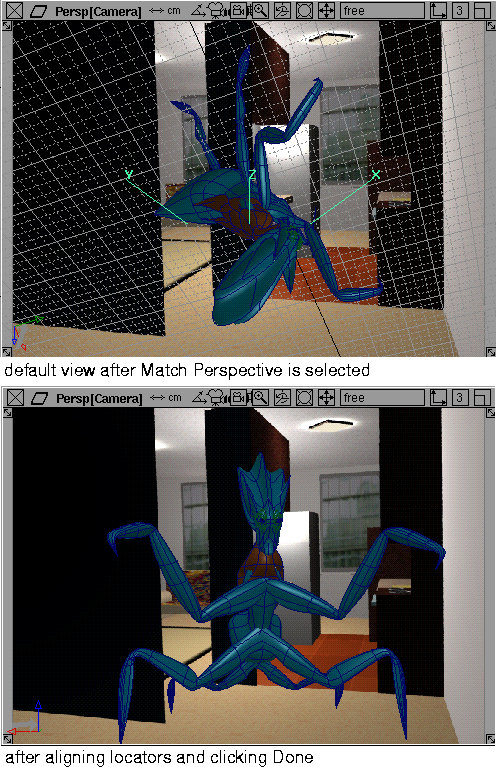
The following is an example of what happens when you click and drag the Z-axis locator once.
|


