|
|
Cohesion: Cohesion is a property or characteristic of an individual module. Cohesion is the measure of the strength of
functional relatedness of elements within a module. Cohesion of module represents how tightly bound the internal elements of the module are to one another. Cohesion is concerned with the internal activities of a single module.
Back To Design Concepts |
Different types of cohesion are:
1.Coincidental cohesion.
2.Logical cohesion.
3.Temporal cohesion.
4.Procedural cohesion.
5.Communicational cohesion.
6.Sequential cohesion.
7.Functional cohesion.
back to top
|
Coincidental cohesion: This is the worst type of cohesion. A module has coincidental cohesion if its elements have no meaningful relationship to one
another. This happens when a large and bulky program is broken down into several smaller sized portions. The instructions have no relationship to each other at all, they just
coincidentally fall in the same module.
Example:
FILE PROCESSING
OPEN EMPLOYEE UPDATE FILE
READ EMPLOYEE REC
PRINT_PAGE_HEADING
OPEN MASTER FILE EMPLOYEE)
SET PAGE COUNT TO 1
SET ERR FLAG TO FALSE
END
*no meaningful relationship to each other, just coincidently fall in same module.
back to top
|
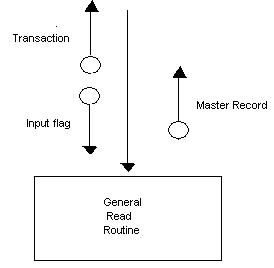
Logical Cohesion: A module that uses a selection structure to decide which tasks to perform. The tasks are included in a single module because of the selection. For example, a module that decides which sub-procedure to perform based on a user's choice of menu selection.
Example1:
READ_ALL_FILES
CASE OF FILE_CODE
1: READ CUST_TRAN REC
IF NOT EOF
INCREMENT CUST_TRAN_COUNT
END IF
2: READ CUST_MASTER REC
IF NOT EOF
INCREMENT CUST_MASTER_COUNT
END IF
3: READ PRODUCT MASTER REC
IF NOT EOF
INCREMENT PRODUCT_MASTER_COUNT
END IF
END CASE
END
*'READ_ALL_FILES' is the class - three functions group together due to certain class of activities
Example 2:
back to top |
Temporal cohesion: A temporal cohesive module is one whose elements are involved in activities that are related in time. This is not a good type of modularization as lot of data will have to be exchanged across modules.
Example 1:
A group of statements in the Form_Load() event of your VB project would be grouped there because they must occur as the program is loading.
Example 2:
Another example of temporal modularization could be the modules by end of periods, end
of day, end of year.
back to top
|
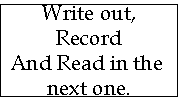
Procedural cohesion: A module whose elements are involved in different and possibly unrelated activities in which control flows from one activity to the next. Here the sequence is important.
Example 1:
Example 2:
Example of "DOALL_GUEST_PREP" module
CLEAN DISHES
PREPARE DINNER
MAKE PHONE CALL
TAKE SHOWER
SET TABLE
Related by execution order, not purpose
Example 3:
READ_STUD_REC_AND_TOTAL_STUDENT_Ages
NO_OF_Rec = 0
TOTAL_AGE = 0
READ STUD_REC
DO WHILE MORE_REC_EXIST
ADD AGE TO TOTAL_AGE
ADD 1 TO NO_OF_REC
READ STUD_REC
ENDDO
END
*'AND' word means which module perform more than 1 function
back to top
|
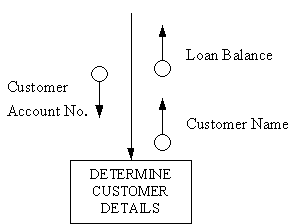
Communicational cohesion: A
communicational cohesive module is one whose elements contribute to activities that use the same input or output data. Here the sequence is NOT important.
Example 1:
back to top |
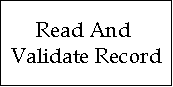
| Sequential cohesion: In sequential cohesion, modules are divided into a series of activities such that the output of one module becomes the input to the next module. Here the sequence of events is very important.
Example 1:
Example 2:
PROCESS PURCHASES
TOTAL_PURCHASES = 0
READ NO_OF_PURCHASES
DO LOOP_INDEX = 1 TO NO_OF_PURCHASES
GET PURCHASES
ADD PURCHASES TO TOTAL_PURCHASES
ENDDO
SALES_TAX = TOTAL_PURCHASES * SALE_TAX_PERCENT
AMT_DUE = TOTAL_PURCHASE + SALE_TAX
END
*the module calculates TOTAL_PURCHASES first, then use the variable TOTAL_PURCHASES in the subsequent calculation of AMT_DUE
back to top |
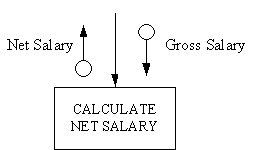
Functional cohesion: A functional cohesive module contains elements that all contribute to the execution of one and only one problem-related task. It is the best form of cohesion as the module perform a single specific function.
Example 1:
CALCULATE_SALES_TAX
IF PRODUCT IS SALES_TAX EXEMPT THEN
SALES_TAX = 0
ELSE
IF PRODUCT_PRICE < $50 THEN
SALES_TAX = PRODUCT_PRICE * 0.25
ENDIF
ENDIF
*all statements relate to CALCULATE_SALES_TAX function
Example 2:
|
|
back to top |
| Back To Design Concepts |