What you need:
1. The original Divx codec, any weird patches (VKI) will not work, get it here.
2. Nandub, a modification to virtual dub, click here
for the binary, the source code can be found somewhere. For the rest of this
document, most of the reference to Virtual Dub (VDub) will also apply to Nandub,
when I say use Nandub that means its Nandub only feature.
3. A video source, either a fake avi file that is made by VFAPI, or a mpeg that
is extracted from VCD using VCDgear.
First have the non-patched Divx installed, either run the register Divx executable, or right click on the inf and choose install. Then we are ready for the next step.
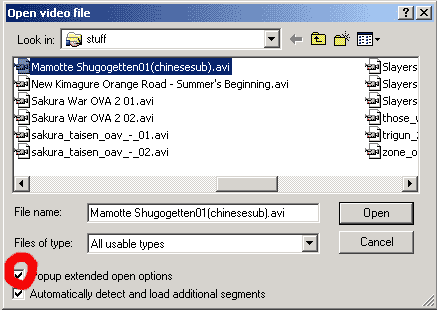
I use Shugogetten episode 1 that I got somewhere as my example, this is a avi encoded using AngelPotion codec that was known to cause problems. However, the guts is the same as Divx, so we can tell Virtual Dub (or Nandub) to use Divx to open for us. You can use any video source that is acceptable by Virtual Dub, first open Virtual Dub(VDub) and open the video file. If you use mpeg you will have to let VDub do some parsing. That might take some time depending on your video length. VDub will also try to guess which codec this video file uses, in case you have Divx installed and the file still won't play (but sound goes), when you open the file check the box on the bottom.
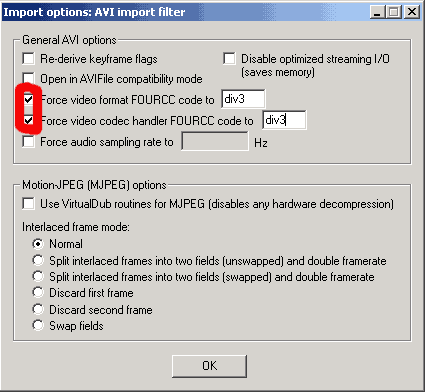
and then make a few changes to the settings:
set the fourcc code to either div3 or div4 is ok.
Proceed to the next section after you click ok.
Next-> |
||