Graphics cards have many components designed to perform different functions. Different types of cards have different parts.
Components of a Graphics Card:
Memory: The
type of Random Access Memory (RAM) used on graphics cards varies
widely, but the most popular types use a dual-ported configuration.
Dual-ported cards can write to one section of memory while it
is reading from another section, decreasing the time it takes
to refresh an image. Memory is crucial to the operation of a
graphics card. The memory holds the color of each pixel ("Picture
Element", the smallest divisible part of a digital image).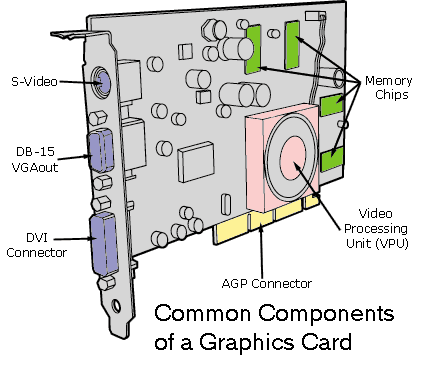
Graphics BIOS: Graphics cards have a small Read-Only Memory (ROM) chip containing basic information that tells the other components of the card how to function in relation to each other. The Basic Input/Output System (BIOS) also performs diagnostic tests on the card's memory and input/output (I/O) to ensure that everything is functioning correctly.
Computer Interface:
The graphics card needs a way to communicate with the Central
Processing Unit (CPU). The computer interface is usually through
the motherboard, by way of either Peripheral Component Interconnect
(PCI) or Accelerated Graphics Port (AGP), which you will learn
more about on the next page, Graphics
Card - Computer Interface. Display Connector - Graphics cards
use standard connectors. Most cards use the 15-pin connector
that was introduced with Video Graphics Array (VGA). You'll learn
about VGA and other standards on the Graphics
Card History and Standards page. Computer (Bus) Connector - This is usually
Accelerated Graphics Port (AGP). This port enables the video
card to directly access system memory. Direct memory access helps
to make the peak bandwidth four times higher than the Peripheral
Component Interconnect (PCI) bus adapter card slots. This allows
the central processor to do other tasks while the graphics chip
on the video card accesses system memory. 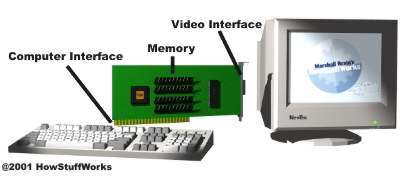
Video Interface: The graphics card needs a way to generate the signals through the PC that can be interpreted and shown by the monitor. It must also generate horizontal and vertical sync (sync keeps the screen in one place and stable). The video interface refreshes the screen a certain number of times per second, depending on the refresh rate. The video interface handles color in one of two ways: through channels, where the graphics card devotes a certain number of bytes to generate color; or to use a Color Look-Up Table (CLUT), which uses 1 byte per pixel for color. To see a example of a CLUT, click here.
Digital-to-Analog Converter (DAC): The DAC on a graphics card is commonly known as a RAMDAC because it takes the data it converts directly from the card's RAM. RAMDAC speed greatly affects the image you see on the monitor. This is because the refresh rate of the image depends on how quickly the analog information gets to the monitor.
Graphics Processing Unit (GPU): This is the most important component of a graphics card: the brains (also known as Video Processing Unit (VPU)). A graphics card will either have a frame buffer, coprocessor, or an accelerator.
Frame Buffer: A very old card will have one of these. A frame buffer simply hods every frame and updates every byte of video memory. The problem with this is that it has to draw one pixel at a time, which is slow and seriously drains the CPU's resources.
Graphics Accelerator: In an accelerator system, the graphics driver software sends the instructions to the CPU, and the CPU then directs the accelerator to perform graphics-specific tasks. In this configuration, the chip on the graphics card renders graphics based on commands from the computer's CPU. This is the most common configuration used today.
Graphics Coprocessor: A coprocessor gets is commands from the graphics driver software and all non-graphics related commands are sent to the CPU. 3D graphics operations such as shading, texturing, or anti-aliasing are sent to the accelerator. A card with this type of processor can handle all of the graphics chores without any assistance from the computer's CPU. Graphics co-processors are typically found on high-end video cards.
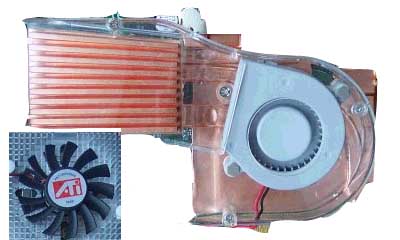 Cooling
System - The various components in a graphics card can heat
up quickly when handling advanced 3D graphics. This requires
a cooling some sort of cooling system, such as a fan. Cards also commonly have passive heatsinks on the GPUs.
Cooling
System - The various components in a graphics card can heat
up quickly when handling advanced 3D graphics. This requires
a cooling some sort of cooling system, such as a fan. Cards also commonly have passive heatsinks on the GPUs.
The gargantuan cooling system of the new NVIDIA GeForce FX compared to the cooling fan of the older ATi RADEON 9000 (Above)
Back to Top of Page << Previous Page: What is a Graphics Card? Next Page: Graphics Card - Computer Interface >>