
The Source: eCheques (3/5)
DCS Run
This performs the actual Direct Credit run.
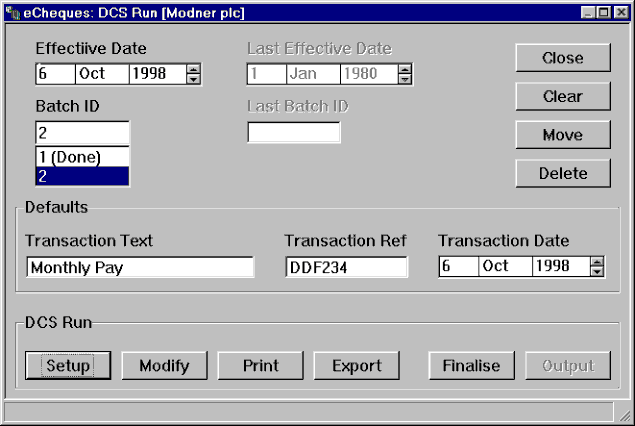
For each subscriber account, you may have more than one payment run in progress. Each payment run is identified by:
- Effective Payment Date: the date the transactions will go into force. This must be a future date
- Batch Reference: the reference of the payment run.
The Effective Payment Date and Batch Reference must provide a unique combination identifying the run. Therefore a particular subscriber account may have more than one run carrying the same date.
Scrolling through the dates, the batch field automatically displays the batches that have been done or are still pending as at that date. Already updated batches have the word (Done) following the number.
The button Delete will erase a batch. This only applies to batches that have not been completed.
The button Move allows you to alter a batch. You will use this button when, for example, you want to change the effective payment date of the batch.
The Clear button resets the details, presenting an empty form.
When you enter a valid date/batch combination some of the buttons at the bottom of the screen (DCS Run group) may become active/inactive.
The Setup button allows you to initiate a new run. Through it you can also copy the default subscriber payees. Clicking this button when a run has already been initialised allows you to reset the run (only applies to runs that have not been updated).
Depending on the Bank, the following entries may apply:
| DCS Run Text | This is a free text field will be displayed on the payee’s and subscriber transactions |
| DCS Run Reference | This is a free text field that may contain a numeric reference. It will appear on the subscriber’s statement. |
| Transaction Date | The date when the transactions are to be credited to the individual payee accounts. Must be greater than or equal to the effective payment date. |
The Modify button is discussed below. It is only available for batches that are not (Done).
The Print button outputs to a windows printer the payees defined in this run. See changing Maintain DCS Run Print Defaults to see how to go about customising your report. Go to Print Font Defaults to change the point size of your output.
The Export Button copies the run to one of the following:
- Corel WordPerfect
- Lotus Word Pro
- Microsoft Excel
- Text File (cvs format)
The created files are stored in the same directory as your database. The name given is made up of the following parts:
- Subscriber ID
- Payment Date
- Payment Batch
If the batch has already been updated, the word (Done) will also be included in the file name. Dashes separate the various parts making up the filename. (This allows for easy differentiation between word processing documents which have spaces instead of dashes).
If you uninstall your default Spreadsheet applications nothing will be generated. When you install one of the applications eCheques works with, you should rerun the detection process. Go to Default Helper Applications for more information.
The Finalise button checks that the run is valid for the particular bank and offers assistance with problem batches. You must provide the total number of payees and transaction amounts so as to ensure that the right number of persons and the correct amount will be transacted. Upon successful completion of this procedure the run will be indicated as (Done) (only applies to runs that have not been updated).
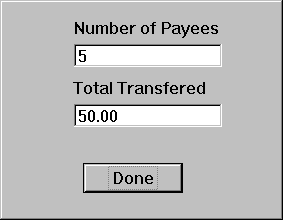
The Output button only becomes available after the Finalise button has been pressed. It
constitutes the final stage of the DCS Run. Through it you generate the necessary files and documentation required by your bank. For example, a particular bank might require that the files be zipped, other might require some form of password protection, other might result in two files being generated. eCheques conforms to the specific requirements of the registered institutions. All generated files are stored in the same directory as your database. This button will no longer be available after the latest possible transmission date accepted by your Bank.
Contact Information |
| Chris Bonnici CBSoft Ltd email: [email protected] |
