
M Tutorial (part 1/6)
We now have two M tutorials per issue. This column deals with M running on character based interfaces, the other is a tutorial about MSM-Workstation (the native Windows 95 GUI implementation of the language). M is M irrelevant of the platform on which the language is being executed; and therefore the material presented here is important if you are new to M. In the GUI tutorial it is assumed that you are already familiar with the core (syntax) of the language (which is discussed here).
The programs in this tutorial can be run on the student version of Micronetics Standard M (MSM/Student). In order to download a copy of this program check out Chris Bonnici's Download M section. Before you leave this page be sure to bookmark it so that you can find your way back with ease. If you would like to know more about the host of products and services Micronetics provide, check out their web site at http://www.micronetics.com. Micronetics is listed in our Thank You page. Drop them an e-mail to let them know that you appreciate the fact that they are helping MWM.
Back issues of this page can be viewed by going to the index.
If you have any comments or questions we are here to help. Your input could be in the form of general comments giving us the green light, hitting the expand-topic button and even taking us back a step or two. No two people will generate the same solution to a problem. We welcome any code you send in, be it different approaches to what we present here or other code of your choice.
Click here to download this issue's routines.
In this issue we continue with our discussion of intrinsic functions. You will be please to know that this is the largest M Tutorial to date.
$PIECE(<string>,<delimiter>[,<first>,[<last>]]) or $P((<string>,<delimiter>[,<first>,[<last>]])
$PIECE is a function that supports the claims that M has powerful string handling capabilities. Imagine a conference hall with movable partitions. If used in its entirety it can hold 255 seats. The conference hall is a variable we shall call HALL.
SET HALL="255"
Now let us represent a partition using the tilde (~) symbol. We can split the hall into two parts. One part will contain 100 seats, while the other part will hold 155. In M this would be
SET HALL="100~155"
Notice that in the above 100~155 is a string (enclosed in quotes). The $PIECE function is used to manipulate and extract string data which is separated by a unique symbol (in our case the ~).
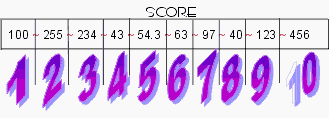 The variable SCORE contains within it the numbers
100, 255, 234, 43, 54.3, 63, 97, 40, 123 and 456 delimited by ~. The program
below will extract and maniplate the data from this string.
The variable SCORE contains within it the numbers
100, 255, 234, 43, 54.3, 63, 97, 40, 123 and 456 delimited by ~. The program
below will extract and maniplate the data from this string.
INTFN101�;Program demonstrates intrinsic
functions - Chris Bonnici - July 1997
�;M Web Magazine @ http://www.geocities.com/SiliconValley/7041/mwm.html
�;You are using this program at your own risk
�;
�N SCORE,NUM,TOTAL
�S SCORE="100~255~234~43~54.3~63~97~40~123~456",TOTAL=0
�S NUM=$P(SCORE,"~",1),TOTAL=TOTAL+NUM
�S NUM=$P(SCORE,"~",2),TOTAL=TOTAL+NUM
�S NUM=$P(SCORE,"~",3),TOTAL=TOTAL+NUM
�S NUM=$P(SCORE,"~",4),TOTAL=TOTAL+NUM
�S NUM=$P(SCORE,"~",5),TOTAL=TOTAL+NUM
�S NUM=$P(SCORE,"~",6),TOTAL=TOTAL+NUM
�S NUM=$P(SCORE,"~",7),TOTAL=TOTAL+NUM
�S NUM=$P(SCORE,"~",8),TOTAL=TOTAL+NUM
�S NUM=$P(SCORE,"~",9),TOTAL=TOTAL+NUM
�S NUM=$P(SCORE,"~",10),TOTAL=TOTAL+NUM
�S NUM=$P(SCORE,"~",11),TOTAL=TOTAL+NUM
�W !!,"Total of ",SCORE," is ",TOTAL
�Q
The program above uses $P to extract the numbers one at a time into variable NUM. By cross referencing the various PIECE commands with the diagram above you should be able to figure out how PIECE works. You supply the variable you want to extract data from, the delimiter symbol (which could easily be stored inside a variable as we shall see in the program below) and the partition you want.
In INTFN101, we extract a partition that doesn’t exist S NUM=$P(SCORE,"~",11). No error will be generated although in this case NUM will be empty, represented as a null ("") value.
INTFN102�;Program demonstrates intrinsic functions - Chris Bonnici - July 1997
�;M Web Magazine @ http://www.geocities.com/SiliconValley/7041/mwm.html
�;You are using this program at your own risk
�;
�N SCORE,NUM,TOTAL,PARTS,I,DELIMIT
�S SCORE="100~255~234~43~54.3~63~97~40~123~456"
�S TOTAL=0,DELIMIT="~",PARTS=$L(SCORE,DELIMIT)
�F I=1:1:PARTS S TOTAL=TOTAL+$P(SCORE,DELIMIT,I)
�W !!,SCORE," consists of ",PARTS," partitions delimited by
",DELIMIT,"."
�W !!,"The Total is ",TOTAL
�Q
INTFN102 has a number of things worth nothing:
- As we said above, the delimiter can be a variable.
- If we specify the delimiter character as the second parameter of the $L function we get the number of partitions that may exist. Do note that the number of partitions will be one more than the number of delimiter characters. For example SCORE has 10 partitions delimited by 9 ~’s.
- Using looping structures such as the FOR instruction can result in both compact and efficient coding.
 Modify the program above
to calculate the average of the group.
Modify the program above
to calculate the average of the group.
Assume SCORE contains "100~255~234~43~~63~97~~123~". Some partitions are empty (null). Modify your average program so that it will only average those scores that do contain a number. (Hint: $P(SCORE,DELIMIT,I) is not null).
Without introducing anything new, we one look at one of the "tricks of the trade" when using $PIECE. There is nothing new to what we already said; it is merely an iteration on how one can nest one delimiter into another.
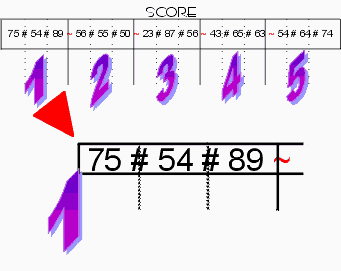
A class of five students during a particular course will sit for three exams. At the end of the year, the lecturer’s mark sheet will contain:
 Student 1 :
Mark 1, Mark 2, Mark 3
Student 1 :
Mark 1, Mark 2, Mark 3
Student 2 : Mark 1, Mark 2, Mark 3
Student 3 : Mark 1, Mark 2, Mark 3
Student 4 : Mark 1, Mark 2, Mark 3
Student 5 : Mark 1, Mark 2, Mark 3
If the tutor wants to find the 2nd mark of the 1st student, he will first extract the student, following this, he will go for the mark desired. The program below automates this function.
INTFN103�;Program demonstrates intrinsic functions - Chris Bonnici - Aug 1997
�;M Web Magazine @ http://www.geocities.com/SiliconValley/7041/mwm.html
�;You are using this program at your own risk
�;
�N STUDMRK,STUD,EXAM,BUF,MARK
�S STUDMRK="75#54#89~56#55#50~23#87#56~43#65#63~54#64#74"
10�W /ED(2),/CUP(1,1),"Mark Enquiry Program"
�R /CUP(5,1),"Enter Student # (<Enter> to Quit): ",STUD
�Q:STUD=""
�S BUF=$P(STUDMRK,"~",STUD)
�I BUF="" W /BEL G 10
20�R /CUP(7,1),/EL(2),"Which Exam (1 - 3 or <Enter>): ",EXAM
�G:EXAM="" 10
�G:EXAM<1!(EXAM>3) 20
�S MARK=$P(BUF,"#",EXAM)
�W /CUP(9,1),"Student # ",STUD," obtained ",MARK," in exam
",EXAM
�G 20
Before we flip the $P coin, there is one point that needs clarifying. We have always used numbers. One can delimit strings as well, for example S NAMES="John~Mary~Peter~Alan~Anne". It is important to re-stress that in M everything is stored as characters because M is an untyped language. Numbers are given their numeric attributes when they are computed upon. The short program provides a coded clarification.
INTFN104�;Program demonstrates intrinsic functions - Chris Bonnici - Aug 1997
�;M Web Magazine @ http://www.geocities.com/SiliconValley/7041/mwm.html
�;You are using this program at your own risk
�;
�N NUM1,NUM2
�S NUM1="10" ;Observe that the 10 is enclosed in quotes
�S NUM2=20
�W NUM1," + ",NUM2," = ",NUM1+NUM2
�Q
Modify
INTFN103 so that the name of the student is displayed when the tutor enters the student
number.
