
M Tutorial
(Part 1)
by
Chris
Bonnici
Commencing with this issue, we now have two M tutorials per
issue. This column deals with M running on character based interfaces, the other is a
tutorial of MSM-Workstation (the native Windows 95 GUI
implementation of the language). M is M irrelevant of the platform on which the language
is being executed; and therefore the material presented here is very much the same so
those who will be delving into the MSM-Workstation tutorial will get a kick start by going
through this column.
The programs in this tutorial can be run on the student
version of Micronetics Standard M (MSM/Student). Regular readers of this column will be
pleased to learn that Micronetics have extended the license of
MSM/Student. In order to download a copy of this program check out Chris Bonnici's Download M
section. Before you leave this page be sure to bookmark it so that you can find your
way back with ease. For a free subscription to MWM click the Subscribe
button on top. If you would like to know more about the host of products and services
Micronetics provide, check out their web site at http://www.micronetics.com.
Micronetics is listed in our Thank
You page. Drop them an e-mail to let them know that you appreciate the fact that they
are helping MWM.
Back issues can be viewed by going to the the index.
If you have any comments or questions we are here to help.
Your input could be in the form of general comments giving us the green light, hitting the
expand-topic button and even taking us back a step or two.
No two people will generate the same solution to a problem.
We welcome any code you send in, be it different approaches to what we present here or
other code of your choice. All accepted submissions will be prominently displayed in MWM.
Last time we delved into procedures (or as they are also
called routines). In this issue we will be looking at their close cousins, functions.
Click here to download this issue's routines
Intrinsic Function
Last time we talked about user defined or extrinsic
functions. Today we look at the functions that are available in M as standard; the
intrinsic functions.
$ASCII(<string>[,<string position>])
or $A(<string>[,<string position>])
Within a computer, all symbols are stored at
numbers. This is because by their very nature, modern computers operate exclusively in a
binary world with the only valid digits being 0 and 1. In order for a computer to
manipulate anything other than its numeric 2 digit world, it must reference a table to
translate from the user’s world to its own.
ASCII, which stands for American Standard Code for
Information Interchange is the table (there are others though) exclusively used in the
modern small and medium sized computers. The table spans 256 characters from 0 to 255. The
characters 0-31 are controlled characters and are not normally printable. The characters
up to 126 are normally found on the keyboard, while the characters 128-255 consist of a
variety of language, math, currency and drawing symbols.
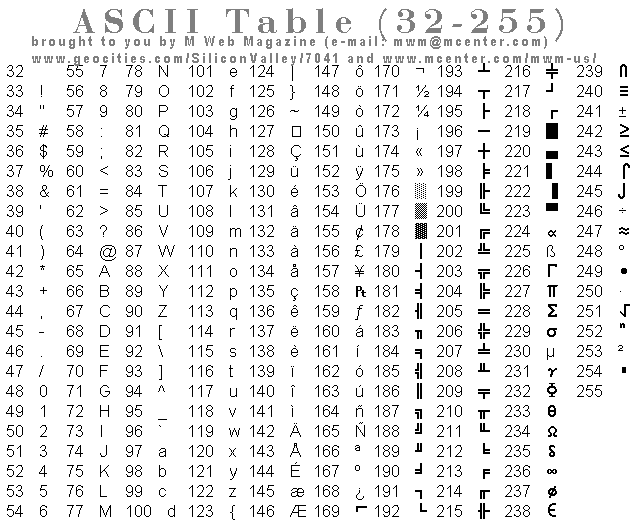
The $A function converts a character to its numeric
equivalent. It can take up to two parameters; the string and the position. The position is
optional and if left out will result in the first character of the string being converted.
If the character is null or the string position does not
exist, $A will return a value of –1.
Example 1
SET WORD="M WEB MAGAZINE"
FOR I=1:1:16 W $ASCII(WORD,I),!
will give
77
32
87
69
66
32
77
65
71
65
90
73
78
69
-1
-1
Note that the last two numbers are –1. This is
because the length of the variable WORD is 14 not 16.
Example 2
W $A("M Web Magazine")
Gives 77 as does
W $A("M Web Magazine",1)
Example 3
INTFN001�;Program
demonstrates intrinsic functions - Chris Bonnici - June 1997
�;M Web Magazine @ http://www.geocities.com/SiliconValley/7041/mwm.html
�;You are using this program at your own risk
�;
�W #
�S (ROW,COL)=1 ;Set both ROW and COL variables to 1 (eqv to S
ROW=1,COL=1)
10�R /CUP(24,1),"> ",ANS#1:2
�S LET=$A(ANS)
�Q:LET=-1 ;Exit if the character is null
�W /CUP(ROW,COL),LET
�S COL=COL+3
�I COL>80 S ROW=ROW+1,COL=1
�I ROW>20 D
�.F ROW=1:1:20 W /CUP(ROW,1),/EL(2)
�.S ROW=1
�.Q
�G 10
The program above is a ASCII typewriter. At the
bottom of the screen you get a prompt >. Anything you type will be displayed in ASCII
format in the top part of the screen. If the screen fills up, it will clear.
To exit the program don’t type anything for two
seconds. This will cause the READ instruction to timeout and return a null string, which
gets translated to –1 in ASCII (whih should explain the Q:-1 below the read command.
The rest of the code mainly handles the jumping of the
cursor between input and output.
$CHAR(<ascii num1>[,<ascii num2>…]) or
$C(<ascii num1>[,<ascii num2>…])
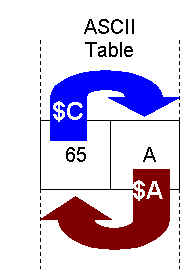 This function converts from the ASCII number to the character it
stands for. This function does the opposite of $A as shown in the diagram. This function converts from the ASCII number to the character it
stands for. This function does the opposite of $A as shown in the diagram.
To specify more than one number at the same time separate
them with commas.
Example 1
W $C(77,32,87,69,66,32,77,65,71,65,90,73,78,69)
Will output M WEB MAGAZINE.
If you recall we had converted the string M WEB MAGAZINE to
ASCII in $A examples.
INTFN002�;Program
demonstrates intrinsic functions - Chris Bonnici - June 1997
�;M Web Magazine @ http://www.geocities.com/SiliconValley/7041/mwm.html
�;You are using this program at your own risk
�;
�W #
�; Preceding the READ variable with an * will terminate input
after first character is pressed. ANS will contain the ASCII equivalent of the key
10�R /CUP(24,1),"Press <Y>es or <N>o
",*ANS
�S OPT=$C(ANS)
�I "YN"'[OPT W /BEL G 10
�W /CUP(24,1),"Thank you for pressing "
W:OPT="Y" "Yes" W:OPT="N" "No"
�Q
The program shown above shows how one could
translate the ASCII character returned by the READ command when the read variable is
preceded by an *. This could be useful for single letter prompts.
INTFN003�;Program
demonstrates intrinsic functions - Chris Bonnici - June 1997
�;M Web Magazine @ http://www.geocities.com/SiliconValley/7041/mwm.html
�;You are using this program at your own risk
�;
�W #
�S (ROW,COL)=1 ;Set both ROW and COL variables to 1 (eqv to S
ROW=1,COL=1)
10�R /CUP(24,1),"> ",ANS#1:2
�S LET=$A(ANS)
�Q:LET=-1 ;Exit if the character is null
�W /CUP(ROW,COL),$C(LET+1) ; Output the next ASCII
character
�S COL=COL+1
�I COL>80 S
ROW=ROW+1,COL=1
�I ROW>20 D
�.F ROW=1:1:20 W /CUP(ROW,1),/EL(2)
�.S ROW=1
�.Q
�G 10
We modified INTFN001 two write the most basic form
of encryption program. What the program does is add 1 to the read character before
displaying it. The changed lines have been coloured differently.
 What is
the character equivalent of –1. This is the number we got when we attempted to find
the $A of null. What is
the character equivalent of –1. This is the number we got when we attempted to find
the $A of null.
Write a FOR loop to display the $C of the numbers 32 to
255.
$C allows to access the symbols not available on a
keyboard. The Try-it example above should display them.
INTFN004�;Program
demonstrates intrinsic functions - Chris Bonnici - June 1997
� ;M Web Magazine @
http://www.geocities.com/SiliconValley/7041/mwm.html
�;You are using this program at your own risk
�;
�W #
�; Working
from top to bottom in the block list, once a condition is matched the Q command exits the
block and not other command in the block is processed.
�F
ROW=1:1:15 F COL=1:1:79 W /CUP(ROW,COL) D
�.I ROW=1 D Q
�..I COL=1 W
$CHAR(218) Q
�..I COL=79
W $CHAR(191) Q
�..I
COL#26=1 W $CHAR(194) Q ; Column 27 and 53 (because 1 and 79 is catered for in preceding
lines
�..W
$CHAR(196) Q ; All remaining column positions
�..Q
�.I ROW=15 D Q
�..I COL=1 W $CHAR(192) Q
�..I COL=79 W $CHAR(217) Q
�..I COL#26=1 W $CHAR(193) Q ; Column 27 and 53 (because 1 and
79 is catered for in preceding lines
�..W $CHAR(196) Q ; All remaining column positions
�..Q
�.I COL#26=1 W $CHAR(179) Q
�.I COL<27 W $CHAR(176) Q
�.I COL<53 W $CHAR(177)
�.W $CHAR(178) Q ; All remaining column positions
�.Q
�W /CUP(17,1) ; Before stopping land cursor in a clean
position of the screen
�Q
INTFN004 is a very simple program that basically
draws a little drawing using extended characters. Refer to the table on top (printing it
will prove useful if you intend to use these characters frequently).
INTFN005�;Program
demonstrates intrinsic functions - Chris Bonnici - June 1997
�;M Web Magazine @ http://www.geocities.com/SiliconValley/7041/mwm.html
�;You are
using this program at your own risk
�;
�W #,"
-b� �(b2 -4ac)"
�W !,"roots equal=---------------"
�W !,"
2a"
�Q
If you load INTFN005 into the M editor you might
wonder how those codes got embedded directly into the code. The code is much more readable
and simpler than the example INTFN004.
To enter an extended character from the keyboard simply
type in its ASCII number from the numeric keypad. Entering the number from the
main keyboard will not work. This should work in practically any program both Windows
and not (although in Windows, the mappings may be different from those presented in the
table above).
Another alternative to using the $CHAR function when
outputting characters is to use the asterisk (*). For example W $C(253) and W *253
will product the same output.
Write a currency conversion program. Don’t forget to display
the appropriate denominations.
Modify INTFN004 and display the characters using the
*<number> notation rather than the $C function.
Write a program that prompts you for a phrase. Enter a
foreign language phrase (using non-English letters).
Before we leave the $ASCII and $CHAR functions, I would
like to mention briefly the characters between 0 and 31. We normally exclude them because
they are non printing. For example ASCII 12 clears the screen and ASCII 7 sounds a bell
(equivalent to W /BEL). You should know how to write a program that displays these
numbers.

E&OE


|