
MSM-Workstation Tutorial
(Part 1)
MSM-Workstation is a native Windows 95 GUI development tool manufactured by Micronetics Design Corporation. This product allows developers to write windows based application utilizing M to perform actions associated with these front ends. We already run a tutorial of MSM/Student, the character based version of M and this product is also manufactured by Micronetics.
Since we anticipate that there will be a number of readers who use character based interfaces (CHUI), in this issue we will lay the important points a programmer must mentally adjust to when developing Windows graphical user interface (GUI) software.
Click Here to download this issue's programs.
You can do more with less
A CHUI programmer normally marvels at the amount of things that are contained within a program. From a simple Message Box, through to an OK – Cancel (Confirmation) dialogue window into the screen designs and printing facilities. CHUI programmers are used to doing everything themselves and some are daunted by having to learn how to do these things.
The good news is that these are part of the development part (as is the case with libraries you purchase or loan from others) and the only thing you have to do is to supply the parameters.
For example, if you want to display an Information popup box with "Just Me" on the title line and "Hello World" within the box, you call I^%msgbox("Hello World","Just Me"). This same library has entry points so that you could bring up an Error, Warning, OK, Yes-No, and Yes-No-Cancel system message boxes. Opening an Open or Save box is through a routine that is part of MSM-Workstation.
If we move to printing the little program shown here should help us understand how many complex procedures are automated.
INTRO001�;Program demonstrates basic
MSM-Workstation functionality - Chris Bonnici - November 1997
�;M Web Magazine @ http://www.geocities.com/SiliconValley/7041/mwm.html
�;You are using this program at your own risk
�;
�O 3 U 3
�W /CHOOSEPRINTER
�S FAILED=+$DEVICE
�I FAILED D I^%msgbox("Cancelled","M Web Magazine")
�E D OUTPUT
�C 3
�Q
�;*** EOR ***
OUTPUT�W /SETDOCUMENT("M Web Magazine") ; This displays the document name in
the Print Spooler Dialog box.
�W /SETFONTNAME("Arial") ; We will print Arial
�W /SETFONTSIZE(14),"1. ",/SETFONTSIZE(12),"You can do more with
less",!
�W /SETFONTSIZE(14),"2. ",/SETFONTSIZE(12),"You don't control what is
going on (well at least not always)",!
�W /SETFONTSIZE(14),"3. ",/SETFONTSIZE(12),"Be prepared to learn",!
�W /SETFONTSIZE(14),"4. ",/SETFONTSIZE(12),"The old rules…",!
�W /SETFONTSIZE(14),"5. ",/SETFONTSIZE(12),"Is it M?",!
�Q
W /CHOOSEPRINTER brings up the dialog box that allows one to choose the printer where output is to be directed to.
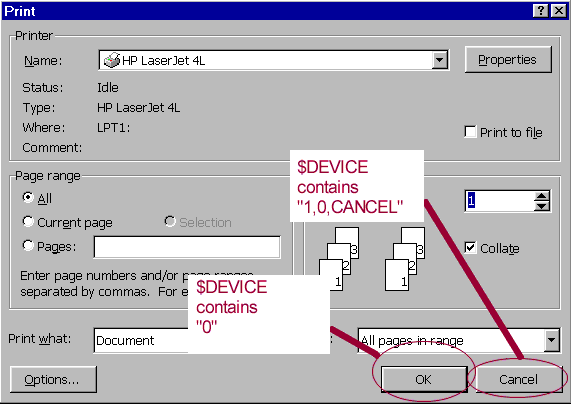
The system variable $DEVICE reports whether the user chooses OK or Cancel.
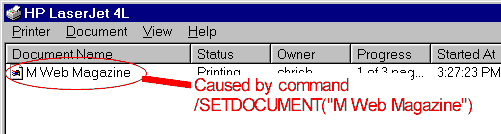
The Mnemonics to control the font and point size are very simple. To set the font to Arial, we type /SETFONTNAME("Arial"). The point is set to 14 by invoking /SETFONTSIZE(14).
Do appreciate that the code we are looking at is only for demonstration purposes and that if you don’t understand something today, we will be delving to these topics more formally.
Looking at the entire program, one soon notices that one may write GUI programs using the traditional CHUI environment. This should prove useful to those who want to dip their feet gradually (even though we recommend otherwise).
You don’t control what is going on (well at least not always)
In a CHUI program the programmer normally dictates the order of everything. A program follows from top to bottom with control clearly in the hands of the author of the code. For example, one prompt follows another because such action is dictated in the program. GUI programs are driven by events and a user may not always fill in the boxes as you intended them to be filled in. A user may click the OK button before having filled all fields. Therefore when talking about a GUI interface is it very important that one anticipates in the code user "misbehaving".
The route to GUI programming is in our opinion similar to the transition from centralized to distributed systems. Users have more control and rather than having user interfaces work the way the programmer intended, these now work the way the user wants. In INTRO002 we show demonstrate how this can happen. Using the printer mnemonic /CHOOSEFONT we allow the user to specify the font and size for the report. Imagine what can happen if the user goes for 72 point.
INTRO002�;Program
demonstrates basic MSM-Workstation functionality - Chris Bonnici - November 1997
�;M Web Magazine @ http://www.geocities.com/SiliconValley/7041/mwm.html
�;You are
using this program at your own risk
�;
�N FAILED
�O 3 U 3
�W
/CHOOSEPRINTER
�S
FAILED=+$DEVICE
�I FAILED D
I^%msgbox("Cancelled","M Web Magazine")
�E D OUTPUT
�C 3
�Q
�;*** EOR
***
OUTPUT�N
FAILED
�W
/SETDOCUMENT("M Web Magazine") ; This displays the title in the Print Spooler
Dialog box.
�W /CHOOSEFONT("Arial",12,0,0,0,0) ;
The 4 0's represent Bold, Italic, Underline, Strikeout
in that order. 0 switches them off and 1 on.
�S FAILED=+$DEVICE
�I FAILED W /SETFONTNAME("Arial"),/SETFONTSIZE(12)
�W "1. You can do more with less",!
�W "2. You don't control what is going on (well at least
not always)",!
�W "3. Be prepared to learn",!
�W "4. The old rules…",!
�W "5. Is it M?",!
�Q
You don’t control what is going on (and must therefor anticipate)
We do want to clarify that this "anarchy" reigns solely in the parts of the programs that deal with user interactions. Processing parts of our programs will still operate as we always intended them to do and therefore one should not be blame (our bugs) on some haphazard operation.
Having said this we should always help users protect themselves by offering as much leeway as possible, but warning them when the data they supply to our programs will cause problems to the output or in the processing.
Be prepared to learn
It should be understood that there will be new things that one must have to get accustomed to when heading along the route to GUI programming. Besides the difference in approach (which we discuss above) there is also new commands. Practice makes perfect and all said there is no better way to learn a language than to jump neck deep into it. Set yourself a little project (something tangible) and be prepared to put time into it. The newsgroup comp.lang.mumps is a great place to post questions.
The old rules…
Irrelevant of what you use to develop a program, remember only that a good program is a planned program. No good project can be produced unless the rules of software engineering are applied. With windows programming this is no exception.
Is it M?
We have included an exe file in the archive that you can download. We will not go into the workings today but would like to ask one question. By looking at the code, is it M code or not. Since it is now possible to write stand-alone royalty free exe programs this may prove very attractive to beginner programmers who are looking for a language to develop code with. Also as far as the user is concerned, the myths about how bad M is can be shoved under the carpet.
"Since it is now possible to write stand-alone royalty free exe programs this may prove very attractive"


