|
| [Flash Games] [Wallpapers] [Computer Tips] [Web Designing Tips] [Chat Room] [Love Calculator] |
|
|
Tips & Tricks
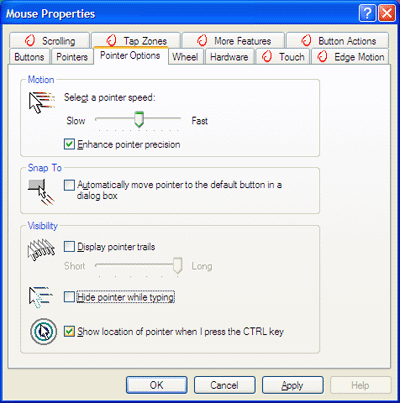
Well, here's a quick solution for you Windows XP users: Click on Start, select Control Panel, click on "Printers and Other Hardware," and choose Mouse. In the resulting window, click on the Pointer Options tab. In the Visibility section, I would recommend un-checking "Hide pointer while typing" so your mouse cursor doesn't disappear that often. Then check "Show location of pointer when I press the CTRL key." This will activate a bulls eye target to appear around the mouse cursor when you press the Ctrl key.
(Your mouse control panel may look different and have fewer features, so don't be surprised if it is not the same as what you see here.) And don't worry, it won't interfere with keyboard shortcuts using the Ctrl key. Once you've made your selections, click Apply and then OK and you'll have a mouse that doesn't scurry away quite as much! |
|
Tips & Tricks
When it comes to our computers, all we tend to think about is the stuff we see on the screen - the software. Most of tend to neglect the computer itself. What can you do
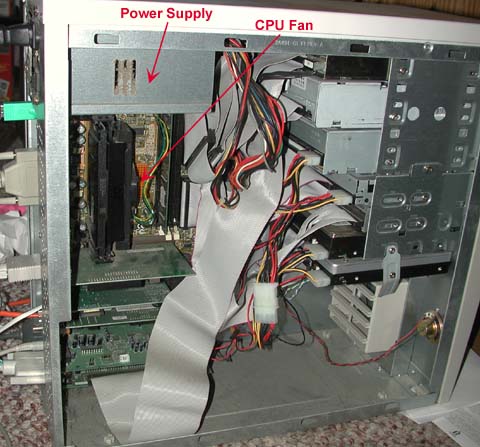
with your computer to make it run longer? Keep it clean. So, what can you do? I recommend that you open your computer's case (unplug it first) about once every 6 months or so and blow it out with that canned air stuff (you can get it at any office supply store). Of course, be careful not to disconnect or damage anything. Make sure you blow out the power supply (DO NOT open up the power supply unit) and the CPU fan too. Since all this dusting can make a mess, you may want to do it outside. Here's a shot of one of my dirty old PCs. This one uses a Pentium III processor, so its CPU fan is vertical in orientation. Your CPU fan may be flat on the board.
Also, make sure you keep your can of compressed air upright. The propellant inside those things tends to come out when the can is inverted or at an angle, so be careful. Oh, if you can get some kind of good "mini-vacuum" that would be OK too. In fact, some would argue vacuums are better because compressed air can force dust deeper into the cracks and crevices of your computer. That said, I still like canned air better for a several reasons. 1. I've yet to find a little vacuum that was any good. They all seem to leave a ton of dirt behind on the boards. In my opinion, if you can't get all the dirt off, what's the point? 2. In addition, there are a lot of places that even small attachments just can't get to. Again, what's the point of cleaning if you can't get it all? 3. I've been cleaning computers since before DOS, and have yet to actually see a problem with using canned air. In my opinion, compressed air simply removes the most dust. So, I'll stick to my little cans, you can still vacuum if you like :-) Finally, no matter how tempting it is, washing your computer with the help of a garden hose is always a bad idea :-) |
 :
[email protected]
:
[email protected]
Best view at 1024 x 768 resolution and above internet explorer 6. Copyright © 1999-2003 ShahrukhWeb.TK. All Rights Reserved. |
 Ahh, I'm losing my mind, I mean, my mouse!