Many programs and utilities configure themselves to load when windows starts.
Each of these programs is consuming valuable resources,
Here we are going to try and prevent some of these utilities from loading with windows.
Click the Start Button
Select Run,
Type "msconfig", and hit OK,
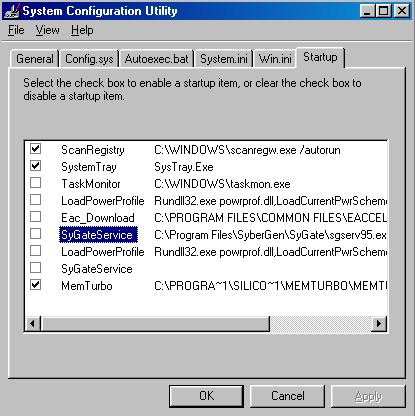
Select the startup tab,
The list of programs in the startup tab will be different for most PC's.
All items that are checked will load when windows starts up.
Uncheck those items you don't want loaded.
hit OK
Which ones you allow to load,
and what you disable is a matter of personal preference,
SysTray is the systems tray,
PowerProfile controls powering down monitor, hard drives etc.
Scanreg runs once when windows loads to check the registry.
TaskMon I disable as a personal preference, it has no effect on my system.
As a general rule, be cautious,
if you don't know what it does, it is probably best to leave it checked
Why not edit everything from this program?
Open the other tabs, autoexec and config are fine.
But there are way too many settings in win.ini and sys.ini
that you don't want to make a mess of.
They are best left alone.
Reboot your PC and check all is well.
7 - Maintenance
Performance Index